Mostrando entradas con la etiqueta Windows XP. Mostrar todas las entradas

viernes, 22 de abril de 2011

I'm considering not to renew your contract, Windows

For this Easter (or Holy Week, as we call it in my country), I had planned to perform a task that requires some time: reinstalling Windows XP.

I dragged myself very close to starting. However, to be honest, when I saw the installing CD, I anticipated the fun that awaited me and became very lazy. After all, to complete the operation, I have to find the drivers, the programs, make back ups, customize the OS...

I, somehow, envisioned Windows XP as an employee working on a contract basis. Mr. XP's contract is becoming due, so he steps into my office to discuss contract renewal. From the filing cabinet, I take his performance record and analyze it.

Tasks accomplished in the last four months: None. I don't need Windows to browse the Web, to chat, to modify images, to work with videos... In my company, Windows XP is unnecessary to operate the scanner, use Skype, or to download pictures from my wife's camera. Its "excellent" MS Office suite has been replaced by Open Office and Libre Office completely (even to the point for me to wonder why I didn't use Open Office before). To make matters worse for him, I did give XP a significant task twice and it failed both times: to connect me to the internet. Last time, XP didn't even boot the computer!

Skills: According to this post, Windows XP has several skills that make him an essential employee. Let's see...
  1. Installing software in a simple way. Yes, that's true...provided that YOU already have the software. Otherwise, you have to browse the Web for a while and download a good many of trash looking for the program you need. Oh, and then, if you don't want to pay, you have to look some more to get a crack/code/loader with the imminent risk of getting your valuable employee infected by the computer equivalent of Ebola because that simplicity to install is exploited by malware.
  2. Speed. For crying out loud! Hasn't this person EVER used Windows? I suppose that if you never install anything, it will always be fast. But the truth is that point 1 contradicts point 2 and we all know it: the more programs you install, the more you mess up with Windows registry and the OS becomes slow...sometimes PAINFULLY so. And let's not forget that you have to wait until it loads the anti-virus, anti-zombie, anti-spyware, firewall and who knows what else...Yes, this employee doesn't work unless you cover him with a large workplace risk insurance policy.
  3. Excellent program portfolio. The ones that are ACTUALLY INCLUDED with the OS, that is? Give me a break. Now, if you are talking about the programs that you can get, then how excellent they are depends on two variables, identity and custom. The former variable determines whether or not you need Autocad or Photoshop, for instance. Simple users who enjoy retouching pictures don't need Photoshop; I've seen them do their work with MS Paint (poor them!). I wonder what they could do with a program like Paint, but that actually works, like Kolourpaint...Let's not talk about MS Moviemaker...it gets frustrating. On the other hand, the latter variable, custom, acts as a barrier preventing you to use other programs that can help you achieve the same objectives, but following a different process (Photoshop vs The GIMP). Such recalcitrance makes you call your usual tool "excellent" because you already know how to use it, not because it is actually the BEST there is (or that there will be).
I completely agree with the author in one point: Windows XP can be repaired quickly. However, that can be seen as a problem and not as an advantage. Windows XP is a worker that takes too many sick leaves, which, for any company, becomes EXPENSIVE. My two Linux employees (Mandriva and Pardus) have been working diligently since they came last December. No interruption whatsoever, except for a hardware problem last week. In the same period, XP has been on sick leave twice. And I seldom ask him anything!

In addition to his ability to get sick quickly, XP has another flaw: it tends to sleep on the job, especially when we need multitasking. Oh, but he is very good at playing games! In my case, the games I like to play (DOS-based ones) were discontinued thanks to XP. World of Warcraft means nothing to me. I admit that the Tomb Raider saga caught my eye, but...is playing that game a justification for all I have to do to get XP back on his feet?

An employee that I only need because he is good at playing?

Furthermore, there is a powerful antagonist that wants XP out. It's Microsoft, which has decided not to cover XP against certain diseases and marginalized him regarding the new browser they released. This company wants XP's reputation to taint as much as possible so that they can ask me to replace him with the brother of that Vista punk that came looking for a job four years ago. So, do I need an employee that is even betrayed by the firm he represents?

Mr. XP... I'm seriously considering not to renew your contract...

viernes, 8 de abril de 2011

The inevitable...My return to Windows

Today I received a disappointing surprise when I turned on my desktop computer, which is a triple boot (Mandriva 2010.2 PwP, Pardus 2011, Windows XP SP3). It came as a cold shower after a day that started with gratifying experiences that skyrocketed...until I got home and tried to use the PC. But bear with me and let me describe how the day went, so that you grasp my tragedy in full form.

My day started with a class discussion on malware, lies, and false pretenses thanks to two texts that we read. It's a reading comprehension class and my students reacted with an awakened interest that you normally do not expect for a class that begins at 7 AM. After reading a poorly supported piece spreading misconceptions, we read Carla Schroder's post on FUD, which cracked a paradigm that many of us once failed to see. The session went great and was followed by a challenging task. Yes, two colleagues asked me to install Mandriva to their netbooks, a Toshiba and an Acer powered by that little gem of an OS that has prompted many to give Linux a try: Windows 7 Starter. I could have failed there had not been for the timely help I received from Megatotoro, who saved the day with his tactics to make Starter share the HDD.

The rest of the day was pretty normal until I went back home and turned my computer on with a fervent wish to post a festive entry. As usual, Mandriva started the computer, but there was something unexpected: the network applet, instead of showing a green check mark, displayed a red "X". Without caring too much, I clicked on the applet to launch Netdrake and fire off the connection manually. However, the X stood there, defying my clicks and laughing sardonically before my baffled eyes. "Mandriva is not working," I thought, after having checked the wires and realizing that everything was properly attached. "Well, there's always Pardus," I consoled myself, and rebooted the PC using the Turkish distro. But Pardus also told me that the connection was unavailable and a spiral of uneasiness ascended through my stomach. My two Linux distros had deserted me: only Windows was left, that long-forgotten OS that had rested unused for more than four months already. Windows was my last hope to connect to the Internet. I could not prevent it; I was shivering as I clicked the red button in Pardus and selected "Boot Windows".

Last time I tried to use Windows, there was a blackout, so I, logically, got a black screen asking me if I wanted to boot Windows normally, or with the last configuration that had worked, etc. I selected "normal" and saw with hope the XP logo...but the computer rebooted unexpectedly and threw me again to the same black screen. "OK, let's go 'last good config' this time," I mumbled and chose. And XP, for its part, chose to do something wonderful: it got me into a cute loop and refused to start. Isn't that wonderful? I have been using my PC all this time without even knowing that Windows XP had fried! Thus, my return to Windows was colored by the inevitable reminder of its many weaknesses.

Five years ago, this loop would have thrown me into a state of anxiety that easily justified my spending the whole night up reinstalling the darn OS. Right now, I just don't care. No anxiety build-up. The plain truth is that my computer works; Windows doesn't.

By the way, I realized that the problem with the net was because the hardware is malfunctioning. See, I'm posting this entry from the wireless connection. Tomorrow, I will get the hardware piece replaced :-)

sábado, 12 de marzo de 2011

Emergency at the University: A PC problem or an OS that is defective?

On Jan 20th, 2011, I posted an entry on my office network and, jokingly, put up a picture in which viruses were pawning the Windows computers. Well, that picture became prophetic: while the Windows 7 machine gradually collapsed, the XP one became a zombie that got the entire University Internet service in trouble for a whole week. However, my Mandriva box emerged pristine, completely unscathed. This is the account of what happened.

The main computer in the section is an XP system, which was later linked to the new Windows 7 computer that was bought. The computer I use was also an XP one. However, I installed Mandriva Linux to make it a dual boot and now I seldom boot it in Windows. After less than a year, the Windows 7 station started to show some strange symptoms: It would not start, the screen would flicker, or the machine would freeze. We asked the department technician to come to examine it and, as Carla Schroder said it back in April 2010 (read article here), the technician deemed the whole thing a hardware problem (he blamed it on the hard drive) and substituted the HD. I told him I had my reserves, but people in the office pretty much ignored me.

Last week, the Internet service of the University was in terrible shape. I wanted to go talk to the IT Manager of the Faculty, but it was not necessary because he stormed yesterday into my department. He was a rabid pitbull after something to bite and barked that a machine in my section was sending viruses non-stop and collapsed the University Internet service. His boss, therefore, gave him a furious call with an ultimatum: "Either you find the infected computer, or you pull the switch off for the entire Faculty". He went to my machine first, but I told him that I only run Linux on it, upon which he responded: "Linux? Then it's not yours!" and jumped to the other machines and found the IP of the culprit...it was the XP system. The result? The machine was unhooked from the network and will remain in quarantine.

But what happened to the Windows 7 box? I asked the technician in my section if he had actually checked the integrity of the hard drive to support his claim. I knew the answer already; he only supposed it had been a hardware failure, but never checked the disk! Carla Schroder was absolutely right: people assume that computer problems are necessarily hardware, not OS problems!

I asked him to put the disk back. He reformatted it and Windows 7 is behaving OK so far. I wonder if Windows does not check the integrity of the disk BEFORE install... Anyway, I installed Mandriva (no indication of disk problems whatsoever, by the way) and now that system is also a dual boot.

Maybe it's time for people to stop blaming computer problems on hardware and to begin seeing reality. In my office, there are three stations for three individuals who are not computer experts. The two Windows machines broke; the Linux one is still up to the job and has not failed, not even once, since its Penguin OS was installed.

As a simple computer user, what can I learn? Well, the lesson that I see is that if you want to have Windows as the OS of your computer, you must accept that its security is flawed by design, which eventually will cause problems for an user that is not an expert. You must then invest a lot of time to learn how to protect your system, how to correctly operate the antivirus, firewall, anti-malware, etc. You also have to refrain from downloading shiny animations and programs to enhance your desktop, as they can compromise your system. On the other hand, if you do not want to be bothered by common security problems, then you should use Linux. Thus, you will discover that many so-called PC problems are but Windows problems.

lunes, 5 de julio de 2010

Popularity... or Performance?

Since Microsoft is not being very nice to XP users, I decided to check on some issues a person can have when migrating from dear old XP onto the shiny 7 OS.

This is what I discovered:

1. Remember that you must run a clean install, which means that your HD has to be erased. Some people are saying that this lack of upgrading compatibility is Microsoft's revenge on you for rejecting Vista.

2. Under 7, some users have reported problems with XP compatibility mode. This means that some of your programs might crash.

3. Make sure you can locate ALL of your drivers for Windows 7. So get ready for a good driver hunt...

4. If you have a laptop, CONSIDER THE BATTERY ISSUE.

Regarding #4, I even read there a post of a person instructing users on how to check the status of the battery first... using UBUNTU LINUX!

Can MS go any lower??

viernes, 2 de julio de 2010

New Windows Security Breech: Microsoft!

Dear Windows XP user, listen:

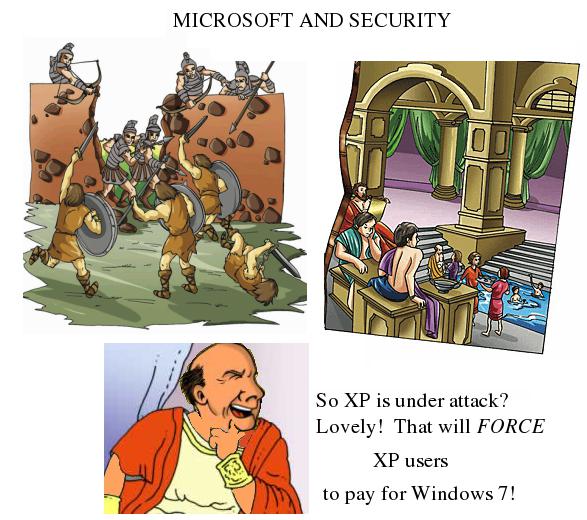
Windows XP is NOW UNDER ATTACK! But don't worry. Microsoft has got your back...Or maybe not?

A lot has been said about why Linux is inherently more secure than Windows. However, after reading this post (dated July 1, 2010) from PC Advisor, I realized that, right now, the security problems in Windows can actually be promoted by Microsoft. In fact, the security policy of the company has to do more with its business model than it does with costumer support.

While Windows XP users entrusted the security of their systems to the software emporium, which vowed support for XP until 2014, Microsoft's peculiar response to fix the problem reveals certain interesting facts.

1. Microsoft got the information way in advance, but remained relatively silent until the problem was disclosed and exploited publicly. Why didn't Microsoft hurry to correct the situation? Lack of interest, maybe? Or conflictive interests?

2. Microsoft told users in June 10 that they had to fix the problem themselves and released a "manual" for that purpose. Now, the problem was found in Windows Help and Support Center, automatic services that average users normally cannot control. To solve the issue, users were expected to get their hands dirty editing the Windows registry. Why was the company asking users to mess up with the registry? Doing so implies, for most Windows users, running the risk of actually destroying their systems. Doesn't Microsoft have the obligation to correct the issue in the first place? Or is it that the company switched policies and is now "educating" Windows users on how to dissect their operating system?

I believe this shows how much Microsoft cares for their loyal Windows users, who turn on their computers with confidence, feeling protected by the Redmond giant. The message is not so difficult to grasp: MICROSOFT WANTS WINDOWS XP USERS TO BE ATTACKED. They want you, XP user, to be victimized by viruses or exploits. This way, when you look for a solution, you are likely to inflict more damage to your system yourself. So you die by your own hand.

All this leads you to end up paying for Windows 7, which will certainly give Windows 7 sales a boost. What a nice business model Microsoft has created! Too bad that, in this paradigm, selling a new OS is more important than either security or support for costumers.

Windows 7 users might grin and think, "I don't care. I have 7 anyway." Well, that's absolutely true. I hope you can remain as confident once Microsoft releases Windows 8.

And people still hesitate to use Linux...

My First 12 Days with Mageia 10: How to enable repos with dnf5

Well, 12 days have passed since I migrated all of my desktop, laptop, and portable work system to Mageia 10. I have not used the work system...