Last week, a project that had been brewing for quite a while became a reality.
We wanted to set up a basic security camera for the office where I work but, as the University is short of budget, all we were given was a webcam. With that contribution, the whole idea was pretty much a long-term goal (or a dream, to be more honest, given the circumstances).
However, I learned that they were discarding some "old equipment", which included computers. I asked for one of those machines marked as "not-working" and could get a computer in which Windows XP ran so slowly that you could literally age before being able to type a letter with it.
With that poor wreck of a system, the webcam, and Megatotoro's help, we could make the security system dream a reality.
First, Megatotoro wiped out the HD and installed Mepis 11 to it. Boy, what a difference a good OS makes! The computer started performing decently. To use an analogy, it went from snail speed to that of a marathon runner.
Second, as the webcam was a Logitech model, Mepis recognized it instantly, without the pain of go driver-hunting. Ah, and since Mepis has VLC, everything was ready for starting the security cam project.
The streaming capabilities of VLC made it easy to capture video from the webcam and store it as a local file. I learned how to do this by accident a while ago and the process is rather simple:
1. Under the menu FILE, I clicked on streaming.
2. In the window that opens, I selected the tab CAPTURE DEVICE
3. Now, this is the interesting part. In the line SELECT DEVICE, I typed /dev/video0, and then clicked on STREAM. A new dialog (Streaming output) opened and I clicked "next".
4. Then I selected "show locally" and used the drop-down menu to select VIDEO THEORA+VORBIS (OGG)
5. Finally, I clicked STREAM and voilà, the webcam started showing and recording video!
The humble computer is now there, working non-stop, like a true champion...And the rest of the workers became interested in Linux when they saw what it can do.
After all, who would have said that a discarded computer was going to resurrect as a modest, but effective security station? And for a total cost of $0? All thanks to Linux, free software, and people who know that the Windows paradigm is not the only reality that there is.
Mostrando entradas con la etiqueta security. Mostrar todas las entradas
Mostrando entradas con la etiqueta security. Mostrar todas las entradas
sábado, 27 de octubre de 2012

domingo, 26 de febrero de 2012
TEST: How to know if your computer license should be revoked
 In this world of ours, where cyber-crime has taken a rise, people should be given a test to determine if they are capable to use a computer. After all, if licenses are given to operate machinery and vehicles, or to prove that a person has undergone training on a certain area, why is it that individuals who have no idea about how to use a computer without risking a network have indiscriminate access to one?
Or even worse, why do those people who couldn't possibly care less about their own cyber-protection (or that of others) feel they have the right use a high-tech system they regard as some sort of an electric kettle and, in so doing, they compromise the safety of the Internet?
They should at least take a test with some easy questions to determine if it is less risky to have those people juggle with flame-throwers than it is having them turn on a computer. You know, like those tests that are published in magazines and newspapers to find out if you are cool, or if you are a nerd, or if one's habits indicate that one will eventually become a social menace.
Negligent computer users should take the test voluntarily in an attempt to assess their risk factor. The questions should be straight forward and, when in doubt, they should simply choose "yes".
I have collected some functional indicators from experiences with people around me:
Risk Level 1: Each affirmative answer = 1 pt.
1. You click on any link that you get by email as long as you recognize the name of the sender.
2. You plug in your USB drive and erase alerts without reading them because they bother you.
3. You can use your computer only because you wrote the steps to find your programs.
4. As soon as you see your computer acting funny, you call your techie friend to fix it for you.
5. Once the techie friend goes away, you generally blame him/her for all subsequent problems that your computer gives you.
Risk level 2: Each affirmative answer = 2 pts.
1. You keep forgetting to close your Facebook or email session.
2. You get an email reading "My girlfriend got your pictures and sent them to your spouse. You are dead meat. See pictures attached". So, you freak out and open the attachment, which happens to be a zip file where the compromising material is.
3. You strongly believe that there wouldn't exist any viruses online if everyone had the same antivirus and they kept it updated.
4. You open every powerpoint presentation that your relatives, friends, or colleagues send you, regardless of the fact that the powerpoint icon looks funny and the file is called "presentation.exe".
5. You download bundled software from the internet and install it to your Windows computer without even reading the different screens.
Risk level 3: Each affirmative answer = 3 pts.
1. You think that remembering passwords is too much trouble. Anyway, that's the job of the "computer people", not yours.
2. You never update the antivirus in your Windows computer because everyone else does. Anyway, that's also the job of the IT guys, not yours.
3. You strongly believe that your computer is OK as long as the system starts. All computers act funny, so it's not strange that yours also misbehaves from time to time.
4. You cannot run a specific program because a "moron" deleted the icon on the desktop.
5. You argue with people who do not support SOPA and PIPA, whom you call pirates. Then you go home and download a movie using this great Bitcomet thing that your teenage daughter/son installed to the home computer.
RESULTS:
From 1-5 points: You are like a drunk driver roaming cyber-roads. Your license should be suspended until you learn a bit about how not to be a danger for others and yourself online.
From 6-12 points: You might not know, but you became a legend. Yes, you are (in)famous because every computer you touch starts failing "mysteriously". Do the world a favor and stop using computers until you understand the risks. License suspended.
13-20 points: In your case, danger is like giving a four-year old a loaded Steyr TMP to play in the middle of a wedding reception. You HATE computers and it shows. Keep away from computers; they also HATE you. Only cyber-criminals love you. Your license to use computers should be revoked immediately.
21 points or more: I don't even know how to put it. You should seriously consider to lock yourself up in an anti-chip bubble, so that it will become difficult enough for you to interact with a computer in the future.
But you insist and want to use one of those wonderful machines? Then go get Linux ASAP. Only Linux can save us from you.
sábado, 8 de octubre de 2011
Why I failed the Windows 8 Logo Program
 With all this uproar because of the implementation of UEFI as a requirement for the Windows 8 Logo Program, I decided to apply to get it because of the advantages it offers. You know, I tend to boot up rather slowly in the morning: I walk around my house in a state of semi-consciousness until all the proper drivers and modules are loaded. It would be great just to wake up and boot up into my operating system in the blink of an eye.
I discovered that one of the requirements to apply for the Windows 8 Logo Program, before I boot up, is to have secure boot enabled by default. I also must carry several sets of keys, all for the sake of prevention. According to MS, if I do not, some malicious thoughts could hijack the boot process and then I would be cast into a zombie state, controlled by some criminal or terrorist. Thus, I might end writing and sending millions of useless postcards...That's scary, isn't it?
So, the basic idea, protection from criminals, sounds appealing. Yet, I started asking some questions and found some problematic issues hidden below the surface of the venerable claim of security:
1. The keys and what you wear
The keys that they give me allow me to boot up super fast because they restrict the elements that I need to function. For instance, I will save time getting to work because I won't have problems remembering where I left my glasses the night before. What's more, in theory, even if a malicious poltergeist wants to play with my eye-prescription device, the mischievous spirit won't be able to. However, there is a big problem with this approach depending on who provides the keys. Let us suppose that MS allows OEMs (Organism Evaluating Mechanisms) to provide their keys. The control on what I boot up into will be so tight that if I, by any chance, want to wear a pair of glasses that is not certified by the key that they gave me, I will be treated like the poltergeist myself. Yes, I'd be in trouble to change my shirt, too. This will make a uniform world, indeed. I'm surprised that the United States, a country that defends individual rights with a passion, might meekly agree to let everyone use "the same clothes". Everyone into the same school uniform! How about that?
But the most worrisome part comes next...
2. Secure boot and the right to think
The fact that I cannot choose my glasses manifests something important that is underlying this prohibition disguised as "prevention". If this so called "secure boot" will not let me swap glasses or shirts easily (action), my right to consider wearing some glasses other than the certified ones (thought) is taken away from me. That is, I cannot even think about wearing anything else... Not even the widely-used MS XP Professional SP3 Glasses, for example. Paradoxically, I won't even be able to replace my MS 8 glasses (OEM version) by a brand new a pair of boxed MS 8 glasses if the keys are given by an OEM and not MS itself. You see, my individual right to think about choosing what I want simply ceases to exist.
You might think that all this is simply solved by disabling secure boot. You are, of course, absolutely right; I also thought that way. And that's the reason why I failed the Windows 8 Logo Program: you must have secure boot enabled BY DEFAULT to apply, remember?
I guess I value my freedom more than the Logo. In the end, if I'm free, I can take care of my security myself.
----------------------------------------------
On a serious note, next time I need to buy a computer, I'll make sure I'll purchase it from a manufacturer that respects my freedom to choose.
viernes, 15 de octubre de 2010
I know how to use Windows properly, so it's not my fault!
"I know how to use Windows properly, so it's not my fault."
With that declaration and the particular stress on the possessive adjective, Mr. Valmers started his testimony before the inquiring eyes of a judge and the jury members, who began whispering and shaking their heads in disapproval. They had listened to the technical report of a software expert before the afflicted average computer user sat in front of them.
Sensing the effect that his initial words had on the atmosphere of the room, Mr. Valmers paused timidly and cleared his throat before the microphone, causing listeners to tilt their heads for a second that became awkwardly long. Pierced by the prying eyes of the prosecutor, the fifty-something owner of an infected PC wished he could have uttered something like: "I know how to use Windows. I took courses to learn how to use my Windows computer, you know, so do not patronize me, techie." However, he just sat there, mute, as a target for the questions that, sooner or later, would dart from the mouth of the implacable man in front of him.
Mr. Valmers thought for a second. How could he prove that he did nothing wrong according to what he learned in those Windows courses he took? In spite of the fact that the expert had made it clear that such action was a pre-requisite for a secure Windows computer, no instructor had ever told him that he was supposed to disable autorun. Darn pedantic guy! But then, why was it that the stupid autorun feature was enabled by default in Windows if it was so dangerous? Mr. Valmers had done what he was told in four courses to be safe from malware: he bought an expensive antivirus (what a poor investment!), he had that software installed along with MS Security Essentials, and he made sure that the Windows firewall was on as he browsed the Web. Religiously, the man had downloaded antivirus updates and the traitor software never gave a warning of the infection that had him sitting as a fool in front of all those people that looked down on him.
"This is not fair," he heard himself say, "if autorun is so dangerous, or Windows is insecure, I am not to be blamed. I did not do anything to make my computer any more vulnerable than it was when I bought it."
How he wished that Microsoft's CEO, that bad-tempered bald guy, had been there in his place! This guy was actually the one who was responsible for all computer infections...He was the careless person that approved the release of such a defective product for mass consumption!
"It was your negligence that caused the infection. It was your computer, Mr. Valmers, which was spreading viruses to several Government institutions," charged the prosecutor, assuming a stance of superiority. "Your computer," he stressed with poorly-concealed satisfaction.
The possessive adjective lingered for an additional second on the thick air of the room and echoed inside Mr. Valmers' head. "Your computer, your computer," repeated a hypnotic voice while the man felt as an insect pinned on a wall.
All of a sudden, that simple four-letter word opened his heart with hope in a Joycean epiphany.
"Yes, sir, it was my computer," he replied. "But, according to the EULA, Windows is not my software. I do not own it. I did everything in my power to secure my computer, but I cannot do anything to improve the condition of the software".
Murmurs of the listeners grew until they became a tidal wave of noise that forced the judge to demand silence... (to be continued)
------------------------------------------------------------------------------------------------------------
Yes, this is a piece of fiction I am working on. However, it can turn into a reality if people are dumb enough to accept Microsoft's newest trickery: a call for banning sick computers from the Internet. Read about it here.
With that declaration and the particular stress on the possessive adjective, Mr. Valmers started his testimony before the inquiring eyes of a judge and the jury members, who began whispering and shaking their heads in disapproval. They had listened to the technical report of a software expert before the afflicted average computer user sat in front of them.
Sensing the effect that his initial words had on the atmosphere of the room, Mr. Valmers paused timidly and cleared his throat before the microphone, causing listeners to tilt their heads for a second that became awkwardly long. Pierced by the prying eyes of the prosecutor, the fifty-something owner of an infected PC wished he could have uttered something like: "I know how to use Windows. I took courses to learn how to use my Windows computer, you know, so do not patronize me, techie." However, he just sat there, mute, as a target for the questions that, sooner or later, would dart from the mouth of the implacable man in front of him.
Mr. Valmers thought for a second. How could he prove that he did nothing wrong according to what he learned in those Windows courses he took? In spite of the fact that the expert had made it clear that such action was a pre-requisite for a secure Windows computer, no instructor had ever told him that he was supposed to disable autorun. Darn pedantic guy! But then, why was it that the stupid autorun feature was enabled by default in Windows if it was so dangerous? Mr. Valmers had done what he was told in four courses to be safe from malware: he bought an expensive antivirus (what a poor investment!), he had that software installed along with MS Security Essentials, and he made sure that the Windows firewall was on as he browsed the Web. Religiously, the man had downloaded antivirus updates and the traitor software never gave a warning of the infection that had him sitting as a fool in front of all those people that looked down on him.
"This is not fair," he heard himself say, "if autorun is so dangerous, or Windows is insecure, I am not to be blamed. I did not do anything to make my computer any more vulnerable than it was when I bought it."
How he wished that Microsoft's CEO, that bad-tempered bald guy, had been there in his place! This guy was actually the one who was responsible for all computer infections...He was the careless person that approved the release of such a defective product for mass consumption!
"It was your negligence that caused the infection. It was your computer, Mr. Valmers, which was spreading viruses to several Government institutions," charged the prosecutor, assuming a stance of superiority. "Your computer," he stressed with poorly-concealed satisfaction.
The possessive adjective lingered for an additional second on the thick air of the room and echoed inside Mr. Valmers' head. "Your computer, your computer," repeated a hypnotic voice while the man felt as an insect pinned on a wall.
All of a sudden, that simple four-letter word opened his heart with hope in a Joycean epiphany.
"Yes, sir, it was my computer," he replied. "But, according to the EULA, Windows is not my software. I do not own it. I did everything in my power to secure my computer, but I cannot do anything to improve the condition of the software".
Murmurs of the listeners grew until they became a tidal wave of noise that forced the judge to demand silence... (to be continued)
------------------------------------------------------------------------------------------------------------
Yes, this is a piece of fiction I am working on. However, it can turn into a reality if people are dumb enough to accept Microsoft's newest trickery: a call for banning sick computers from the Internet. Read about it here.
domingo, 12 de septiembre de 2010
I got Seven from 7
Last week, as usual, my USB drive got infected from a public computer. What is interesting here is that this was a Windows 7 system. Coincidentally, the malware that jumped to my USB drive was called seven.exe so I checked online to see what it does, partly in jealousy because Megatotoro reported that he got his first beacon.
It turns out that seven.exe is a worm that has been around since 2007 (hence the name) and, consequently, predates Windows 7, which was released in 2009.
Because of this incident, I indulged in some irrational thoughts...
How come a two-year-old threat is still capable of infecting Windows systems in September 2010? I should have expected the so-acclaimed Windows 7 to be immune to the diseases XP and Vista suffered. After all, they called 7 "an UPGRADE". So, what qualities make it an "upgrade"? Apparently, security is not one of them. Spare me the new bar! What is so glorious about Windows 7 if old malware still compromises it? Where are the security improvements? MS Essentials? They take you to fake antiviruses to infect your computer with ransomeware!
I get a new virus from that computer every week and, every time, its owners claim that the system is well protected. It is until I plug the USB drive in Linux that I see the protection Windows systems give me.
No wonder why people are so reluctant to migrate from XP to 7. After the XP dynasty and the failed reign of Vista, one would have expected Windows 7, the successor, to be made of sterner stuff...
It turns out that seven.exe is a worm that has been around since 2007 (hence the name) and, consequently, predates Windows 7, which was released in 2009.
Because of this incident, I indulged in some irrational thoughts...
How come a two-year-old threat is still capable of infecting Windows systems in September 2010? I should have expected the so-acclaimed Windows 7 to be immune to the diseases XP and Vista
 suffered. After all, they called 7 "an UPGRADE". So, what qualities make it an "upgrade"? Apparently, security is not one of them. Spare me the new bar! What is so glorious about Windows 7 if old malware still compromises it? Where are the security improvements? MS Essentials? They take you to fake antiviruses to infect your computer with ransomeware!
I get a new virus from that computer every week and, every time, its owners claim that the system is well protected. It is until I plug the USB drive in Linux that I see the protection Windows systems give me.
No wonder why people are so reluctant to migrate from XP to 7. After the XP dynasty and the failed reign of Vista, one would have expected Windows 7, the successor, to be made of sterner stuff...
sábado, 28 de agosto de 2010
Are these actually PC problems?
 When this blog was born, I wanted to record everything I was learning from computers. I believe that a computer is a great tool when it works on your side and not against you.
Since I started recording my experiences here, I have seen many problems and read a lot online about many more threats. Interestingly, they are all reported as PC issues. Among the most common situations one can find:
1. Rarely are USB drives clean. It doesn't matter what your antivirus software tells you (AV technologies catch in average 19% of threats according to statistics). Once those jump into your HD, prepare for a whole lot of fun trying to remove them.
2. Portable Hard Disks are not immune to USB viruses. USB viruses think of them as gigantic flashdrives.
3. Security is almost a synonym of insecurity. Even the highly-praised MS Security Essentials got hit and cooperated with viruses!
4. You must be prepared for your system to fail, be it due to a system failure or a user-caused problem. Sometimes it will happen sooner than expected. How about four months (as in this case)? Well, that should give you a reasonable time span for you to make your back ups... Being computers fallible and vulnerable, users should bear and grin when these problems occur.
-------------------------------------------------------------------------------------------------------
Well, I disagree. I also bought a netbook four months ago. It is, by definition, a PC, but it has not crashed so far. It does not get infected regardless of how many hours I spend online everyday or how many infected USB drives I plug to it (I have seen 53 different viruses in two weeks). So, it is secure. When people ask me about my efficient antivirus, they open up their eyes in astonishment as they hear that I do not have an antivirus because my OS protects me; it is is my antivirus.
An experienced reader who goes online under PJCOLON once said: "It's disconcerting that when the so-called technical publications report on malware, trojans, botnets, etc, it is always a PC problem they never call it out for what it really is: A Windows OS/application problem. I'm using a GNU/Linux powered PC and I do not have any malware problems. Do you?"
So, PJCOLON is right. Those in the list are not PC-bound issues, but OS problems. The press should start reporting them as what they really are: the intrinsic flaws of Windows, not of PCs. My Mandriva desktop has none of those. Nor does my Mandriva netbook. As far as I have heard, the other members of the Linux family (Mepis , Pardus, Ubuntu, Linux Mint, Fedora, Sabayon, Arch, and the rest) that run on PCs stand solid against viruses.
However, before you migrate to Linux, you must know that, as in any change of OS, a successful migration depends on intelligent choices and understanding of the situation. I will discuss that later.
lunes, 12 de julio de 2010
Computer Paranoia
 I've seen how people who were paralyzed by fear when using a computer (even after taking formal courses on Windows) liberated themselves when Linux was installed on their machines. Since the general idea is that Linux is a more difficult OS than Windows, the explanation to this mystery had eluded me until today, when I reviewed all the security programs that I, as a Windows user, kept for some peace of mind.
Of course, in my Windows days, I had an antivirus that I trusted...until the infamous Sircam deleted my thesis. So I got another AV, but there were lots of viruses that could fool it and I just accepted that reality. Everybody would recommend an antivirus program to me and I obediently tried a good many, but all of them failed. I also had an anti-spybot solution, anti-malware software, a zombie monitor, a firewall, additional antivirus programs for specific USB threats, a browser hijacker antidote, and I used to run scans of those every time I thought my computer was acting up, which was pretty much every single day. That was living in an absolute state of paranoia!
No wonder why people might feel uneasy when they approach a computer. They have been bombarded by all the messages telling them that there is danger everywhere: online, in USBs, in PDFs, in crashing code...and this negative expectation becomes a pending sword on their heads that certainly does not motivate them to learn about the OS, to do their banking online, or to work peacefully with a computer.

The only lesson you actually learn from this situation is that you cannot trust any security program, so you (tembling) turn on your computer, work with fear, and hope you can finish your session without any problem; all of which becomes magnified when you have to do a bank transaction online...And, if you must do it from a computer that is not your own, the worries fall on your head like the furious ice pellets of a merciless hail storm.
For those people who switched from Windows to Linux, the latter OS took a great deal of stress away from computer usage. Yes, I know that Penguin bashers are going to claim that Linux can also be targeted by threats and that, if one is careful, Windows can be very secure, too. However, we know that, in Windows, the chance of getting hit is high whereas, in Linux, the opportunity for you to be attacked is drastically reduced. We know that security in Windows is a joke, so you can never be too careful. You must protect yourself against spyware, malware, viruses, you name it. We know as a fact that your protection has to be updated everyday to be effective, so we go back to paranoia and this tight chest that cannot let us breathe as we turn the computer on. And, once you get hit, well, that's the end of the show. Recovery can be painful and you have a lot to lose. Your valuable information gets compromised because, if they stumble, technicians (at least in my country) will always end up formatting your HD... Thus, you pay them for destroying your data! I'm pretty sure that some of them know that Linux can solve your problems but, obviously, they won't tell you.
Do you want a real solution for those problems? Then go to this page and read carefully. Yes, Portable Linux IS the answer. Not only is it cheaper (it's hard to beat free), but you can also rescue your own system. Believe me: you can save your data (both from viruses and lazy technicians). You can get back to work quickly and do your banking online confidently. You can live without the fear of viruses, spyware, crashes, and zombie computers. You take off your chest that prickly sensation of anguish when you haven't updated your "protection" software. And most importantly, you can get rid of this computer paranoia that prevents many users from enjoying the time they spend in front of a PC.
viernes, 2 de julio de 2010
New Windows Security Breech: Microsoft!
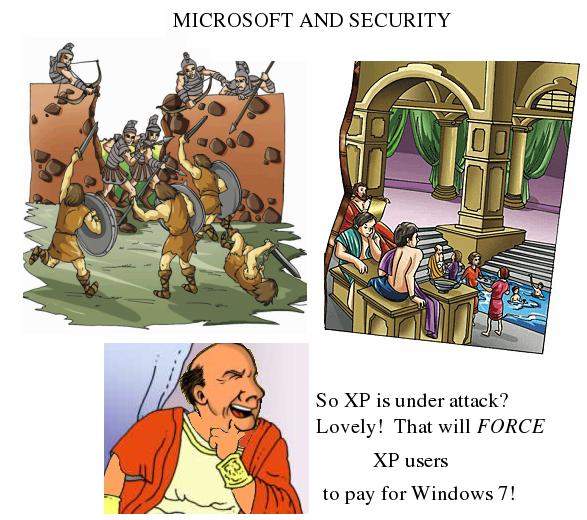 Dear Windows XP user, listen:
Windows XP is NOW UNDER ATTACK! But don't worry. Microsoft has got your back...Or maybe not?
A lot has been said about why Linux is inherently more secure than Windows. However, after reading this post (dated July 1, 2010) from PC Advisor, I realized that, right now, the security problems in Windows can actually be promoted by Microsoft. In fact, the security policy of the company has to do more with its business model than it does with costumer support.
While Windows XP users entrusted the security of their systems to the software emporium, which vowed support for XP until 2014, Microsoft's peculiar response to fix the problem reveals certain interesting facts.
1. Microsoft got the information way in advance, but remained relatively silent until the problem was disclosed and exploited publicly. Why didn't Microsoft hurry to correct the situation? Lack of interest, maybe? Or conflictive interests?
2. Microsoft told users in June 10 that they had to fix the problem themselves and released a "manual" for that purpose. Now, the problem was found in Windows Help and Support Center, automatic services that average users normally cannot control. To solve the issue, users were expected to get their hands dirty editing the Windows registry. Why was the company asking users to mess up with the registry? Doing so implies, for most Windows users, running the risk of actually destroying their systems. Doesn't Microsoft have the obligation to correct the issue in the first place? Or is it that the company switched policies and is now "educating" Windows users on how to dissect their operating system?
I believe this shows how much Microsoft cares for their loyal Windows users, who turn on their computers with confidence, feeling protected by the Redmond giant. The message is not so difficult to grasp: MICROSOFT WANTS WINDOWS XP USERS TO BE ATTACKED. They want you, XP user, to be victimized by viruses or exploits. This way, when you look for a solution, you are likely to inflict more damage to your system yourself. So you die by your own hand.
All this leads you to end up paying for Windows 7, which will certainly give Windows 7 sales a boost. What a nice business model Microsoft has created! Too bad that, in this paradigm, selling a new OS is more important than either security or support for costumers.
Windows 7 users might grin and think, "I don't care. I have 7 anyway." Well, that's absolutely true. I hope you can remain as confident once Microsoft releases Windows 8.
And people still hesitate to use Linux...
domingo, 2 de mayo de 2010
New Record
After resizing my computer's partitions, I decided to re-install Mandriva 2010 (Adelie), not because Mandriva Linux was giving me any headache, but because I, in my attempt to increase the size of the /home partition, ended up deleting it stupidly.
LINUX UNLEASHES THE POWER OF YOUR COMPUTER--NEVER FORGET THAT!
I started the process at 12PM and finished at 2PM. Two hours to put everything back might seem excessive; however, one must realize that installation time from the Powerpack DVD normally takes less that 25 minutes. It took so long because I am talking about installing + customizing + adding new software.
I customized the desktop and then the work areas to have multiple desktop wallpapers. I then activated the Kwin effects (I love that cube!)
After that, I restored all the documents from the back up DVD.
Finally, I downloaded the programs that I like. Notice I said "I like". Many equivalent programs come bundled with KDE, such as the video/sound players and the image editors. Yet, I feel more comfortable with certain applications. Among the list of add-ons that I wanted on my Mandriva system, I can count:
1. French dictionary for Open Office
2. Templates for Open Office
3. Audacity sound editor
4. Audacious 2 audio player
5. KM player multimedia player
6. Cheese! for webcam
7. Record my desktop for tutorial production
8. Festival for Text-to Speech
9. Wine
10. Java
11. DeVeDe for DVD production
12. The three security add-ons for Firefox (WOT, Adblock plus, NoScript)
13. The robot for checking my mail in Firefox (Webmail Notifier)
14. Frozen Bubble--a game
15. Supertuxcart--another game ;-)
16. The Zsnes emulator (Famicom games, anyone?)
17. The DOSBox emulator (For playing Heretic and those wonderful DOS games that died with the advent of Windows XP)
18. The Virtual Machine--I catch Linux distros as if they were Pokemons ;-)
This means that, in just a couple hours, I had a system fully equipped to do all the things that I learned to do in Windows in a period of 15 years...back in time, prior to the Windows 95 release.
In April 2009 (when I had to reformat my Windows system due to a virus attack), it took me three days (yes, and that was due to continuous practice & strict organization) to have the system up. Of course, I could not do the whole process in one sitting. Let's compare:
1. Installing Windows XP (my second favorite Win distro--how I miss Windows ME!)
2. Putting in MS Office 2000
3. Loading drivers (tons of the darn things!!) to be able to use the camera, the printer, the sound, etc.
That would take a good 2-4 hours. One would think that the numbers are not that bad for Uncle Billie and his OS. However, the real fun would begin as I had to locate and install the programs to do the sound, video, and picture editing; in sum, all the fun applications that gave sense to my spending so much time in front of the screen.
But that was not the end of the story: since I was concerned with security, I had to install the firewall, the antivirus, the Spybot-Search & Destroy (great application, Windows users!), the cute Zombie monitor, the Hijackthis (for exorcising Internet Explorer),the Malware detector, and ...
And one wonders how on Earth I had to format the HD because of a virus, right?
What's clear is that the process was far from complete: I still had to do the customizing and... The documents, of course! I still had to copy the document backups.
Three days for doing that was a record...Or so I thought. It would take me weeks to restore my Windows system to the state it was before the attack.
So, in retrospective, I think I have an extremely good reason not to switch back to Windows again. Two hours was all it took to have the whole system up and running as it was before... No, you can't beat that, Uncle Billie.
LINUX UNLEASHES THE POWER OF YOUR COMPUTER--NEVER FORGET THAT!
I started the process at 12PM and finished at 2PM. Two hours to put everything back might seem excessive; however, one must realize that installation time from the Powerpack DVD normally takes less that 25 minutes. It took so long because I am talking about installing + customizing + adding new software.
I customized the desktop and then the work areas to have multiple desktop wallpapers. I then activated the Kwin effects (I love that cube!)
After that, I restored all the documents from the back up DVD.
Finally, I downloaded the programs that I like. Notice I said "I like". Many equivalent programs come bundled with KDE, such as the video/sound players and the image editors. Yet, I feel more comfortable with certain applications. Among the list of add-ons that I wanted on my Mandriva system, I can count:
1. French dictionary for Open Office
2. Templates for Open Office
3. Audacity sound editor
4. Audacious 2 audio player
5. KM player multimedia player
6. Cheese! for webcam
7. Record my desktop for tutorial production
8. Festival for Text-to Speech
9. Wine
10. Java
11. DeVeDe for DVD production
12. The three security add-ons for Firefox (WOT, Adblock plus, NoScript)
13. The robot for checking my mail in Firefox (Webmail Notifier)
14. Frozen Bubble--a game
15. Supertuxcart--another game ;-)
16. The Zsnes emulator (Famicom games, anyone?)
17. The DOSBox emulator (For playing Heretic and those wonderful DOS games that died with the advent of Windows XP)
18. The Virtual Machine--I catch Linux distros as if they were Pokemons ;-)
This means that, in just a couple hours, I had a system fully equipped to do all the things that I learned to do in Windows in a period of 15 years...back in time, prior to the Windows 95 release.
In April 2009 (when I had to reformat my Windows system due to a virus attack), it took me three days (yes, and that was due to continuous practice & strict organization) to have the system up. Of course, I could not do the whole process in one sitting. Let's compare:
1. Installing Windows XP (my second favorite Win distro--how I miss Windows ME!)
2. Putting in MS Office 2000
3. Loading drivers (tons of the darn things!!) to be able to use the camera, the printer, the sound, etc.
That would take a good 2-4 hours. One would think that the numbers are not that bad for Uncle Billie and his OS. However, the real fun would begin as I had to locate and install the programs to do the sound, video, and picture editing; in sum, all the fun applications that gave sense to my spending so much time in front of the screen.
But that was not the end of the story: since I was concerned with security, I had to install the firewall, the antivirus, the Spybot-Search & Destroy (great application, Windows users!), the cute Zombie monitor, the Hijackthis (for exorcising Internet Explorer),the Malware detector, and ...
And one wonders how on Earth I had to format the HD because of a virus, right?
What's clear is that the process was far from complete: I still had to do the customizing and... The documents, of course! I still had to copy the document backups.
Three days for doing that was a record...Or so I thought. It would take me weeks to restore my Windows system to the state it was before the attack.
So, in retrospective, I think I have an extremely good reason not to switch back to Windows again. Two hours was all it took to have the whole system up and running as it was before... No, you can't beat that, Uncle Billie.
Suscribirse a:
Entradas (Atom)
-
 A few days ago, thanks to one student, I realized that something funny was happening with my Linux netbook. He said that it was weird that I...
 -
 That's right. My desktop, which runs Windows, is infected and I blame Linux. As it normally happens in these cases, this new infection ...