Mostrando entradas con la etiqueta IME. Mostrar todas las entradas

viernes, 5 de marzo de 2021

Two Nice Discoveries on PCLinuxOS 2021

Today I bought a wireless mouse.  Truth be told, I did it because, long ago, I had read that Linux had problems running such devices and I wanted to experiment.

I had booted my laptop with PCLinuxOS and, in my ignorance, I got ready to struggle with Bluetooth to configure it.  I placed the batteries and plugged in the USB connector.  That was all it took for PCLinuxOS to start using the device correctly, he, he.  No struggle whatsoever. 

Then I remembered that I could no longer type in Japanese using PCLinuxOS because iBus simply would not be displayed in the task bar (even after a correct installation of all the packages).  So, I decided to tinker a bit to see if I could get Japanese IME to function once again.

All I did was to go to the PCLOS control center, System, Manage localization and, once there, select iBus after choosing the language.  A message asked me to restart the session, so I logged out and back in.

But the iBus icon was not in the task bar.  I looked in the menu and found "run iBus," so I ran it.  Still, no icon in the task bar.

Then, I tried to type something in the menu search space and this was my input:

PCLINUXOSはやっぱり日本語を書くことができますよ。(Of course PCLINUXOS can write in Japanese.)

The problem was that, since there was no iBus icon showing, I could not disable the Japanese IME... until I found that, in the UIM configuration, the keys to toggle iBus are meta+space:

So, that was it.

I can now type in Japanese using PCLinuxOS again... Funny that I could have done it all this time, but I just did not know how to.

One is always learning!

sábado, 24 de octubre de 2020

Japanese IME on PCLinuxOS 64 KDE5 Magnum 2020 1015

I recently saw that my install of PCLinuxOS was behaving funny after and update: the effects ceased working and web pages were loading slowly.

Last time this happened to me, I had to install a new iso because I had been working with a very old one.

This time, however, I had kept up with all the updates thanks to the convenient Simple Update Notifier, but something was not good.

Anyway, I decided to install the new PCLinuxOS 64 KDE5 Magnum 2020 1015.  The installation went well, but I was worried because I normally install the PCLinuxOS GRUB2 on the distro partition, not on the MBR, but it was not possible for me to do it this time, so I was predicting a mess trying to boot OpenMandriva, Mageia, MX Linux, and Elive.

When the installation finished, saw the PCLinuxOS GRUB2 replacing my old Mageia GRUB2, so I booted all the other distros to see if something was broken.  Nevertheless, there was neither a kernel panic in OpenMandriva nor a horrible delay to boot in Mageia.  All was well!  YAY!

I then booted the new install of PCLOS and I was greeted by a more dynamic splash screen and neon icons on a new wallpaper:


The effects were not working, but it was a matter of activating them.  I read the solution in the PCLOS forum:

System Settings>Hardware>Display and Monitor>

The only problem I had was getting the Japanese IME to work.

After trying, I managed to get iBus working with Mozc.  So, everything was good.

But then, after a KDE update, the iBus icon disappeared.

I have tried everything to make it come back with no positive results.

Even so, and although it's a bit inconvenient, I can still invoke iBus from the terminal with these commands:

pkill -9 ibus 

ips -ef | grep ibus  

/usr/bin/ibus-daemon --xim &
 

sábado, 13 de agosto de 2016

OpenMandriva Lx 3.0 on my laptop

Before anything else, let me just say upfront that this is not a technical review.  I am a non-technical Linux user, so what I say here comes exclusively from the perspective of someone who, without understanding much about what is under the hood, appreciates Linux for the smooth ride that it provides.

My previous OpenMandriva Lx 2014 install
My old OpenMandriva Lx 2014. x install was working perfectly: it made the ZaReason Strata laptop work efficiently.   It also looked beautiful, with the four different wallpapers on each workspace, the Ghost KDE theme, and the Cairo dock.  The only problem I had with this system was that I could never manage to make it type in Japanese (I tried SCIM and iBUS to no effect).

Using ROSA Image Writer, I copied the ISO to an USB drive and went to adventure land, installing OpenMandriva Lx 3.0 twice on the same machine, first keeping the home partition of my previous OpenMandriva  and then a clean install.

Now, after I installed OpenMandriva Lx 3.0, this is what I noticed:

  1. The installation is fast!  I knew that some Linux OSs can install quickly (Mx took like 5 minutes), but I consider that completing all the process in less than 15 minutes is not bad at all.  And it was very simple, too.  The most complicated part was, as usual, partitioning, but that is because my  laptop is a heptaboot.
  2. It is best to do a clean install.  Although it was convenient to have all the files
    Visual problems
    and most of the settings there after the installation, I noticed several visual problems with Firefox.  There were unreadable message windows and elements were not properly located. These problems disappeared after I performed a clean install, so they were caused probably by previous settings overlap.
  3. With Plasma 5, you must say good-bye to certain aesthetic preferences.  We already know that the KDE team eliminated the possibility of having an independent wallpaper on each workspace, which is a big disappointment.  However, I also saw that the Ghost theme is not working.  Well, one must compromise here with Plasma 5.  You lose some, win some.  But what exactly have I won?
  4. OpenMandriva now comes with Japanese input support.  Sort of.  There is a
    mysterious keyboard icon on the task bar.  It turns out that it is Fcitx, an IME. 
    With it, one can, in theory, input Japanese characters.  However, I have not managed to make it work, except with a virtual keyboard with kana symbols.  I tried to install iBus, but could not manage to make it work. UPDATE :  Fcitx works perfectly!  I just had to learn how to use it. Here is a tutorial I wrote to that effect.


I am keeping OpenMandriva Lx 3.0 for sure.  In general, I must say that I like the OS and, what I do not like about it is related to my very own Plasma 5 aversion instead of something particular to the OS.  I mean, the OS picked up the wi-fi with no problems, the sound works, effects are working, I saw no crashes, and speed feels good.  Kudos to the OpenMandriva team: their work is awesome.  Of course, I must test other areas; for instance, I need to assess how the OS works with games.  So, my next post will be about that, I guess. 
My new OpenMandriva Lx 3.0 desktop.  Yay!

martes, 28 de abril de 2015

Time for gratitude-- BIG THANKS, MAGEIA DEVELOPERS!

I believe that one of the greatest strengths of Linux is its community.  Unfortunately, most of the times, the hard work of the developers that have the technical ability to put a distro together goes unnoticed in the excitement of the final product.

Users become particularly vocal when things do not work as expected: we rant and, in our frustration, we sometimes fail to recognize all the hard work and commitment of those who make things happen.

Only two days ago, I discovered that the release candidate of Mageia 5 was available and tested it.  I saw that a key feature for me, Japanese IME via iBus, was not working.

I reported the bug without much hope, to be honest.

Almost immediately, I began receiving emails with updates of the progress that Mageia developers were making.  They were busy, buzzing with activity trying to rectify the problem.

Today, I am happy to report that Japanese IME is working again in Mageia 5 RC.

Although I could not manage to make Anthy work, Mozc works perfectly: it lets you type in hiragana and katakana, and gives you suggestions of conversion to kanji, as Anthy did.

Therefore, I want to express my deepest gratitude to those who took their valuable time to tackle this issue.  I don't know the names of all of you who got involved, but one thing I know... You all ROCK!

Japanese IME: iBus + Mozc (Mageia 5 RC)

miércoles, 22 de mayo de 2013

Mageia 3, the WONT FIX scim bug, and iBus

Mageia 3 has been released and, so far, the distro is getting very positive reviews.  Well, given the fact that I have been using Mageia since version 1, I believe that the team behind the distro truly deserves words congratulating their efforts.  As a Mageia user, I must say that I am very pleased with the OS and thankful for the work that has been done.

However, I received yesterday an email that, like a cloud on a blue sky, announced that not everything is rosy in the Linux world.

During my walk in Linux land, I have had the chance to read the complaints of users that get angry when developers refused to fix a bug they filed.  They vented their frustration and slashed to the right and left with sarcasm sharp as swords.  I read their sometimes long expositions and missed the spirit of their rants... until yesterday, when I received a reply from a developer concerning a bug that I filed.

First, allow me to present the context.  Three days ago, I described my experience trying to make Mageia 3 work with Japanese IMEs.  My first attempt was iBus, of course, although I knew it was not working properly in Mageia 2.  As it did not go well, I worked with SCIM and, after a battle, I made it work thanks to a package I "borrowed" from a PCLinuxOS repository.  Then, I filed the bug.

That's the point where my new story starts.  The reply came, brandishing a WONT FIX status that made me uneasy.  However, the comment from the developer bit me with angering poison; it read:

"We are promoting ibus for years. So there we do not include all scim packages in live ISOs."

The "live ISOs" part was bad enough because I obviously gathered the packages from the full list of repositories, not just the Live Core and Live Nonfree ones.  Hey, I can presume that, if you enable the Core Release repo, you should have access to the same packages that a Mageia 3 full DVD install gets, right?

The real sting was on the former part, though.  I can understand the efforts to promote iBus, but I tried that IME first to no avail.

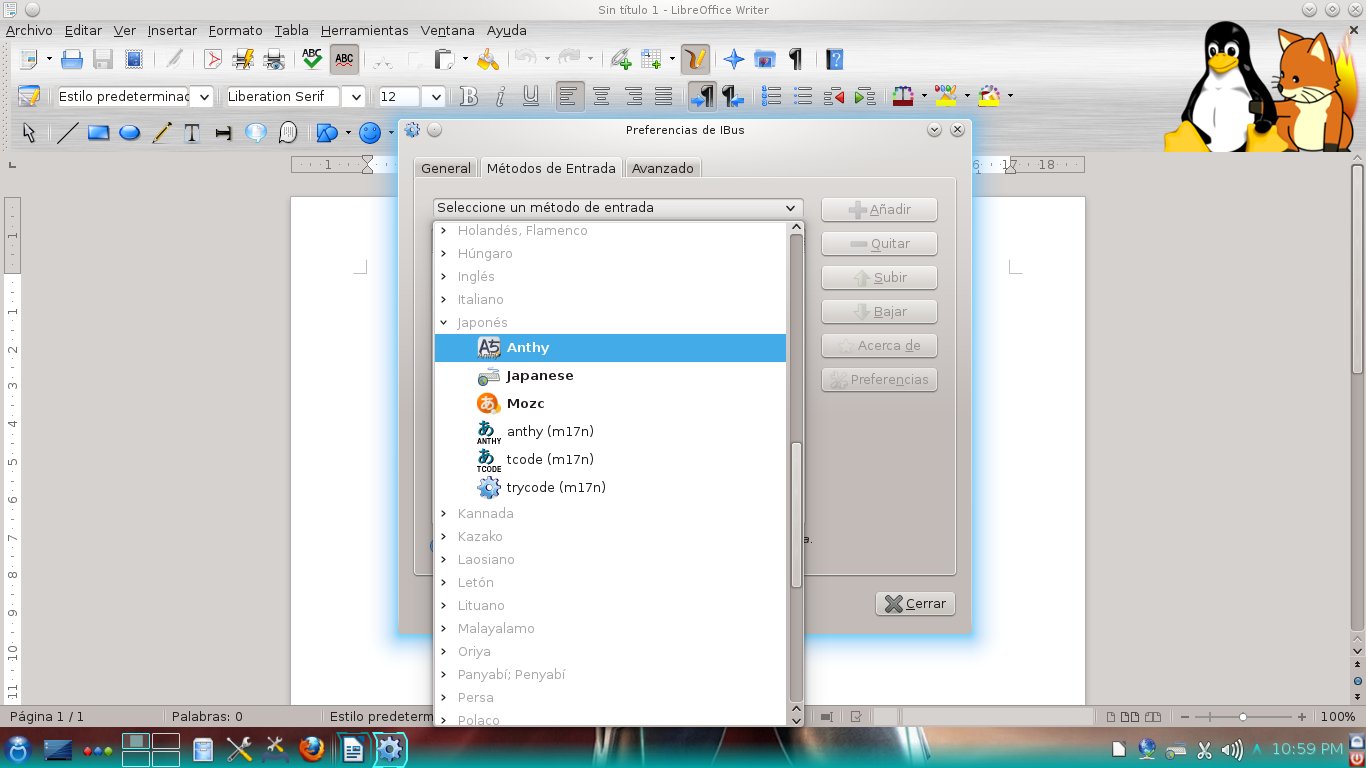
Allow me to show you my case.  After installing iBus, anthy, and all required dependencies, you log out and back in to get iBus working. This is what you get:


iBus is active, showing only "English keyboard"


You right click and go to preferences to add extra languages


You scroll down and locate Anthy by expanding "Japanese"
After adding it, Anthy should be working.  But you click on the iBus applet and...back to square 1: English keyboard only. You can repeat that as many times as you like, using all languages that you desire.


Regardless of what you do, iBus simply refuses to "remember" any additional language you choose.  Not a very usable IME, right?

In Mageia 2, iBus would work, but would mess up with the Spanish keyboard map, ruining your chance to type accents correctly.  In Mageia 3, the said IME is simply dysfunctional and the developer won't add the scim-anthy package that is missing in SCIM so that Japanese input works...because the idea is to promote iBus, an IME that is now in a worse state than it was in Mageia 2.

I must confess that, for a moment, I got really angry.  I finally grasped the spirit of the hurt users who got the infamous WONT FIX tag for the bugs they filed.

But then my anger ebbed when I tried to see the position of the developer.  iBus is, in all accounts, a great tool.  SCIM is a good oldie, but it is somewhat difficult to get working.  Developers have the right to work on what they choose, especially when they squash bugs voluntarily and without any monetary compensation.

So, instead using this as an excuse to release all the tension that has accumulated lately (these last two weeks have not been a ball, really), I decided not to show how fluent I am in sarcasm when rabid. Ken Starks said that "rants are best served cold".  He is right.

For my part, I waited until my wrath, the propeller that efficiently takes me to the Land of a Thousand-and-One Regrets, ceased to spin.  Then I filed another bug.  This time, for iBus.

I truly hope they get to fix the problem.

UPDATE (May 23, 0:23)
I recently changed my desktop install from Mageia 3 Live to Mageia 3 DVD.  It turns out that iBus works now like a charm.  I guess the bug only affects Live installs. 

domingo, 19 de mayo de 2013

Mageia 3: Here's what I gained and what I lost

Mageia 3 was released today and I downloaded the Live DVD version to replace my Mageia 2 Desktop install without further consideration.  Normally, I test the betas and the RC of a distro carefully in a virtual machine.  This time, sadly, I had no time to do that.

In my old Windows days, I would simply install the new release on top of the old one.  If something went wrong, I used the "bear-and-grin philosophy.  With Linux, I have been extra careful before updating the OS, but I guess that this was the time to test whether or not I could leap blindfolded into a new Mageia OS.  So, here is the summary of my adventure:
Mageia 3, here I go!!!

First impressions

I moved from a 32-bit architecture to the x86-64 architecture that the Live DVD includes.  To make my life easier, I wiped out the root partition and left the home partition intact.

The DVD booted without a problem and, after asking me the regular questions (language to use, if I accepted the license, where to install), the process completed in about 16 minutes.  I was prompted to add my root and user password and to reboot.  Again, I chose to use GRUB and not GRUB2 because I am not confident with the latter quite yet.

The system booted picking up my other OSs without a problem.  Then, Mageia 3 enabled the network and started downloading the common repositories.  After this process, I saw my desktop.  Although my wallpapers had been replaced by a solid black color, I simply located my favorite pictures and put them back on.  My personal settings had been preserved (effects, configurations, icons, etc), so I was quite relieved.

With KDE 4.10.2, the system became noticeably faster.  I tried to pinpoint the changes, but they were not so easy to spot for my untrained eye.  However, I gradually noticed that menu translations were more consistent, that the "home" tag had been replaced by "START" under "PLACES", that all my other partitions were listed under "DEVICES" and that the "space available" mini bar that appeared below a connected USB device was gone and only the big bar at the foot of the Dolphin window stayed.  I guess the duplicity was purged.  The notification system seemed to have received a cleaning, too.

I also noticed some new software entries in the general menu.  I decided to explore those later because I wanted to reinstall my favorite programs.  Thus, I fired up MGG (oh, new graphics that match the start screen) and enabled some other repositories (backports, tainted).

Mageia 3 played MP3s out-the-box.  Amarok impressed me with its performance this time!  However, Mageia 3 got stuck on some .mp4, .flv, and .mpeg video files.  I installed VLC (which took care of the video problems), audacious, and audacity.  So far, Mageia 3 was performing as a great substitute for my Mageia 2 install.  I saw myself as a version of Mario, the game character, jumping up and falling on top of mushrooms that could not stop me.  But then...

Watch out, Mario!  Here's the boss!

I installed Wine, the x86-64 version, that is.  Some of my programs were not working...

What do you do then?

I mean, it's not that those Windows-based programs are absolutely required.  However, they are convenient to have around.

So, I uninstalled the 64-bit version of Wine and got the 32-bit one instead.  Problem solved, let's go on!

That was too easy...

Here's the REAL boss!

I must have an IME to type in Japanese.  In Mageia 2, I gave up iBus because it messes up the Spanish tildes (accents) in LibreOffice.  That was not a big deal because I had always used SCIM anyway.

In Mageia 3, iBus refused to display the Anthy Japanese IME regardless of what I did. It also changed my keyboard configuration from Spanish to English and, on top of that, the tildes in LibreOffice were a mess, as expected.
"I'm going to be your opponent, Mario"

"OK, iBus is not an option," I thought. "Fine, let's install SCIM and forget about this problem".

And I installed SCIM only to find out that, after doing all I know to enable it, the IME simply refused to work properly.  Again, Anthy was not showing...

There I was, with a great system that did everything I needed, except accepting Japanese input.

I was a little discouraged, but open MCC and, after a while, discovered that a package was missing: scim-anthy!  Obviously, without it, I could never make SCIM work with Anthy.

I Googled "scim-anthy rpm x64" and landed on RPM pBone.net, where they were hosting a scim-anthy package built for PCLinuxOS.  I downloaded it and, in a desperate move, I installed it to Mageia 3.  MCC simply asked me to install Kasumi along.  I accepted and MCC retrieved Kasumi from the Mageia repositories to do its thing.  The computer did not blow up.

Not a confident Mario any longer, I opened LibreOffice and...Anthy was there!
よかったね!本当に、よかった!PCLOS、たすけてくれて、ありがとうな!

With SCIM working, I filed a bug and, more at ease, finished adding up the remaining software that I need to work comfortably with my new Mageia 3 Desktop install.

Overall Balance

I got a good scare with the IME, but it's working now.  Aside from that, everything seems to be performing right on cue.  KDE is responding faster, Jovie and its text-to-voice service is working in multiple languages, and I haven't seen any major problem, like a crash or something.

I guess the leap of faith was worth it.


UPDATE (May 21, 7:33PM)

I also updated my laptop from Mageia 2 to Mageia 3.  As with the desktop install, everything worked fine.  However, despite I use the fix I described here to get Mageia 2 pick up the WPA2 wifi of the university, Mageia 3  simply refused to work with it for two hours.  Then, the problem solved by itself (?!).  I hope the rainstorm had something to do with it.
 

domingo, 10 de marzo de 2013

Mageia 3 Beta 3, A Quick Test Drive

I tested the Beta 3 of Mageia 3 today.  To summarize my experience, I can say that it looks solid, reliable, and promising.

First, I tried the Live version in my laptop.  After booting, the distro let me use KDE 4.10.  The first thing I noticed was the smoothness of the effects.  Even the cylinder and the sphere work now: 


I had absolutely no problem with sound, USB drives, or, more importantly, the wi-fi.  Mageia 3 B3 picked up everything out of the box in Live mode.


Then I installed the distro to a Virtual Machine.  I saw nothing new in the installation process, but after the install, I saw some new artwork in the Mageia Control Center.


Once the repositories were updated, I gave Mageia 3 B3 my Japanese IME test: I installed iBus, Anthy, and Japanese fonts.  To my relief, the IME worked flawlessly with LibreOffice 4:


Finally, I opened some YouTube videos and MP3s and there was nothing to report there, either.

I really liked the progress that the Mageia team has made. Kudos to them!

domingo, 24 de febrero de 2013

Japanese Input in PCLinuxOS 2013.02

I've been trying to get the latest release of PCLOS to accept Japanese input.  First, I made the changes that I explained here.  Basically, you have to download the required packages and add these lines to the file i18n: 
GTK_IM_MODULE=scim
QT_IM_MODULE=scim
XIM_PROGRAM="scim -d"
XMODIFIERS=@im=SCIM

I did that using the command
export $ (dbus-launch)
to edit the files with Konsole, as I had also explained here once.

I also installed Abiword (as it helped me once to test SCIM) and removed the LibreOffice KDE integration package, which has prevented me to fire up SCIM both in Mandriva and Mageia.  Then I followed the detailed directions for PCLOS here

However, after trying this process in PCLinuxOS 2013.02, all I achieved was to freeze the desktop when attempting to launch any application.


Today I found the culprit and fixed the problem. In
/usr/share/X11/xdm  you have to open the file Xsession, to which you will append the following lines before the line that starts with exec
export XMODIFIERS=@im=xim  
export GTK_IM_MODULE=scim-bridge
export QT_IM_MODULE=xim
export XIM_PROGRAM="scim -d"


The problem was that the first line must read xim at the end, not SCIM, as I had detailed before.

By the way, remember that PCLOS shows the IME on demand.  You have to press CTRL + space to work with it.  日本語がきっと書けますよ!

Oh, and the best part of this method is that Japanese IME also works with Firefox.

I wonder if this can be applied to Mageia/Mandriva to enable Japanese in Firefox...
できればいいなあ。

I'll try that tomorrow.

lunes, 24 de diciembre de 2012

A problem with iBus in Mageia 2 and Mandriva 2011

I just found an interesting problem in the way Mageia 2 handles typing Asian languages with iBus, the Input Method Editor (IME) that is configured easily during the installation of the distro.

For work reasons, I need my computers to be able to handle Japanese (and for fun, Korean and Thai).  You can do this with iBus (a more modern IME) or SCIM.  I chose iBus because you can install it during the installation process of Mageia. 

I had not seen this situation before because I have installed iBus only to computers that have an English keyboard.  However, since my main desktop computer has a Spanish keyboard, when I opened LibreOffice, I discovered that iBus was preventing the keyboard to display the accents ("tildes") of Spanish and those of French.

After using the SU command and inputting my root password, I wrote this in the terminal:
cd /etc/sysconfig

export $(dbus-launch)

kwrite

Then, when the graphical interface of kwrite came up, I opened the file i18n and found these entries related to iBus:


GTK_IM_MODULE=ibus
QT_IM_MODULE=ibus
XIM_PROGRAM="ibus-daemon -d -x"
XMODIFIERS=@im=ibus

I played with them a bit and the only thing I achieved was to break the IME, which slowed down the session start in Mageia.  Therefore, I tried to install automatically good old SCIM from the locale administrator in the Mageia Control Center.  It told me that there was no scim-tables packages, but I restarted the session anyway to find that SCIM was, effectively, not working

No problem.  I went to the file i18n in /etc/sysconfig again and saw that the following lines had been changed to make SCIM work instead of iBus:


GTK_IM_MODULE=scim
QT_IM_MODULE=xim
XIM_PROGRAM="scim -d"
XMODIFIERS=@im=SCIM

The problem was the second line.  It has to read
QT_IM_MODULE=scim

so I changed it.

The next step was to remove the libreoffice-kde4 integration package.  After doing that, SCIM started to work and I could type the correct Spanish accents.

Mandriva 2011 shows the same problem with iBus if you have a Spanish keyboard.  However, although the locale manager installs SCIM with the missing scim-tables package, it took me more time to get SCIM to work.  It so happened that Mandriva did not install several important dependencies (scim-bridge-gkt, scim-bridge-qt4) and libreoffice-gnome, which were needed for the IME to work (provided you remove the package libreoffice-kde4).

miércoles, 13 de junio de 2012

Mandriva finally died! Well, sort of...

Many Linux users have already proclaimed Mandriva deceased and buried it. But is this old Linux distro quite dead?  Well, yes.  Sort of.  Mandriva became a zombie!

Bernie, the zombie that moved only to the sound of music

That is, at least, what some developers have implied with the release of the Mandriva 2012 Tech Preview: they code-named it "Bernie Lomax", the famous character of the comedy "Weekend at Bernie's".

I know that Tech Previews are not targeted to end-users but, stung by curiosity, I gave the DVD a test drive.  I must confess that the distro, just like Bernie in the sequel of the movie mentioned above, still moves, dances, and even fights!

Let me share my impressions.

First, the DVD booted flawessly when I installed to a virtual machine.  However, I had to give it more disk space than the average 8GB because the DVD included a lot of packages (it asks you if you want an office workstation, a gaming PC, etc).  I chose a KDE desktop install.


Installation screen: language selection


The installer is the same that was included in the Mandriva Desktop 2011.  The artwork, however, has changed: there was a bunch of friendly-looking penguins that kept me company along the way until the installation process was complete and the machine rebooted.


From that moment, my question was if Mandriva would follow the line established with the 2011 release (ROSA SimpleWelcome, launcher, Time Frame) or if it would go back to the 2010 feel, now donned by Mageia.  The answer came soon enough.  When I say "soon", I mean it: the desktop became operational much faster than with the 2011 and the latest ROSA releases.
The log in screen
The ROSA launcher getting ready to dance


Once the desktop loaded, I opened Mandriva Control Center to give this Linux distro release wannabe my mandatory test: Japanese IME capability.  I had chosen iBus as the IME during the installation, but I had to download Anthy and some other packages from the repositories.  "Bernie Lomax" passed the test; it can handle Japanese input with iBus+LibreOffice perfectly.

A となりのトトロ background image I used in Mandriva 2012 TP
I have to say that although the ROSA stuff is not my cup of tea, when I saw its responsiveness here, I found it more appealing.

So there you have it: Mandriva is still moving after being proclaimed dead.  Now we have to see if the corpse finally rots or if a new, more vigorous distro is reborn from its ashes, like a phoenix.

sábado, 17 de marzo de 2012

Some reflections on Mageia 2 Beta 2

As a non-technical user of Linux, and after reading several posts about the battle between developers and users who feel neglected by them, I could not prevent myself from worrying a bit about the soon-to-come release of Mageia 2. You know, maybe Mageia also jumped on board that train that takes you to DumbOSland, where you "use-your-computer-as-if-it-were-a-cellphone".

So, I downloaded the beta2 to have a preview of what Mageia offers to users of Linux who are not computer gurus by any standard, but who like computers to behave as what they are.

DISCLAIMER: This is not a technical review, so I'm not getting into codecs, Flash, boot-time, and the like. As a simple computer user, I wanted to check on the progress made by Mageia and I saw both positive points and negative ones. This is what I found on the negative side:

1. The artwork needs some, er, work!

I am inclined into thinking that OSs must keep a balance between efficiency and beauty. While I do not find myself necessarily annoyed by the color scheme or login screens of Mageia, I do believe that lack of consistency might make potential users to refrain from using a system because simple users, when seeing an inconsistency in the booting process, tend to think of it as "a problem". The graphical screen of Mageia 2 Beta 2 overlaps the text screen and it looks strange. Of course, that is not going to make a computer blow up, but still...

2. A hideous bug crawls through Mageia Control Center/ RPMDrake

Although the installation was smooth, when I opened Mageia Control Center to start adding programs, it told me that RPMdrake had to be updated. That is normal, so I marked some packages for install and waited.

The installation was successful and so was the updating of RPMdrake. The latter was the problem: after the updating, RPMdrake became unusable, which prevents you from performing any further software install operations.

Now, this is what I really call a problem. I presently ignore if it is a localized issue or many users experienced it, but this is not good. I tried three different combinations and all of them led me to the same dead end:

a. Install Mageia, select no upgrades, refresh repos (leaving DVD), install software from MCC=locked RPM db

b. Install Mageia, select upgrades, refresh and select some additional repos, install software from MCC=locked RPM db

c. Install Mageia, select no upgrades, refresh repos (unselecting DVD and selecting some additional repos), install software from MCC=locked RPM db

However, this worked:
Install Mageia, select no upgrades, refresh repos (unselecting DVD and keeping the default active), install software from MCC. I suppose this problem is going to be taken care of with the RC.

3. Japanese IME with iBus: Dekiruka, dekinaika?

This is perhaps the most technical requirement I have for selecting an OS: I need a free and efficient way to write in Japanese. There are many functionalities I can live without (games included), but my computer has to accept Japanese character input.

Mageia 1 Beta2 astonished me when I saw that iBus worked flawlessly out of the box, something I could never achieve in Mandriva 2010 regardless of all my efforts (iBus works perfectly in Mandriva 2011, though).

Since Mageia 1 Live CD removed this functionality (I must use SCIM for Japanese IME with that version of Mageia), I was a bit concerned of whether or not iBus will work in Mageia 2. I tried the beta 1 and, to my disappointment, although iBus seemed to be activated, all the languages were shown in light gray, the "conventional" color for unavailable features in a menu.

iBus in Mageia 2 Beta 2 showed the same. However, I discovered that, although they were displayed in a lighter color, if you click on the arrow preceding each language, a tree opens and you see the possibilities... Wheeee! My bad, really. After my battle with MCC, I downloaded all the packages to get Japanese working (Anthy, ibus-anthy, Japanese font) and tried iBus. It works... sort of. Now, although you see the ibus keyboar in the taskbar, you must restart it to get Anthy running. And you must install the java packages for LibreOffice, too. Interestingly, iBus works in LibreOffice even if you do not uninstall the Libreoffice-kde package. Another issue: it does not seem to work with Firefox.

Mageia 2 beta 2 で、日本語のIME、できるか、できないか?できそう。

----------------------------------------------------------------------------------------------------------

On the other hand, Mageia 2 Beta 2 brings onto the table some tempting features for simple computer users like me:

1. New KDE
I really like the way in which Mageia 2 is working with KDE 4.8.1. Let me say this and, please, computer experts, do not feel offended. I simply do not care if KDE is a resource hog or not. I mean, KDE runs perfectly on my 2GB RAM, 500GB HD, even if I have several programs open (including Firefox with 6 tabs). It also looks beautiful with all the eye candy and plasma widgets. People can get systems with twice the horsepower of mine to run another OS that requires a ridiculous amount of resources and they are happy that way. So, to be honest, I find KDE's demands reasonable (again, I am a simple computer user, not a technical expert). Stability? Well, I haven't experienced a single KDE crash in a very long, long time. Yes, maybe it's because I do not use each and every KDE application, but I use the ones I find indispensable. That being said, I think that the prize KDE obtained was well deserved and using it is fun.

By the way, now the bottom panel marks with indicators the programs that are active and it also offers you an instant full-screen preview of the applications that are running. Some people I know are going to be crazy about these new features...

2. A satisfactory assortment of programs

Mageia 2 Beta2 packs LibreOffice 3.5.1.2, KOrganizer (I cannot live without it!) Okular (another gem), Scribus, Amarok 2.5.0, which nows incorporates the Amazon Store... I don't care because it works in some countries and mine is not included), Kdenlive, the players Dragon and Totem, and Gimp 2.7.4 with its new "export as" instead of "save as" dialog and image transformation tools.

3. Solid translations

As a Linux user, I cannot emphasize this point enough. Linux distros that provide only a couple of languages or inconsistent translations might not realize it, but they are reducing their possibility of adoption. Not all computer users speak English.


I believe that Mageia wants to offer a nice usability/freedom blend. Yes, I know that many Linux distros use the same motto, but they do not deliver; some say "We are the easiest computer experience", but then they switch your desktop for something you had never seen before and you are stuck with a desktop that that you simply don't understand. Mageia developers seem to understand that non-technical computer users need an OS that works with them, not against them. Thus, instead of "dumbifying" the user interface to the maximum, which is rather popular lately, they are following KDE's progress while keeping the same installation process. For computer users who lack technical training, that is certainly the right approach: I can follow the same steps and obtain a familiar, more polished desktop in the end. I can use it in my own language; it has the appropriate tools, and it requires little effort to use as I am not expected to relearn everything.
...A desktop that tells me I'm using a computer, not a gigantic cellphone. Thank you, Mageia!

domingo, 7 de agosto de 2011

Japanese in PCLinuxOS? Of course!

After having installed PCLinuxOS 2011.6, I must say that I am very pleased with it. Differently from Mandriva 2010.2, I can see videos and listen to MP3 files out of the box and I don't need to fiddle with the system to mount the partitions where my other Linux distributions are. It seems that everything works as expected. Great!

But I still had one concern. Although I'm not a power user, for my work, I require a feature that is not very common: a Japanese input method editor. That's one major area (of the many) where Windows 7 fails miserably; you are expected to pay more to obtain a Japanese-capable system, which is a rip off because regular XP did include a Japanese IME. Oh, well, we are familiar with the "Less-is-more" philosophy underlying Windows...Too bad it doesn't apply to your pocket ;-)

On the other hand, many Linux distros can handle Japanese typing, either via SCIM or iBus, working with either OpenOffice or LibreOffice. For example, while Mandriva 2010.2 can accept Japanese IME (SCIM + Open Office), the newly born Mageia 1 handles Japanese typing via both iBus and SCIM with LibreOffice. I know that Mepis 2011, Fusion 14 and Zenwalk 7 also let you type in Japanese.

The question was, could I activate either iBus or SCIM in PCLinuxOS 2011.6? I mean, I've only been using PCLOS for less than a week. Besides, this distro works with LibreOffice and, because of my repeated failure making this suite and IMEs work in Mandriva, I was not very confident.

Anyway, I first tried with iBus. After downloading all the packages and their dependencies, differently from what happens in Mandriva 2010.2, iBus started. The problem was that, despite I downloaded Anthy, iBus did not detect any typing method. I checked the dependencies and the reason was simple: the iBus-Anthy wrapper is missing in the repositories.

I tried SCIM then. I followed the same steps to activate SCIM in Mandriva and failed again. I then undid my changes and went to the Forums for help. I read an explanation here. Thus, I realized that I was missing some dependencies, so I downloaded those and, after following the relevant indications (because the thread is for a situation other than mine), absolutely nothing happened.

I was back to square 1, but not discouraged. With all the dependencies already installed, I decided to follow the process to activate SCIM+Open Office in Mandriva:
  1. First, I looked for i18n in /etc/sysconfig.
  2. After seeing that the structure is the same, I fired up Konsole. I typed su then my password.
  3. Once as root, I typed CD.. to get to / and then CD /etc/sysconfig
  4. I typed Kwrite, opened i18n with that application and appended the following lines to the end:
GTK_IM_MODULE=scim
QT_IM_MODULE=scim
XIM_PROGRAM=”scim -d”
XMODIFIERS=@im=SCIM

After saving, I logged out and then back in. Nothing happened, apparently. But you must remember that different systems work differently, so I pressed CTRL+Space and voilà, er, できた!PCLOSで、私はだいたい日本語を書くことができるよ。方法もあまり難しくない、すばらしい!日本語、PCLOSで?もちろん!

So, that's the way I found to type Japanese in PCLinuxOS with SCIM and LibreOffice. I couldn't be any happier with this system now :-)

UPDATE
After a new install, LibreOffice started behaving differently and would not respond to the above process. To make SCIM work with it, you also have to open Konsole and, as root, type

cd
/usr/share/X11/xdm

then type kwrite to fire up the editing program and open a file called
Xsession, to which you will append the following lines before the line that starts with exec

export XMODIFIERS=@im=SCIM
export GTK_IM_MODULE=scim-bridge
export QT_IM_MODULE=xim
export XIM_PROGRAM="scim -d"

and, after a log out/in, that does the trick.

miércoles, 27 de abril de 2011

Mageia Beta 2: Japanese IME is back!

Today I installed the Beta 2 of Mageia interested in running one simple test: Japanese IME support with Libre Office.

Since I could not solve the issue myself with the approach I used in Mandriva 2010.1 (Open Office), I posted a cry for help in the Mageia forum. I got prompt, friendly, and helpful answers, for which I feel most thankful.

When I was installing the OS, I noticed that Mageia adds options I had never seen in Mandriva:

Do you want multi language support? (Definitely let's make it a YES!) I choose Japanese, Thai, and Korean.

Later on, when choosing the keyboard: Which input method editor do you prefer? None/iBus/Scim/Scim-bridge? (In the forum they recommended iBus, so...) I selected iBus.

And that was it. When I got into my desktop, I could see a nice icon sitting on the lower bar, indicating the presence of iBus. I added Anthy for the Japanese IME and a Thai and Korean IMEs, too.

Then, I fired Libre Office.
Anthy was working but, instead of Japanese characters, I got boxes...
No problem, all I had to do was to go to Libre Office menu, options, and select Umeplus as the font for Japanese text and...

マジイア、やっぱり日本語ができるよ。すごい!


Therefore, for my particular purposes, in the Mageia 1/ Mandriva 2011 challenge, Cauldron (Mageia 1) is definitely on the lead.

sábado, 16 de abril de 2011

Testing Japanese IME in Mageia 1 Beta1 (with Libre Office!)

UPDATE:
After filing a bug report, the Mageia team fixed the problem in Mageia 1 Beta 2 Cauldron. Now Anthy works perfectly fine with SCIM. You also get the option of using iBus for Japanese IME, which is a lot simpler. Read about it here.

So, here I am, typing this entry from Mageia 1 Beta1.
Since I haven't encountered any problems so far, I decided to live dangerously and pushed my luck: how about testing the Japanese IME with SCIM? That works flawlessly in Mandriva with Open Office, but I haven't managed to make it work in Libre Office in this OS.

Given the fact that Mageia ships with Libre Office, I thought it would be a nice experiment to see if I can follow in Mageia the same process to activate Japanese input in Mandriva and type both in kana and kanji.

For those of you who might be interested, I described the procedure to follow in Mandriva 2010 here. However, Mandriva 2010.1 created some problems (that I could circumvent and described here).

So, I downloaded all the packages that are available in the Mageia repositories (I noticed that there was no SCIM-ANTHY, so I predicted problems).

Then, after using the SU command and inputting my password, I tried to add the required lines in the i18n file by using gedit, but the program wouldn't run:

[root@localhost sysconfig]# gedit
**
GLib-GIO:ERROR:gdbusconnection.c:2279:initable_init: assertion failed: (connection->initialization_error == NULL)
Abortado
[root@localhost sysconfig]#

Thus, I tried Kwrite, which has never worked for me in Mandriva for this particular purpose and I got another bash problem:

[root@localhost sysconfig]# kwrite
kwrite(4738): Session bus not found
To circumvent this problem try the following command (with Linux and bash)
export $(dbus-launch)

KCrash: Application 'kwrite' crashing...
KCrash: Attempting to start /usr/lib/kde4/libexec/drkonqi from kdeinit
sock_file=/root/.kde4/socket-localhost/kdeinit4__0
Warning: connect() failed: : No existe el fichero o el directorio
KCrash: Attempting to start /usr/lib/kde4/libexec/drkonqi directly
drkonqi(4739): Session bus not found
To circumvent this problem try the following command (with Linux and bash)
export $(dbus-launch)

[root@localhost sysconfig]#

Discouraged, I was about to give up, but decided to read the information that the terminal was giving me... and I saw that it was giving me the solution!

To circumvent this problem try the following command (with Linux and bash)
export $(dbus-launch)

So I typed
export $(dbus-launch) kwrite

and this was what I got:

[root@localhost sysconfig]#

I typed krwite and this is what happened:

Connecting to deprecated signal QDBusConnectionInterface::serviceOwnerChanged(QString,QString,QString)
kbuildsycoca4 running...
kbuildsycoca4(4901)/kdecore (services) KServicePrivate::init: The desktop entry file "/usr/share/applications/kde4/trash.desktop" has Type= "Link" instead of "Application" or "Service"

kbuildsycoca4(4901) KBuildServiceFactory::createEntry: Invalid Service : "/usr/share/applications/kde4/trash.desktop"

After which, kwrite launched and I could append the lines to the i18n file.

Then I proceeded and removed the Libre Office kde integration package and, after restarting the session...

やった!マジェイアは にほんごをかくことができますよ!


The problem:

Anthy is not working, so I'm using Canna...which is fine, but I cannot get Canna to change kana into kanji (this feature works in Mandriva/Open Office).

Oh, well, but I achieved something, didn't I?

domingo, 30 de enero de 2011

How to install Libre Office in Mandriva 2010.2

Mandriva (the distribution) comes with Open Office and, apparently, the company behind it has not voiced its support toward Libre Office, as many other Linux companies already have (including the Mageia project) (Read here the list). Of course, the similar circumstances that triggered the existence of both Libre Office and Mageia might be a little embarrassing for Mandriva (the company) to admit right now.

That is, nevertheless, of little significance for the end user and, if that end user happens to be a Linux beginner, those internal tensions within the Linux world are pretty much incomprehensible.

Let us assume that you are a newbie running Mandriva 2010.2. (like me, I guess). You know that Linux distributions have differences; for example, while Debian uses packages named .deb, Mandriva requires packages known as .rpm.

You also know that Linux distros have a different release schedule. Therefore, you have to wait until mid 2011 to get a new version of the distribution and to find out if Libre Office will replace Open Office. But you want Libre Office to run in your Mandriva 2010.2 system right now, so you go to the download section of Libre Office and are greeted by many different links. As you know how to read (something you learned as a child and have been practicing ever since), the many links do not scare you away: you discover that you need to locate first your language and the appropriate packaging (for Mandriva, you definitely need RPM.

So, you download the file... now what?

Installation of Libre Office in Mandriva 2010.2

You need: The installation file, your root password, and self confidence.

Once you have the file, you right-click on it and select "extract here, auto detect subfolder". Then you get inside the newly created folder and go inside a sub folder called RPMS.

WARNING:
the following step is not for the faint of heart as it requires use of the TERMINAL!!

Yes, the above is sarcasm. I've read too much about how complicated and inconvenient it is to use the terminal...well, not in this case. I could do it and, believe me, I have no training in programming.

Once inside the folder RPMS, go to the window menu and click on "tools". Select "open terminal" to deal with the friendly black screen.
1. Type su
The terminal returns: password:
2. Type your root password (you have it, don't you?)
The terminal returns: [root@localhost RPMS]#
3. Type urpmi *.rpm and relax while the computer does its own thing. Once it's over, you will see the same prompt ([root@localhost RPMS]#)
4. Now, close the terminal (Boy, that didn't hurt, did it?)

Double click to open the folder called desktop-integration.
Once inside this folder, go to the window menu and click on "tools". Select "open terminal" to deal with the charming black screen. YES, AGAIN! But you are not afraid, are you?
1. Type su
The terminal returns: password:
2. Type your root password
The terminal returns: [root@localhost RPMS]#
3. Type urpmi *.rpm and see what the computer does this time. It might give you a warning about some dependency-requirements not met. Before you freak out, READ. It's about SUSE and Red Hat. You are using Mandriva, so just say yes to continue and relax while the computer does its own thing. When it's over, you will see the same prompt ([root@localhost RPMS]#)
4. Now, close the terminal (Boy, that was enlightening, wasn't it?)

After this, your OFFICE menu in Mandriva will display icons for Libre Office.
No, having both Libre Office and Open Office does not imply that the two office suites fight like cats and dogs within your computer, in case you are wondering.

My only complaint about Libre Office so far is that I haven't been able to use SCIM (the input method editor) to enter text in Japanese. That's a big concern for me. I hope to find a solution soon. In the meantime, I'll keep Open Office for that purpose... or Abiword.

sábado, 19 de junio de 2010

Japanese Student? マンドリバ、日本語ができるよ

昨日、問題がありましたが、今、パソコンは大丈夫です。そして、日本語を書くことができます。マンドリバはおもしろくて、使い安いです。うれしい!
とことで、新しいパソコンを使っている時、とんでもないことを見ました。 ありはパソコンの中から出ってきて、私はおどろきました。

I guess I need to write my tutorial for writing in Japanese in Mandriva before I forget. Or before the ants damage my netbook. 56 hormigas viviendo en mi Netbook...MiniME アリア, jajaja!

Actualizacion: 70 hormigas. Espero que la grande haya sido la reina.

Happy Belated 15th Anniversary!

Wow!  Another year flew by!  Yes, I have not been very active posting on this blog for some time now. In fact, the last post was precisely o...