Mostrando entradas con la etiqueta iBus. Mostrar todas las entradas

sábado, 24 de octubre de 2020

Japanese IME on PCLinuxOS 64 KDE5 Magnum 2020 1015

I recently saw that my install of PCLinuxOS was behaving funny after and update: the effects ceased working and web pages were loading slowly.

Last time this happened to me, I had to install a new iso because I had been working with a very old one.

This time, however, I had kept up with all the updates thanks to the convenient Simple Update Notifier, but something was not good.

Anyway, I decided to install the new PCLinuxOS 64 KDE5 Magnum 2020 1015.  The installation went well, but I was worried because I normally install the PCLinuxOS GRUB2 on the distro partition, not on the MBR, but it was not possible for me to do it this time, so I was predicting a mess trying to boot OpenMandriva, Mageia, MX Linux, and Elive.

When the installation finished, saw the PCLinuxOS GRUB2 replacing my old Mageia GRUB2, so I booted all the other distros to see if something was broken.  Nevertheless, there was neither a kernel panic in OpenMandriva nor a horrible delay to boot in Mageia.  All was well!  YAY!

I then booted the new install of PCLOS and I was greeted by a more dynamic splash screen and neon icons on a new wallpaper:


The effects were not working, but it was a matter of activating them.  I read the solution in the PCLOS forum:

System Settings>Hardware>Display and Monitor>

The only problem I had was getting the Japanese IME to work.

After trying, I managed to get iBus working with Mozc.  So, everything was good.

But then, after a KDE update, the iBus icon disappeared.

I have tried everything to make it come back with no positive results.

Even so, and although it's a bit inconvenient, I can still invoke iBus from the terminal with these commands:

pkill -9 ibus 

ips -ef | grep ibus  

/usr/bin/ibus-daemon --xim &
 

miércoles, 8 de mayo de 2019

Mixed thoughts

Elive 3
In a bout of insomnia, I booted my laptop with Elive and discovered that it had been updated with a feature to notify me if my HD has a problem.  Wow!  Plus, this live wallpaper is simply gorgeous! The Elive signature live wallpaper changes depending on the time of the day.  I hope I don't have to be up at 1AM to be able to see it, hehe.


OpenMandriva Lx
After installing OpenMandriva Lx 4 Beta (and accidentally erasing my home partition in the process), I decided to re-install OpenMandriva Lx 3.03.  The process took some time because of the updates, but it was worth it.

PCLinuxOS and iBus
I discovered yesterday that PCLinuxOS can now use iBus as the IME.  That was great because I had been using SCIM so far and it is complicated to enable.  Now I can use iBus for Japanese.  Yay!

Mageia 6
My daughter had been sad because, on her desktop, the Steam client running on WINE was not working properly.  That was a problem because one of her favorite games is a Windows-only game that could only be played with WINE... Not even Proton could run the game.
Well, I ran the Steam client in WINE and the issue was rectified.  Now my daughter can play her game after a long wait.

Fedora 30
I still do not get the reason why the root partition gets full so fast... I need t keep looking.


martes, 28 de abril de 2015

Time for gratitude-- BIG THANKS, MAGEIA DEVELOPERS!

I believe that one of the greatest strengths of Linux is its community.  Unfortunately, most of the times, the hard work of the developers that have the technical ability to put a distro together goes unnoticed in the excitement of the final product.

Users become particularly vocal when things do not work as expected: we rant and, in our frustration, we sometimes fail to recognize all the hard work and commitment of those who make things happen.

Only two days ago, I discovered that the release candidate of Mageia 5 was available and tested it.  I saw that a key feature for me, Japanese IME via iBus, was not working.

I reported the bug without much hope, to be honest.

Almost immediately, I began receiving emails with updates of the progress that Mageia developers were making.  They were busy, buzzing with activity trying to rectify the problem.

Today, I am happy to report that Japanese IME is working again in Mageia 5 RC.

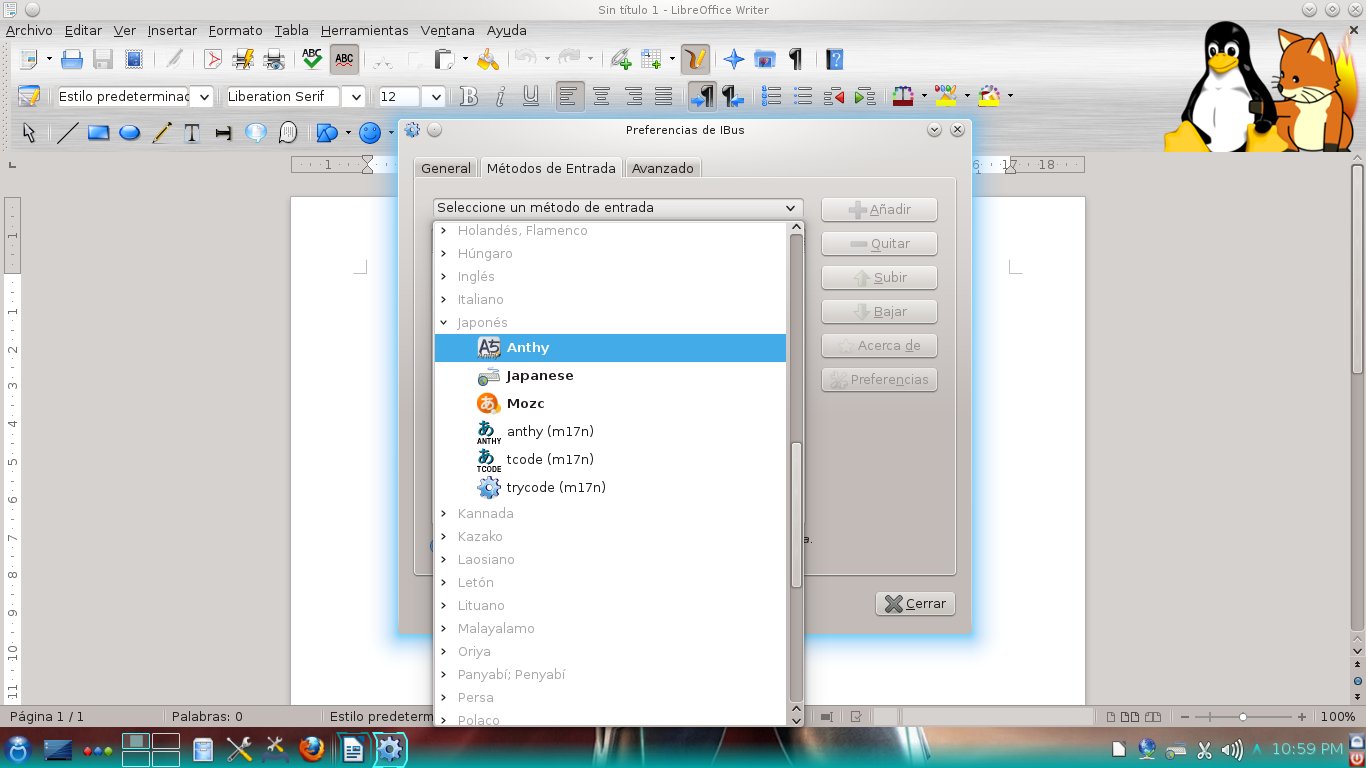
Although I could not manage to make Anthy work, Mozc works perfectly: it lets you type in hiragana and katakana, and gives you suggestions of conversion to kanji, as Anthy did.

Therefore, I want to express my deepest gratitude to those who took their valuable time to tackle this issue.  I don't know the names of all of you who got involved, but one thing I know... You all ROCK!

Japanese IME: iBus + Mozc (Mageia 5 RC)

domingo, 26 de abril de 2015

Mageia 5 RC is Out: A Quick Test Drive

Mageia 5 RC is truly out.  After downloading the Install 64 bit ISO, I ran it first on a VM and this is what I found:

Mageia 5 RC on a Virtual Machine

Splash screen.  I like the new artwork
The new splash screen follows a consistent color pattern with that blue-white that we have seen since Mageia 1.  The installer itself is familiar as its visual characteristics and most of its functionality is inherited from the installer I found in Mandriva PowerPack 2009, if I recall correctly.

Language selection screen

The Mageia team seems truly commited to the ideal of keeping the installation process as consistent as possible.

So, you first select the interface language and then accept a license.  Then you get to choose the time zone, time, location, etc.


The partitioning process follows and then you wait until all packages have been installed to the HD.

Like I said, nothing confusing there if you have done it before.


KDE in Mageia 5 RC.  iBus refuses to work!
You then add users, etc.

The installation was smooth and relatively quick.

Since this first install was a VM one, I experienced no problem with the Wifi connection, but could not activate the effects.

The downside was that, differently from previous releases, this RC does not seem to accept IME, be it by iBus or SCIM.  This is truly sad for people who need their Linux system to type in languages such as Japanese.

UPDATE: iBus is now working for Japanese input with Mozc instead of Anthy.  See here.
This KDE version allows multiple wallpapers
LibreOffice was upgraded

The general experience was that of working with the same system I have (Mageia 4).  No crashes, no weird slow-downs, no problems with multiple wallpapers, as Megatotoro reports here Plasma 5 is showing... aside from the missing IME, I felt like at home.

Mageia 5 RC on real hardware

To install Mageia, I had to use the partitions I have destined for Moondrake (since I could never fix the Control Center to install new packages, I sadly could not do much with Moondrake).

The network applet was missing!
After installing, I observed some bizarre results.  First, the KDE desktop booted with all my favorite effects enabled, but without any panel.  It was not a big deal; I added the lower panel manually.

Then I saw that the network applet was gone from the panel, but both the wired and wireless connections were functional.
Another odd visual aspect was that, when I switched the application launcher to Kickoff, I saw one cute penguin icon...just like the ones in Moondrake.  
That made me understand that the oddities were caused because of my own hand: I did not format the home partition! 

I then played some music and YouTube videos, saw the beautiful screensaver, tested the screen lock... In my humble opinion, if you enjoyed Mageia 4, there is no reason why you will dislike Mageia 5.  As I said, for non-technical users like me, the experience is fully consistent.  I guess the Mageia team did most of the changes under the hood, where the tweaking stays invisible to my untrained eyes.

The system was responsive and solid.  Everything was working as it should... except, again, iBus... So, momentarily, no Japanese input :-(

I hope they correct that before the official release.

jueves, 8 de mayo de 2014

OpenMandriva Lx 2014 and iBus, Success Still Eludes Me

The quest to make iBus work with OpenMandriva has been a difficult one.  I first tried to see if I had all the required dependencies according to this page:

    anthy
    GConf2 [*]
    ibus [>= 1.2.0]
    libanthydic.so.0()(64bit)
    libanthy.so.0()(64bit)
    libc.so.6()(64bit)
    libc.so.6(GLIBC_2.14)(64bit)
    libc.so.6(GLIBC_2.2.5)(64bit)
    libc.so.6(GLIBC_2.3.4)(64bit)
    libc.so.6(GLIBC_2.4)(64bit)
    libpython2.7.so.1.0()(64bit)
    python(abi) [== 2.7]

I discovered that I missed a couple.  Most of them are already installed.  However, even having all of them, iBus refused to launch. 

I followed the instructions on this page to activate iBus:

$ pkill -9 ibus
$ ps -ef | grep ibus
$ /usr/bin/ibus-daemon --xim &

The last command activated iBus, but it did not remember the IME selection (Japanese, Anthy).  

The page also said this, which I did not understand:

After ibus-daemon is invoked, Run ibus-setup to set the preference, enable input methods, also start ibus daemon.
e.g.
 $ ps -ef | grep ibus
foo 15735 15518  0 11:30 pts/3    00:00:17 /usr/bin/ibus-daemon --xim
foo 20037 15735  0 12:58 pts/3    00:00:00 /usr/libexec/ibus-gconf
foo 20039 15735  0 12:58 pts/3    00:00:06 python /usr/share/ibus/ui/gtk/main.py
foo 20041     1  0 12:58 pts/3    00:00:00 /usr/libexec/ibus-x11 --kill-daemon
foo 20042 15735  0 12:58 pts/3    00:00:01 python /usr/share/ibus-anthy/engine/main.py --ibus
 
So, that's as far as I have gotten now...
 

jueves, 23 de mayo de 2013

On Mageia 3 install (not Live DVD)

This is the fastest fully-blown install that I have performed.  I used the Mageia 3 x86_64 install DVD and, in 1:30 minutes, my system was up and running.  This might seem excessive, but the time includes what I used for my personal configurations, printer, scanner, tweaks for multimedia playback, and favorite programs.

What I liked the most was that iBus works perfectly with a Spanish locale and the Japanese IMe anthy.  So, I guess the poor performance of iBus that I  I reported here has to do with the Live install.  Hey, I even checked that the packages needed were on place in the Live install but, even when they were there, iBus would not obey.

iBus package installation, Mageia 3 x86-64 DVD (on VM)


I suspect that Mageia 3 will be a real pleasure to use.

Kudos to the developers!

miércoles, 22 de mayo de 2013

Mageia 3, the WONT FIX scim bug, and iBus

Mageia 3 has been released and, so far, the distro is getting very positive reviews.  Well, given the fact that I have been using Mageia since version 1, I believe that the team behind the distro truly deserves words congratulating their efforts.  As a Mageia user, I must say that I am very pleased with the OS and thankful for the work that has been done.

However, I received yesterday an email that, like a cloud on a blue sky, announced that not everything is rosy in the Linux world.

During my walk in Linux land, I have had the chance to read the complaints of users that get angry when developers refused to fix a bug they filed.  They vented their frustration and slashed to the right and left with sarcasm sharp as swords.  I read their sometimes long expositions and missed the spirit of their rants... until yesterday, when I received a reply from a developer concerning a bug that I filed.

First, allow me to present the context.  Three days ago, I described my experience trying to make Mageia 3 work with Japanese IMEs.  My first attempt was iBus, of course, although I knew it was not working properly in Mageia 2.  As it did not go well, I worked with SCIM and, after a battle, I made it work thanks to a package I "borrowed" from a PCLinuxOS repository.  Then, I filed the bug.

That's the point where my new story starts.  The reply came, brandishing a WONT FIX status that made me uneasy.  However, the comment from the developer bit me with angering poison; it read:

"We are promoting ibus for years. So there we do not include all scim packages in live ISOs."

The "live ISOs" part was bad enough because I obviously gathered the packages from the full list of repositories, not just the Live Core and Live Nonfree ones.  Hey, I can presume that, if you enable the Core Release repo, you should have access to the same packages that a Mageia 3 full DVD install gets, right?

The real sting was on the former part, though.  I can understand the efforts to promote iBus, but I tried that IME first to no avail.

Allow me to show you my case.  After installing iBus, anthy, and all required dependencies, you log out and back in to get iBus working. This is what you get:


iBus is active, showing only "English keyboard"


You right click and go to preferences to add extra languages


You scroll down and locate Anthy by expanding "Japanese"
After adding it, Anthy should be working.  But you click on the iBus applet and...back to square 1: English keyboard only. You can repeat that as many times as you like, using all languages that you desire.


Regardless of what you do, iBus simply refuses to "remember" any additional language you choose.  Not a very usable IME, right?

In Mageia 2, iBus would work, but would mess up with the Spanish keyboard map, ruining your chance to type accents correctly.  In Mageia 3, the said IME is simply dysfunctional and the developer won't add the scim-anthy package that is missing in SCIM so that Japanese input works...because the idea is to promote iBus, an IME that is now in a worse state than it was in Mageia 2.

I must confess that, for a moment, I got really angry.  I finally grasped the spirit of the hurt users who got the infamous WONT FIX tag for the bugs they filed.

But then my anger ebbed when I tried to see the position of the developer.  iBus is, in all accounts, a great tool.  SCIM is a good oldie, but it is somewhat difficult to get working.  Developers have the right to work on what they choose, especially when they squash bugs voluntarily and without any monetary compensation.

So, instead using this as an excuse to release all the tension that has accumulated lately (these last two weeks have not been a ball, really), I decided not to show how fluent I am in sarcasm when rabid. Ken Starks said that "rants are best served cold".  He is right.

For my part, I waited until my wrath, the propeller that efficiently takes me to the Land of a Thousand-and-One Regrets, ceased to spin.  Then I filed another bug.  This time, for iBus.

I truly hope they get to fix the problem.

UPDATE (May 23, 0:23)
I recently changed my desktop install from Mageia 3 Live to Mageia 3 DVD.  It turns out that iBus works now like a charm.  I guess the bug only affects Live installs. 

domingo, 10 de marzo de 2013

Mageia 3 Beta 3, A Quick Test Drive

I tested the Beta 3 of Mageia 3 today.  To summarize my experience, I can say that it looks solid, reliable, and promising.

First, I tried the Live version in my laptop.  After booting, the distro let me use KDE 4.10.  The first thing I noticed was the smoothness of the effects.  Even the cylinder and the sphere work now: 


I had absolutely no problem with sound, USB drives, or, more importantly, the wi-fi.  Mageia 3 B3 picked up everything out of the box in Live mode.


Then I installed the distro to a Virtual Machine.  I saw nothing new in the installation process, but after the install, I saw some new artwork in the Mageia Control Center.


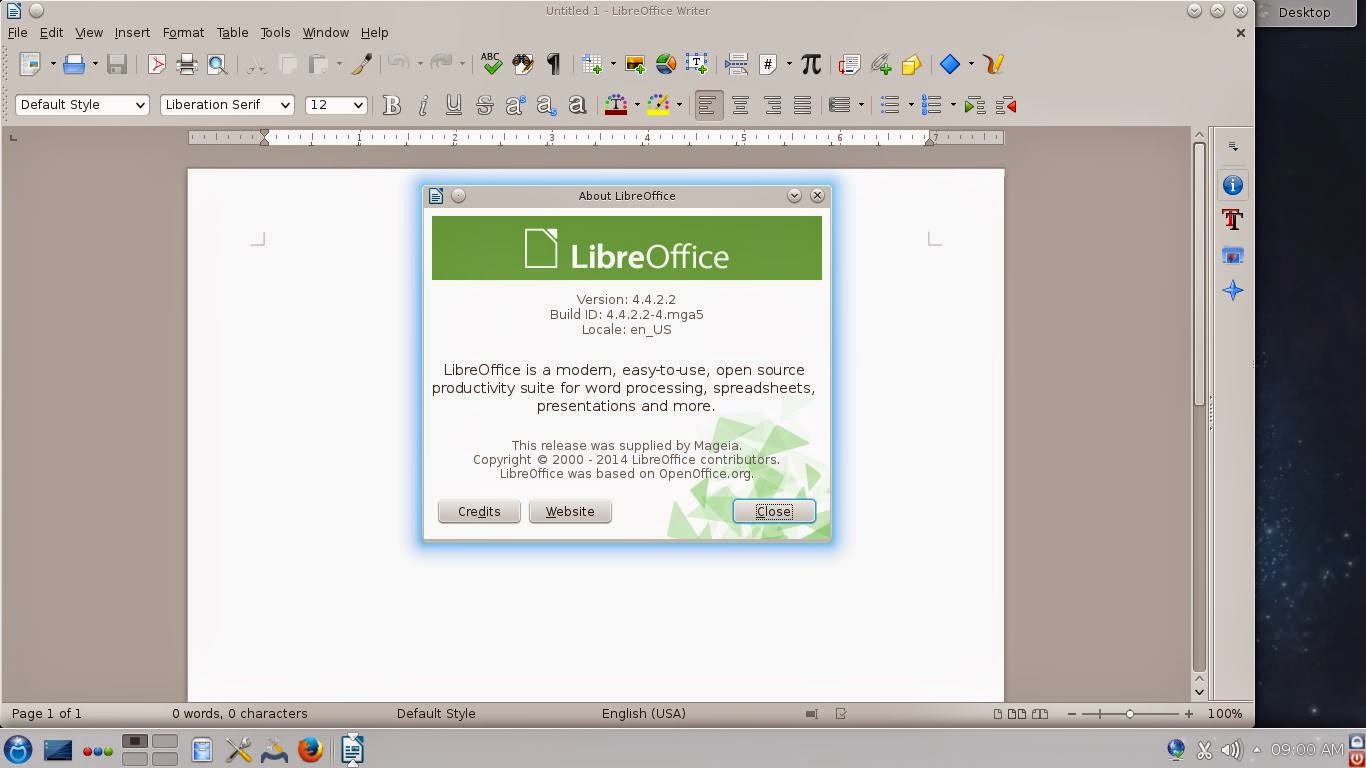
Once the repositories were updated, I gave Mageia 3 B3 my Japanese IME test: I installed iBus, Anthy, and Japanese fonts.  To my relief, the IME worked flawlessly with LibreOffice 4:


Finally, I opened some YouTube videos and MP3s and there was nothing to report there, either.

I really liked the progress that the Mageia team has made. Kudos to them!

lunes, 24 de diciembre de 2012

A problem with iBus in Mageia 2 and Mandriva 2011

I just found an interesting problem in the way Mageia 2 handles typing Asian languages with iBus, the Input Method Editor (IME) that is configured easily during the installation of the distro.

For work reasons, I need my computers to be able to handle Japanese (and for fun, Korean and Thai).  You can do this with iBus (a more modern IME) or SCIM.  I chose iBus because you can install it during the installation process of Mageia. 

I had not seen this situation before because I have installed iBus only to computers that have an English keyboard.  However, since my main desktop computer has a Spanish keyboard, when I opened LibreOffice, I discovered that iBus was preventing the keyboard to display the accents ("tildes") of Spanish and those of French.

After using the SU command and inputting my root password, I wrote this in the terminal:
cd /etc/sysconfig

export $(dbus-launch)

kwrite

Then, when the graphical interface of kwrite came up, I opened the file i18n and found these entries related to iBus:


GTK_IM_MODULE=ibus
QT_IM_MODULE=ibus
XIM_PROGRAM="ibus-daemon -d -x"
XMODIFIERS=@im=ibus

I played with them a bit and the only thing I achieved was to break the IME, which slowed down the session start in Mageia.  Therefore, I tried to install automatically good old SCIM from the locale administrator in the Mageia Control Center.  It told me that there was no scim-tables packages, but I restarted the session anyway to find that SCIM was, effectively, not working

No problem.  I went to the file i18n in /etc/sysconfig again and saw that the following lines had been changed to make SCIM work instead of iBus:


GTK_IM_MODULE=scim
QT_IM_MODULE=xim
XIM_PROGRAM="scim -d"
XMODIFIERS=@im=SCIM

The problem was the second line.  It has to read
QT_IM_MODULE=scim

so I changed it.

The next step was to remove the libreoffice-kde4 integration package.  After doing that, SCIM started to work and I could type the correct Spanish accents.

Mandriva 2011 shows the same problem with iBus if you have a Spanish keyboard.  However, although the locale manager installs SCIM with the missing scim-tables package, it took me more time to get SCIM to work.  It so happened that Mandriva did not install several important dependencies (scim-bridge-gkt, scim-bridge-qt4) and libreoffice-gnome, which were needed for the IME to work (provided you remove the package libreoffice-kde4).

sábado, 17 de marzo de 2012

Some reflections on Mageia 2 Beta 2

As a non-technical user of Linux, and after reading several posts about the battle between developers and users who feel neglected by them, I could not prevent myself from worrying a bit about the soon-to-come release of Mageia 2. You know, maybe Mageia also jumped on board that train that takes you to DumbOSland, where you "use-your-computer-as-if-it-were-a-cellphone".

So, I downloaded the beta2 to have a preview of what Mageia offers to users of Linux who are not computer gurus by any standard, but who like computers to behave as what they are.

DISCLAIMER: This is not a technical review, so I'm not getting into codecs, Flash, boot-time, and the like. As a simple computer user, I wanted to check on the progress made by Mageia and I saw both positive points and negative ones. This is what I found on the negative side:

1. The artwork needs some, er, work!

I am inclined into thinking that OSs must keep a balance between efficiency and beauty. While I do not find myself necessarily annoyed by the color scheme or login screens of Mageia, I do believe that lack of consistency might make potential users to refrain from using a system because simple users, when seeing an inconsistency in the booting process, tend to think of it as "a problem". The graphical screen of Mageia 2 Beta 2 overlaps the text screen and it looks strange. Of course, that is not going to make a computer blow up, but still...

2. A hideous bug crawls through Mageia Control Center/ RPMDrake

Although the installation was smooth, when I opened Mageia Control Center to start adding programs, it told me that RPMdrake had to be updated. That is normal, so I marked some packages for install and waited.

The installation was successful and so was the updating of RPMdrake. The latter was the problem: after the updating, RPMdrake became unusable, which prevents you from performing any further software install operations.

Now, this is what I really call a problem. I presently ignore if it is a localized issue or many users experienced it, but this is not good. I tried three different combinations and all of them led me to the same dead end:

a. Install Mageia, select no upgrades, refresh repos (leaving DVD), install software from MCC=locked RPM db

b. Install Mageia, select upgrades, refresh and select some additional repos, install software from MCC=locked RPM db

c. Install Mageia, select no upgrades, refresh repos (unselecting DVD and selecting some additional repos), install software from MCC=locked RPM db

However, this worked:
Install Mageia, select no upgrades, refresh repos (unselecting DVD and keeping the default active), install software from MCC. I suppose this problem is going to be taken care of with the RC.

3. Japanese IME with iBus: Dekiruka, dekinaika?

This is perhaps the most technical requirement I have for selecting an OS: I need a free and efficient way to write in Japanese. There are many functionalities I can live without (games included), but my computer has to accept Japanese character input.

Mageia 1 Beta2 astonished me when I saw that iBus worked flawlessly out of the box, something I could never achieve in Mandriva 2010 regardless of all my efforts (iBus works perfectly in Mandriva 2011, though).

Since Mageia 1 Live CD removed this functionality (I must use SCIM for Japanese IME with that version of Mageia), I was a bit concerned of whether or not iBus will work in Mageia 2. I tried the beta 1 and, to my disappointment, although iBus seemed to be activated, all the languages were shown in light gray, the "conventional" color for unavailable features in a menu.

iBus in Mageia 2 Beta 2 showed the same. However, I discovered that, although they were displayed in a lighter color, if you click on the arrow preceding each language, a tree opens and you see the possibilities... Wheeee! My bad, really. After my battle with MCC, I downloaded all the packages to get Japanese working (Anthy, ibus-anthy, Japanese font) and tried iBus. It works... sort of. Now, although you see the ibus keyboar in the taskbar, you must restart it to get Anthy running. And you must install the java packages for LibreOffice, too. Interestingly, iBus works in LibreOffice even if you do not uninstall the Libreoffice-kde package. Another issue: it does not seem to work with Firefox.

Mageia 2 beta 2 で、日本語のIME、できるか、できないか?できそう。

----------------------------------------------------------------------------------------------------------

On the other hand, Mageia 2 Beta 2 brings onto the table some tempting features for simple computer users like me:

1. New KDE
I really like the way in which Mageia 2 is working with KDE 4.8.1. Let me say this and, please, computer experts, do not feel offended. I simply do not care if KDE is a resource hog or not. I mean, KDE runs perfectly on my 2GB RAM, 500GB HD, even if I have several programs open (including Firefox with 6 tabs). It also looks beautiful with all the eye candy and plasma widgets. People can get systems with twice the horsepower of mine to run another OS that requires a ridiculous amount of resources and they are happy that way. So, to be honest, I find KDE's demands reasonable (again, I am a simple computer user, not a technical expert). Stability? Well, I haven't experienced a single KDE crash in a very long, long time. Yes, maybe it's because I do not use each and every KDE application, but I use the ones I find indispensable. That being said, I think that the prize KDE obtained was well deserved and using it is fun.

By the way, now the bottom panel marks with indicators the programs that are active and it also offers you an instant full-screen preview of the applications that are running. Some people I know are going to be crazy about these new features...

2. A satisfactory assortment of programs

Mageia 2 Beta2 packs LibreOffice 3.5.1.2, KOrganizer (I cannot live without it!) Okular (another gem), Scribus, Amarok 2.5.0, which nows incorporates the Amazon Store... I don't care because it works in some countries and mine is not included), Kdenlive, the players Dragon and Totem, and Gimp 2.7.4 with its new "export as" instead of "save as" dialog and image transformation tools.

3. Solid translations

As a Linux user, I cannot emphasize this point enough. Linux distros that provide only a couple of languages or inconsistent translations might not realize it, but they are reducing their possibility of adoption. Not all computer users speak English.


I believe that Mageia wants to offer a nice usability/freedom blend. Yes, I know that many Linux distros use the same motto, but they do not deliver; some say "We are the easiest computer experience", but then they switch your desktop for something you had never seen before and you are stuck with a desktop that that you simply don't understand. Mageia developers seem to understand that non-technical computer users need an OS that works with them, not against them. Thus, instead of "dumbifying" the user interface to the maximum, which is rather popular lately, they are following KDE's progress while keeping the same installation process. For computer users who lack technical training, that is certainly the right approach: I can follow the same steps and obtain a familiar, more polished desktop in the end. I can use it in my own language; it has the appropriate tools, and it requires little effort to use as I am not expected to relearn everything.
...A desktop that tells me I'm using a computer, not a gigantic cellphone. Thank you, Mageia!

domingo, 7 de agosto de 2011

Japanese in PCLinuxOS? Of course!

After having installed PCLinuxOS 2011.6, I must say that I am very pleased with it. Differently from Mandriva 2010.2, I can see videos and listen to MP3 files out of the box and I don't need to fiddle with the system to mount the partitions where my other Linux distributions are. It seems that everything works as expected. Great!

But I still had one concern. Although I'm not a power user, for my work, I require a feature that is not very common: a Japanese input method editor. That's one major area (of the many) where Windows 7 fails miserably; you are expected to pay more to obtain a Japanese-capable system, which is a rip off because regular XP did include a Japanese IME. Oh, well, we are familiar with the "Less-is-more" philosophy underlying Windows...Too bad it doesn't apply to your pocket ;-)

On the other hand, many Linux distros can handle Japanese typing, either via SCIM or iBus, working with either OpenOffice or LibreOffice. For example, while Mandriva 2010.2 can accept Japanese IME (SCIM + Open Office), the newly born Mageia 1 handles Japanese typing via both iBus and SCIM with LibreOffice. I know that Mepis 2011, Fusion 14 and Zenwalk 7 also let you type in Japanese.

The question was, could I activate either iBus or SCIM in PCLinuxOS 2011.6? I mean, I've only been using PCLOS for less than a week. Besides, this distro works with LibreOffice and, because of my repeated failure making this suite and IMEs work in Mandriva, I was not very confident.

Anyway, I first tried with iBus. After downloading all the packages and their dependencies, differently from what happens in Mandriva 2010.2, iBus started. The problem was that, despite I downloaded Anthy, iBus did not detect any typing method. I checked the dependencies and the reason was simple: the iBus-Anthy wrapper is missing in the repositories.

I tried SCIM then. I followed the same steps to activate SCIM in Mandriva and failed again. I then undid my changes and went to the Forums for help. I read an explanation here. Thus, I realized that I was missing some dependencies, so I downloaded those and, after following the relevant indications (because the thread is for a situation other than mine), absolutely nothing happened.

I was back to square 1, but not discouraged. With all the dependencies already installed, I decided to follow the process to activate SCIM+Open Office in Mandriva:
  1. First, I looked for i18n in /etc/sysconfig.
  2. After seeing that the structure is the same, I fired up Konsole. I typed su then my password.
  3. Once as root, I typed CD.. to get to / and then CD /etc/sysconfig
  4. I typed Kwrite, opened i18n with that application and appended the following lines to the end:
GTK_IM_MODULE=scim
QT_IM_MODULE=scim
XIM_PROGRAM=”scim -d”
XMODIFIERS=@im=SCIM

After saving, I logged out and then back in. Nothing happened, apparently. But you must remember that different systems work differently, so I pressed CTRL+Space and voilà, er, できた!PCLOSで、私はだいたい日本語を書くことができるよ。方法もあまり難しくない、すばらしい!日本語、PCLOSで?もちろん!

So, that's the way I found to type Japanese in PCLinuxOS with SCIM and LibreOffice. I couldn't be any happier with this system now :-)

UPDATE
After a new install, LibreOffice started behaving differently and would not respond to the above process. To make SCIM work with it, you also have to open Konsole and, as root, type

cd
/usr/share/X11/xdm

then type kwrite to fire up the editing program and open a file called
Xsession, to which you will append the following lines before the line that starts with exec

export XMODIFIERS=@im=SCIM
export GTK_IM_MODULE=scim-bridge
export QT_IM_MODULE=xim
export XIM_PROGRAM="scim -d"

and, after a log out/in, that does the trick.

miércoles, 27 de abril de 2011

Mageia Beta 2: Japanese IME is back!

Today I installed the Beta 2 of Mageia interested in running one simple test: Japanese IME support with Libre Office.

Since I could not solve the issue myself with the approach I used in Mandriva 2010.1 (Open Office), I posted a cry for help in the Mageia forum. I got prompt, friendly, and helpful answers, for which I feel most thankful.

When I was installing the OS, I noticed that Mageia adds options I had never seen in Mandriva:

Do you want multi language support? (Definitely let's make it a YES!) I choose Japanese, Thai, and Korean.

Later on, when choosing the keyboard: Which input method editor do you prefer? None/iBus/Scim/Scim-bridge? (In the forum they recommended iBus, so...) I selected iBus.

And that was it. When I got into my desktop, I could see a nice icon sitting on the lower bar, indicating the presence of iBus. I added Anthy for the Japanese IME and a Thai and Korean IMEs, too.

Then, I fired Libre Office.
Anthy was working but, instead of Japanese characters, I got boxes...
No problem, all I had to do was to go to Libre Office menu, options, and select Umeplus as the font for Japanese text and...

マジイア、やっぱり日本語ができるよ。すごい!


Therefore, for my particular purposes, in the Mageia 1/ Mandriva 2011 challenge, Cauldron (Mageia 1) is definitely on the lead.

My First 12 Days with Mageia 10: How to enable repos with dnf5

Well, 12 days have passed since I migrated all of my desktop, laptop, and portable work system to Mageia 10. I have not used the work system...