I updated my PCLinuxOS and my Mageia laptop installs today. The process finished without any problem and everything is working as expected.
What to say about it?
A blog to compile what I have learned (and what I am learning) about Mandriva (and GNU/Linux in general) since 2009, when I migrated. Current distros I'm using: OpenMandriva Lx ROME 5.0, Mageia 9, MX 19, Manjaro 23.1, and Elive 3.
viernes, 6 de septiembre de 2013
jueves, 29 de agosto de 2013
OMDV.org Landing Page
I've been trying to see the progress of OpenMandriva, especially since I heard about the wallpaper contest. I got this today.
He, he, speak about Linux and fun!
lunes, 19 de agosto de 2013
Mr. Starks, Reglue, Linux: We Believe in You
Dear Ken Starks,
We haven't met personally and, given the geographical distance between my country and yours, will will probably never see each other face to face.
I don't even know if you will ever get to read this.
I just wanted to say that I came across your blog some time ago, when I was taking my first steps in Linux land and, thanks to your posts, I grew more confident. I learned a lot about Linux reading your entries.
There is more. Thanks to your blog, I came across a fantasy novel that will keep me busy academically.
However, that's not all. You made me see harsh realities that had been veiled from my eyes. I discovered the courage of a cancer survivor who fights different battles on multiple fronts. Sometimes, my heart ached with your posts. Some other times, your writing brought happiness into my life when I really needed it.
Perhaps silently, you have been busy bringing happiness to many children in Texas, young people who had been formerly excluded from didactic activities because they lacked a computer. All of them deserved a better future.
As an educator (and more as the father of a little girl), I understand your cause. The future of any society is found in children. Dickens spoke about that long ago with the terrifying scene of the creepy girl and boy that crawled from under the cloak of the ghost in A Christmas Carol. It is no coincidence that the Ghost of Present says that the two terrible children, Ignorance and Want, have the potential to bring about doom.
Mr. Starks, you have been erasing the ominous word from the forehead of many children, giving them a different future. Will the next computer genius come from them? Is the future leader that will keep our world free playing with one Reglue computer today?
The Linux community has one saying: "Linux unleashes the power of your computer". Reglue has been unleashing the power of many children.
That's why I believe in Reglue. And I believe in you. My whole family believes in you.
I wish the Linux community understood this and donated for the future of Linux. That future is in children, not in a mobile device... but maybe those who donated for the mobile device, if their dream does not come true, would be kind enough to redirect a tiny part of the money they pledged to a different cause? Will they paint a smile on the sad face of a child that dreams of a computer?
Mr. Starks, I believe in you because you are a visionary. You know that, ultimately, it's not the code that will keep Linux growing. The future growth of Linux depends on the quantity of children that get exposed to it today.
Finally, let me thank you, Mr. Starks. What you have done in Texas will have a profound impact in my country someday. We will probably not be around by then... by my daughter will.
So, from the bottom of my heart... Big thanks!
We haven't met personally and, given the geographical distance between my country and yours, will will probably never see each other face to face.
I don't even know if you will ever get to read this.
I just wanted to say that I came across your blog some time ago, when I was taking my first steps in Linux land and, thanks to your posts, I grew more confident. I learned a lot about Linux reading your entries.
There is more. Thanks to your blog, I came across a fantasy novel that will keep me busy academically.
However, that's not all. You made me see harsh realities that had been veiled from my eyes. I discovered the courage of a cancer survivor who fights different battles on multiple fronts. Sometimes, my heart ached with your posts. Some other times, your writing brought happiness into my life when I really needed it.
Perhaps silently, you have been busy bringing happiness to many children in Texas, young people who had been formerly excluded from didactic activities because they lacked a computer. All of them deserved a better future.
As an educator (and more as the father of a little girl), I understand your cause. The future of any society is found in children. Dickens spoke about that long ago with the terrifying scene of the creepy girl and boy that crawled from under the cloak of the ghost in A Christmas Carol. It is no coincidence that the Ghost of Present says that the two terrible children, Ignorance and Want, have the potential to bring about doom.
Mr. Starks, you have been erasing the ominous word from the forehead of many children, giving them a different future. Will the next computer genius come from them? Is the future leader that will keep our world free playing with one Reglue computer today?
The Linux community has one saying: "Linux unleashes the power of your computer". Reglue has been unleashing the power of many children.
That's why I believe in Reglue. And I believe in you. My whole family believes in you.
I wish the Linux community understood this and donated for the future of Linux. That future is in children, not in a mobile device... but maybe those who donated for the mobile device, if their dream does not come true, would be kind enough to redirect a tiny part of the money they pledged to a different cause? Will they paint a smile on the sad face of a child that dreams of a computer?
Mr. Starks, I believe in you because you are a visionary. You know that, ultimately, it's not the code that will keep Linux growing. The future growth of Linux depends on the quantity of children that get exposed to it today.
| My 3-year daughter playing with her Linux computer |
Finally, let me thank you, Mr. Starks. What you have done in Texas will have a profound impact in my country someday. We will probably not be around by then... by my daughter will.
So, from the bottom of my heart... Big thanks!
viernes, 9 de agosto de 2013
Those unexpected regressions...
A while ago, I read Ken Stark's delicious rant because of a kernel regression.
Ah, those regressions can be real bothersome in the world of FLOSS. Even so, I had never experienced one. Therefore, the whole thing remained pretty much an abstraction to me... until two days ago, when I found my original thesis presentation and understood the frustration of those regressions.
Let me explain. When I was a student, computers were not as popular as they are today, let alone laptops. Thus, delivering a presentation meant that you had to borrow somebody else's laptop.
Those were my Windows days. Although I had a desktop computer, my Microsoft Office version did not include PowerPoint.
Fortunately, my brother had won a set of CDs with a collection of programs that included some free software and demos. In one of them, there was StarOffice, which allowed me to create my presentation. When finished, I saved it both as an .sdd file and a converted .ppt file.
That was a long time ago. I thought I had lost the presentation forever, but I found an old CD containing only the original .sdd thesis presentation. Logically, I wanted to see it.
I had seen LibreOffice deal with .sdd files before, so, when I got the dialog asking me for a program to open the ancient presentation, I knew that something was wrong.
There was simply no way to open it.
I browsed the web and found that LibreOffice dropped .sdd files support since version 4.
So, there I was, with a document that I was dying to see and no software that could perform the magic to open it.
To make matters worse, it seems that OpenOffice can deal with the files, but I cannot install it without having an office suite dog fight on my modern Linux systems. It seems that the days in which I could keep OpenOffice and LibreOffice side by side are gone (last time I could do that was with Mandriva 2010.2).
Luckily, my wife's Asus Eee PC 901 is still operational and it comes with Xandros Linux and StarOffice! I used it to convert the file to .ppt and later to .odp.
Who would have thought that the tiny netbook was going to save the day?
Ah, those regressions can be real bothersome in the world of FLOSS. Even so, I had never experienced one. Therefore, the whole thing remained pretty much an abstraction to me... until two days ago, when I found my original thesis presentation and understood the frustration of those regressions.
Let me explain. When I was a student, computers were not as popular as they are today, let alone laptops. Thus, delivering a presentation meant that you had to borrow somebody else's laptop.
Those were my Windows days. Although I had a desktop computer, my Microsoft Office version did not include PowerPoint.
Fortunately, my brother had won a set of CDs with a collection of programs that included some free software and demos. In one of them, there was StarOffice, which allowed me to create my presentation. When finished, I saved it both as an .sdd file and a converted .ppt file.
That was a long time ago. I thought I had lost the presentation forever, but I found an old CD containing only the original .sdd thesis presentation. Logically, I wanted to see it.
I had seen LibreOffice deal with .sdd files before, so, when I got the dialog asking me for a program to open the ancient presentation, I knew that something was wrong.
There was simply no way to open it.
I browsed the web and found that LibreOffice dropped .sdd files support since version 4.
So, there I was, with a document that I was dying to see and no software that could perform the magic to open it.
To make matters worse, it seems that OpenOffice can deal with the files, but I cannot install it without having an office suite dog fight on my modern Linux systems. It seems that the days in which I could keep OpenOffice and LibreOffice side by side are gone (last time I could do that was with Mandriva 2010.2).
Luckily, my wife's Asus Eee PC 901 is still operational and it comes with Xandros Linux and StarOffice! I used it to convert the file to .ppt and later to .odp.
Who would have thought that the tiny netbook was going to save the day?
jueves, 25 de julio de 2013
How to install LibreOffice 4.1.0 in Mageia 3
Let us assume that you are a newbie running Mageia 3 (like me, I guess). You know that Linux distributions have differences; for example, while Debian uses packages named .deb, Mageia requires packages known as .rpm.
You also know that Linux distros have a different release schedule. If you check Mageia's here, you will have to wait February 2014 to get a new version of the distribution with a new LibreOffice if they do not update the package later this year. But you want Libre Office to run in your Mageia 3 system right now, so you go to the download section of LibreOffice and, if everything goes right, you will see the packages that you need for your distro and language. You can confirm if you are getting the right RPM packages because you know how to read (something you learned as a child and have been practicing ever since). So you download the main installer, the language translation, and the built-in help in your local language.
So, you download the files... now what?
Installation of LibreOffice in Mageia 3
You need: The installation files, your root password, and self confidence.
Once you have the file, you right-click on it and select "extract here, auto detect subfolder". Then you get inside the newly created folder and go inside a sub folder called RPMS.
WARNING: the following step is not for the faint of heart as it requires use of the TERMINAL!!
Yes, the above is sarcasm. I've read too much about how complicated and inconvenient it is to use the terminal...well, not in this case. I could do it and, believe me, I have no training in programming.
Once inside the folder RPMS, go to the window menu and click on "tools". Select "open terminal" to deal with the friendly black screen.
1. Type su
The terminal returns: password:
2. Type your root password (you have it, don't you?)
The terminal returns: [root@localhost RPMS]#
3. Type urpmi *.rpm and relax while the computer does its own thing. You will read many messages, but do not be afraid. Let the computer handle the installation. Once it's over, you will see the same prompt ([root@localhost RPMS]#)
4. Now, close the terminal (Boy, that didn't hurt, did it?)
Perform the same operation with the language file: right-click on it and select "extract here, auto detect subfolder". Then you get inside the newly created folder and go inside the sub folder called RPMS. Once inside this folder, go to the window menu and click on "tools". Select "open terminal" to deal with the charming black screen. YES, AGAIN! But you are not afraid, are you?
1. Type su
The terminal returns: password:
2. Type your root password
The terminal returns: [root@localhost RPMS]#
3. Type urpmi *.rpm and wait for the computer to finish its thing. When it's over, you will see the same prompt ([root@localhost RPMS]#)
4. Now, close the terminal (Boy, that was enlightening, wasn't it?)
Then do exactly the same for the help file.
After this, your OFFICE menu in Mageia will display icons for LibreOffice under the section MORE.
My only complaint about LibreOffice 4.1.0 so far is that I haven't been able to use iBus (the input method editor) to enter text in Japanese. That's a big concern for me. I hope to find a solution soon. In the meantime, I'll keep the previous version for that purpose... or Abiword.
(For those readers that might thinking about having experienced Déjà Vu --or Déjà Lu ;P --, let me clarify that this is a slightly modified re-post of an entry I wrote before. It was for Mandriva 2010.2 when the first version of LibreOffice was released. The original is here.)
domingo, 21 de julio de 2013
My Revised Wish List
In February, I wrote a small list of the releases that I wanted. It was sort of a wish list of Linux distros.
The first three items have been granted: Mageia 3 is powering most of the computers at home (I upgraded the Mageia 2 partition on Eimi's desktop PC today), Pardus Anka was released as Pisi GNU/Linux Beta Sueño (which also has a partition on my laptop), and I am typing this entry using OpenMandriva LX beta on my desktop PC, now with sound and the ability to access my other HD partitions.
That means that I'm only missing Mepis and Elive from that original list.
My birthday is pretty close. Then time seems to fast forward and, in a blink, it will be Christmas and 2013 will have ended.
Allow me to daydream and revise my wish list. This time, I'll organize it in software and hardware.
A. Software
So that's my wish list ;-)
UPDATE: Tuxmachines.org reports that there is progress regarding the Vivaldi tablet. Great!!!
The first three items have been granted: Mageia 3 is powering most of the computers at home (I upgraded the Mageia 2 partition on Eimi's desktop PC today), Pardus Anka was released as Pisi GNU/Linux Beta Sueño (which also has a partition on my laptop), and I am typing this entry using OpenMandriva LX beta on my desktop PC, now with sound and the ability to access my other HD partitions.
That means that I'm only missing Mepis and Elive from that original list.
My birthday is pretty close. Then time seems to fast forward and, in a blink, it will be Christmas and 2013 will have ended.
Allow me to daydream and revise my wish list. This time, I'll organize it in software and hardware.
A. Software
- Mepis. This distro always surprises me with its stability.
- Elive. I really want to see this distro in action. It will give me the opportunity to start learning how to use Enlightenment.
- Voice command running on Linux. C'mon! Windows 8.1 Blue is trumpeting this feature as an innovation, when the Linux netbook that I bought in 2009 could do it. So can my wife's ancient Asus Eee PC 901. Granted, Mageia 3 now runs Jovie and Kmouth like a champ, but I miss the voice command. I have tried PerlBox Voice to no avail, so I dream on.
- The elusive Vivaldi tablet. I'm waiting for this one eagerly.
- A new laptop with Linux preinstalled. I am studying my options here. (Interestingly, now I have options. Times change, oh you would not believe how times change, Ballmer!) I have seen that I can get Suse and Ubuntu machines from Dell and HP. However, given that Megatotoro had a wonderful experience with ZaReason, I might go for one of their excellent offerings.
- A Firefox OS phone. I am one of those rare individuals who have refused to own a mobile phone in this era. I don't like them. Nevertheless, the carrier that starts selling a Firefox OS phone here will get me as a costumer. I guess I am one of those rare individuals that does care about the OS of the phone, too, and with Mozilla being attacked by protecting individuals instead of advertising companies, I root for Firefox.
So that's my wish list ;-)
UPDATE: Tuxmachines.org reports that there is progress regarding the Vivaldi tablet. Great!!!
viernes, 19 de julio de 2013
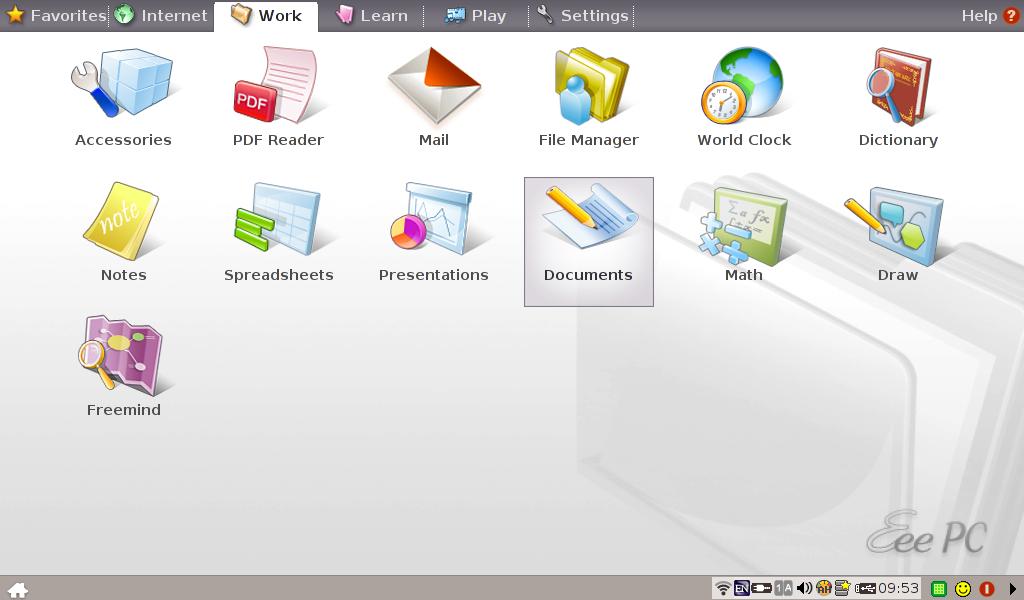
A Museum Item: the Asus Eee PC 901
How nostalgic! Today I powered on my wife's Asus Eee PC 901. That is a tiny 8.9 inch netbook that came with 1Gb RAM, 20Gb SSD, and Linux pre-installed. My wife kept it at her mother's house, but brought it back two weeks ago.
This thingie is especial for me because I myself was introduced to Linux by an Asus Eee PC. It was the Eee PC 900 that I bought in Amazon in 2009. After heavy use, it collapsed. Both machines came with a modified version of Xandros.
However, my wife's netbook sat on a computer store for quite a long time before I purchased it in 2010. They wanted to sell it for a price that made no sense: $635! Obviously, they could not sell it and had to let it go for half the price ($317). As I had paid around $300 for my own netbook, the price cut made sense and I bought it for my wife.
As I played with the netbook today, I discovered that some of the keyboard keys are not working... maybe because my little nephew and niece have been playing with the poor computer. Other than that, the machine is working perfectly. Even its voice command control works.
My wife should get a MS Surface tablet. That way, she can later start a computer museum with the Asus netbook and her Windows-Vista-powered laptop :P
This thingie is especial for me because I myself was introduced to Linux by an Asus Eee PC. It was the Eee PC 900 that I bought in Amazon in 2009. After heavy use, it collapsed. Both machines came with a modified version of Xandros.
However, my wife's netbook sat on a computer store for quite a long time before I purchased it in 2010. They wanted to sell it for a price that made no sense: $635! Obviously, they could not sell it and had to let it go for half the price ($317). As I had paid around $300 for my own netbook, the price cut made sense and I bought it for my wife.
As I played with the netbook today, I discovered that some of the keyboard keys are not working... maybe because my little nephew and niece have been playing with the poor computer. Other than that, the machine is working perfectly. Even its voice command control works.
![]() |
| The default desktop of the Asus Eee PC 901 |
![]() |
| Xandros file manager running on KDE 3.4.2 |
![]() |
| The Learn tab. MeBook actually reads books! |
![]() |
| Oldie Firefox 3.0.4 |
![]() |
| It seems that I can still get some updates, even after Xandros stopped releases in 2006. |
My wife should get a MS Surface tablet. That way, she can later start a computer museum with the Asus netbook and her Windows-Vista-powered laptop :P
sábado, 6 de julio de 2013
A Letter to Windows 8.1 from a non-technical Linux user
Disclaimer: This is my reaction after trying Windows 8.1. It's in no way meant to be read as a technical review.
Hello, Windows 8.1
I am a non-technical Linux user. But wait! Before you turn away in denial (yes, we exist), let me tell you that I once was a long time Windows user. In fact, I started my relationship with your family when I met your great-grand parent, Windows 3.11. 95 and I worked side by side, and 98 also drew me closer to your family. Then I learned how to install OSs myself and thus became a good friend of ME, to whom I painfully had to let go when XP came along.
Can I call you "Blue"?
Well, it's true that my dealings with your family became tense thanks to XP, but I forgave him for all of his uncontrollable RAM cravings and constant infections. I made myself like him as everybody else did. He was a popular guy.
Blue, your cousin Vista came one day and told me that I had to forget about XP. Vista made me dislike your family intensely. That's when I became a Linux user, you see?
No, Seven did not mend things. He has Vista blood after all.
When your brother 8 came around, I jokingly nicknamed him "Ultraman Mebius", the rookie Ultraman that always got battered by every enemy in sight and, sometimes, even by his own Ultra-brothers. This is the thing: Microsoft used Ultraseven, one of my childhood heroes, to promote 7. You pronounce Mӧbius "mebius" (メビウス) in Japanese. Have you noticed that a Mӧbius strip is like the number 8 that has fallen and is lying on the ground? Just like Windows 8.
Please, do not think that I hate you because I use Linux. In fact, I wanted to give you the benefit of the doubt. So, I downloaded you to see if the strong criticism against 8 is justified and if you can fix things for the many disgruntled Windows users out there.
After seeing you in action, I must be honest: it seems to me that you are in trouble.
Although I was impressed by your simple installer (anyone can handle that process) and your overall speed, I believe that the experience that you deliver is not up to the expectations of many Windows users. They neither want to learn new things nor they want to "fiddle" with the system to make it work.
Remember? Those were the words that your family used to badmouth Linux. Charm bars that activate on hidden spots? The army of Microsoft trolls dismissed the idea saying that such is the way of the KDE Penguin Geeks!
The Windows users around me want a start button, a REAL one. What you are offering reminds me of the ROSA launcher that got Mandriva 2011 in trouble, only that yours comes with smaller icons that look way too juvenile.
The other option that you offer is worse: the infamous desktop/metro amalgamation. Listen, it's hideously impractical. As a Linux user, I have been exposed to all kinds of desktop environments and configurations and, let me tell you, nothing is less intuitive than what you want to deliver.
I'll be blunt. I do not see any of my Windows-loving colleagues using any of the two choices you bring with pleasure. Many of them simply cling to XP and haven't even bothered to take a look at 7. I do not think that you can manage to change their minds because, as I said before, they do not want to learn new things. Some of them complain about "not being able to format a document with LibreOffice"... despite the fact that they can customize the toolbars or use the menus!
Hence, the best you can aim at is converting dissatisfied 8 users into a-bit-less-grumpy Blue users... which is not a great feat, really. Let's see the numbers. After 8 (what a magical number!) months out and having the benefit of holiday sales, all that your brother has achieved is 5% market share. It's four months before you go out. By then, how much more market share he can get? Let's be positive and say that he can double in four months what he has done so far in eight: 10%.
You will probably get that in no time. The thing is, can you get more? I've read some generously optimistic predictions for you. Yet, I think they are not seeing the obvious: you are also 8. The public does not want Windows 8. What is the catchy phrase to promote you? "Windows 8.1, attempting to fix Microsoft's OS mess"? The public knows already that 8 is the number to avoid. OEMs, in shame, have removed street billboards featuring pictures and the name of your brother hoping to sell more computers.
Microsoft should have called you Windows Mebius instead.
Don't think it's personal. Well, maybe it is; it's all "personal": the death of the PC (Personal Computer). You also have your mind on the clouds. Why can't I simply keep a local account? You promise a better experience with a Microsoft account and an Internet connection. What's next? "Always on", like the butchered original XBox One? Spying? Unauthorized reading of my Windows Journal by default?
Not everything is lost, however. At least your fish is cute. And the Japanese IME works great (unless you type on the write pad).
Unfortunately, besides all the privacy concerns, that's pretty much what you can offer me: and expensive Japanese IME and a bubble-blowing fish...
I promise I will visit you occasionally until Microsoft decides to put an end to our friendly encounters. I will wish you good luck and forget about you afterwards because I am staying with my Linux friends. I hope you understand.
Until next time, Blue.
Hello, Windows 8.1
I am a non-technical Linux user. But wait! Before you turn away in denial (yes, we exist), let me tell you that I once was a long time Windows user. In fact, I started my relationship with your family when I met your great-grand parent, Windows 3.11. 95 and I worked side by side, and 98 also drew me closer to your family. Then I learned how to install OSs myself and thus became a good friend of ME, to whom I painfully had to let go when XP came along.
Can I call you "Blue"?
Well, it's true that my dealings with your family became tense thanks to XP, but I forgave him for all of his uncontrollable RAM cravings and constant infections. I made myself like him as everybody else did. He was a popular guy.
Blue, your cousin Vista came one day and told me that I had to forget about XP. Vista made me dislike your family intensely. That's when I became a Linux user, you see?
No, Seven did not mend things. He has Vista blood after all.
When your brother 8 came around, I jokingly nicknamed him "Ultraman Mebius", the rookie Ultraman that always got battered by every enemy in sight and, sometimes, even by his own Ultra-brothers. This is the thing: Microsoft used Ultraseven, one of my childhood heroes, to promote 7. You pronounce Mӧbius "mebius" (メビウス) in Japanese. Have you noticed that a Mӧbius strip is like the number 8 that has fallen and is lying on the ground? Just like Windows 8.
![]() |
| This is my intended Windows 8.1 desktop wallpaper |
Please, do not think that I hate you because I use Linux. In fact, I wanted to give you the benefit of the doubt. So, I downloaded you to see if the strong criticism against 8 is justified and if you can fix things for the many disgruntled Windows users out there.
After seeing you in action, I must be honest: it seems to me that you are in trouble.
![]() |
| The Windows 8.1 installer running on a VM (Mageia 3 host) |
Remember? Those were the words that your family used to badmouth Linux. Charm bars that activate on hidden spots? The army of Microsoft trolls dismissed the idea saying that such is the way of the KDE Penguin Geeks!
![]() |
| New "menu" after fixing the start button to get rid of the tiles |
The other option that you offer is worse: the infamous desktop/metro amalgamation. Listen, it's hideously impractical. As a Linux user, I have been exposed to all kinds of desktop environments and configurations and, let me tell you, nothing is less intuitive than what you want to deliver.
I'll be blunt. I do not see any of my Windows-loving colleagues using any of the two choices you bring with pleasure. Many of them simply cling to XP and haven't even bothered to take a look at 7. I do not think that you can manage to change their minds because, as I said before, they do not want to learn new things. Some of them complain about "not being able to format a document with LibreOffice"... despite the fact that they can customize the toolbars or use the menus!
Hence, the best you can aim at is converting dissatisfied 8 users into a-bit-less-grumpy Blue users... which is not a great feat, really. Let's see the numbers. After 8 (what a magical number!) months out and having the benefit of holiday sales, all that your brother has achieved is 5% market share. It's four months before you go out. By then, how much more market share he can get? Let's be positive and say that he can double in four months what he has done so far in eight: 10%.
You will probably get that in no time. The thing is, can you get more? I've read some generously optimistic predictions for you. Yet, I think they are not seeing the obvious: you are also 8. The public does not want Windows 8. What is the catchy phrase to promote you? "Windows 8.1, attempting to fix Microsoft's OS mess"? The public knows already that 8 is the number to avoid. OEMs, in shame, have removed street billboards featuring pictures and the name of your brother hoping to sell more computers.
Microsoft should have called you Windows Mebius instead.
![]() |
| Temporary local account. Get a Microsoft account or else...! |
Not everything is lost, however. At least your fish is cute. And the Japanese IME works great (unless you type on the write pad).
![]() |
| Japanese IME on Writepad |
![]() |
| Your Japanese text after saving it |
![]() |
| Japanese IME working as it should on Windows Journal |
![]() |
| The cute fish at the beginning of the installation |
Unfortunately, besides all the privacy concerns, that's pretty much what you can offer me: and expensive Japanese IME and a bubble-blowing fish...
I promise I will visit you occasionally until Microsoft decides to put an end to our friendly encounters. I will wish you good luck and forget about you afterwards because I am staying with my Linux friends. I hope you understand.
Until next time, Blue.
miércoles, 3 de julio de 2013
My new installs: Pisi, Mageia 3, and OpenMandriva
Taking full advantage of some bouts of insomnia, I made some progress on my handling of GRUB2 (thank you Megatotoro!). I also installed Pisi 1.0 Beta v3 to my laptop, upgraded my netbook from Mageia 2 to Mageia 3 (i586), and finally achived to install OpenMandriva LX (alpha?beta?) to my desktop. Here's a summary of what I have seen so far:
Pisi 1.0 beta v-3 (Sueño) on laptop
For a beta, this new-comer distro is behaving like a champ. BEsides those problems reported by Megatotoro here, the only issues I have experienced are the failure to launch of VLC and audacious. Other than that, this beta has been reliable, fast, and stable.
Mageia 3 DVDi586 on netbook
The installation went perfect but, oddly, the firmware for the wireless was not included and I ended up without Wi-fi. The problem got solved by manually installing the packages. This was a bit problematic because I forgot that one should not choose to add repos during the install and, therefore, Mageia 3 failed to get software sources. After a while, I simply added mirrors from MCC and the wi-fi was recognized. Although the touchpad is a bit crazy, the display problems that I encountered in Mageia 2 (screen edge cube effect) was gone. Oh, and I also got a perfectly functional iBus Japanese IME!
OpenMandriva LX Alpha (beta?)
This one was a bit tricky to install. After having failed several times, I read that there were some workarounds. I followed them and OpenMandriva was soon on one partition of my desktop PC.
There are some issues that I have been trying to fix, such as:
Being an alpha, the issues are understandable. On the good side, it is responsive (boots really fast as compared to Mandriva 2011), looks nice (especially if you like the ROSA stuff), and has been working without crashing so far.
I'll keep working with these distros to see how they behave.
Pisi 1.0 beta v-3 (Sueño) on laptop
For a beta, this new-comer distro is behaving like a champ. BEsides those problems reported by Megatotoro here, the only issues I have experienced are the failure to launch of VLC and audacious. Other than that, this beta has been reliable, fast, and stable.
Mageia 3 DVDi586 on netbook
The installation went perfect but, oddly, the firmware for the wireless was not included and I ended up without Wi-fi. The problem got solved by manually installing the packages. This was a bit problematic because I forgot that one should not choose to add repos during the install and, therefore, Mageia 3 failed to get software sources. After a while, I simply added mirrors from MCC and the wi-fi was recognized. Although the touchpad is a bit crazy, the display problems that I encountered in Mageia 2 (screen edge cube effect) was gone. Oh, and I also got a perfectly functional iBus Japanese IME!
OpenMandriva LX Alpha (beta?)
This one was a bit tricky to install. After having failed several times, I read that there were some workarounds. I followed them and OpenMandriva was soon on one partition of my desktop PC.
There are some issues that I have been trying to fix, such as:
- No repos (fixed!)
- No access to my other partitions or to USB drives.
- Partial sound. After following the instructions to enable sound, I could not listen to the audio on a video (MP4) I have in /home. Since I cannot mount a USB drive, I cannot test with other types of video files. YouTube videos, however, do play after installing the flash package.
- No effects
Being an alpha, the issues are understandable. On the good side, it is responsive (boots really fast as compared to Mandriva 2011), looks nice (especially if you like the ROSA stuff), and has been working without crashing so far.
I'll keep working with these distros to see how they behave.
domingo, 30 de junio de 2013
On my movement to GRUB2
As I wanted to install Pisi Linux Sueño (Beta) to my laptop, I had to take the leap from GRUB to GRUB2. You know, Megatotoro warned me about the fact that Pisi has a bug and therefore installs its own GRUB2 menu on the MBR regardless of what you choose.
So far, I've been working --rather happily-- with Mageia's legacy GRUB. Megatotoro taught me how to edit it and, despite some problems here and there, I have been able to manually add the entries for the new distros I installed.
Although Pisi's GRUB2 menu looks great, I wanted to keep my Mageia background in the GRUB menu. So, I decided to install the packages in Mageia 3 to boot up my laptop and desktop computers with GRUB2. Those include some dependencies and I also installed the GRUB customizer package.
After installing them, my computers picked up all the present OSs, which was a great relief.
Then I proceeded to install Pisi. Everything went fine except for the fact that I, being too tired (it was 1AM), did not double check what I was doing and ended up installing the new distro on the laptop partition that I selected for PicarOS.
I then booted up Mageia and reinstalled its GRUB2.
The silly mistake gave me the opportunity to put PicarOS back and see if this new GRUB could pick it up. Sure enough, it did, but used Debian for the default name. I edited the name and now my Mageia 3 GRUB2 menu shows these entries on my laptop:
Mageia Linux
PCLinuxOS
Pisi GNU/Linux Sueño Beta
PicarOS (Minino Galpon Linux)
Mandriva Linux 2011
I honestly expected this new stage to be a lot more difficult. No wonder why I kept reading on forums about the need to move to GRUB2.
So far, I've been working --rather happily-- with Mageia's legacy GRUB. Megatotoro taught me how to edit it and, despite some problems here and there, I have been able to manually add the entries for the new distros I installed.
Although Pisi's GRUB2 menu looks great, I wanted to keep my Mageia background in the GRUB menu. So, I decided to install the packages in Mageia 3 to boot up my laptop and desktop computers with GRUB2. Those include some dependencies and I also installed the GRUB customizer package.
After installing them, my computers picked up all the present OSs, which was a great relief.
Then I proceeded to install Pisi. Everything went fine except for the fact that I, being too tired (it was 1AM), did not double check what I was doing and ended up installing the new distro on the laptop partition that I selected for PicarOS.
I then booted up Mageia and reinstalled its GRUB2.
The silly mistake gave me the opportunity to put PicarOS back and see if this new GRUB could pick it up. Sure enough, it did, but used Debian for the default name. I edited the name and now my Mageia 3 GRUB2 menu shows these entries on my laptop:
Mageia Linux
PCLinuxOS
Pisi GNU/Linux Sueño Beta
PicarOS (Minino Galpon Linux)
Mandriva Linux 2011
I honestly expected this new stage to be a lot more difficult. No wonder why I kept reading on forums about the need to move to GRUB2.
domingo, 23 de junio de 2013
Random thoughts
Well, thanks to Megatotoro's review of Pisi Linux here (and his output problem), I have been fooling around with my "From-PC-to-TV" output lately. I finally discovered how to have two different monitors on KDE. I'll write about it soon.
I need some time to install Pisi myself. Maybe next weekend. And I need to learn how to install the newer versions of Firefox on Mageia 3, 64 bits.
The PCLinuxOS update went good. I only encountered a minor sound problem because my previous sound configuration was invalid in the new KDE 4.10.4. Yet, it was a matter of changing the position of devices in the hierarchy. Oh, and the new login screen looks great! No wonder PCLinuxOS is now ranked #3 on DistroWatch's chart.
Speaking of the chart, OpenMandriva has climbed positions in DistroWatch.com quite rapidly: from #200 it has gone up to #8.
I hope DistroWatch soon includes Pisi, too.
Wheee! I am still waiting for the new Elive Release...and the Vivaldi tablet...and the Firefox tablet.
And the Jetpack 2 game for Linux.
I need some time to install Pisi myself. Maybe next weekend. And I need to learn how to install the newer versions of Firefox on Mageia 3, 64 bits.
The PCLinuxOS update went good. I only encountered a minor sound problem because my previous sound configuration was invalid in the new KDE 4.10.4. Yet, it was a matter of changing the position of devices in the hierarchy. Oh, and the new login screen looks great! No wonder PCLinuxOS is now ranked #3 on DistroWatch's chart.
Speaking of the chart, OpenMandriva has climbed positions in DistroWatch.com quite rapidly: from #200 it has gone up to #8.
I hope DistroWatch soon includes Pisi, too.
Wheee! I am still waiting for the new Elive Release...and the Vivaldi tablet...and the Firefox tablet.
And the Jetpack 2 game for Linux.
Suscribirse a:
Entradas (Atom)
My First 12 Days with Mageia 10: How to enable repos with dnf5
Well, 12 days have passed since I migrated all of my desktop, laptop, and portable work system to Mageia 10. I have not used the work system...
-
A few days ago, thanks to one student, I realized that something funny was happening with my Linux netbook. He said that it was weird that I...
-
That's right. My desktop, which runs Windows, is infected and I blame Linux. As it normally happens in these cases, this new infection ...