miércoles, 27 de abril de 2011

Mageia Beta 2: Japanese IME is back!

Today I installed the Beta 2 of Mageia interested in running one simple test: Japanese IME support with Libre Office.

Since I could not solve the issue myself with the approach I used in Mandriva 2010.1 (Open Office), I posted a cry for help in the Mageia forum. I got prompt, friendly, and helpful answers, for which I feel most thankful.

When I was installing the OS, I noticed that Mageia adds options I had never seen in Mandriva:

Do you want multi language support? (Definitely let's make it a YES!) I choose Japanese, Thai, and Korean.

Later on, when choosing the keyboard: Which input method editor do you prefer? None/iBus/Scim/Scim-bridge? (In the forum they recommended iBus, so...) I selected iBus.

And that was it. When I got into my desktop, I could see a nice icon sitting on the lower bar, indicating the presence of iBus. I added Anthy for the Japanese IME and a Thai and Korean IMEs, too.

Then, I fired Libre Office.
Anthy was working but, instead of Japanese characters, I got boxes...
No problem, all I had to do was to go to Libre Office menu, options, and select Umeplus as the font for Japanese text and...

マジイア、やっぱり日本語ができるよ。すごい!


Therefore, for my particular purposes, in the Mageia 1/ Mandriva 2011 challenge, Cauldron (Mageia 1) is definitely on the lead.

viernes, 22 de abril de 2011

I'm considering not to renew your contract, Windows

For this Easter (or Holy Week, as we call it in my country), I had planned to perform a task that requires some time: reinstalling Windows XP.

I dragged myself very close to starting. However, to be honest, when I saw the installing CD, I anticipated the fun that awaited me and became very lazy. After all, to complete the operation, I have to find the drivers, the programs, make back ups, customize the OS...

I, somehow, envisioned Windows XP as an employee working on a contract basis. Mr. XP's contract is becoming due, so he steps into my office to discuss contract renewal. From the filing cabinet, I take his performance record and analyze it.

Tasks accomplished in the last four months: None. I don't need Windows to browse the Web, to chat, to modify images, to work with videos... In my company, Windows XP is unnecessary to operate the scanner, use Skype, or to download pictures from my wife's camera. Its "excellent" MS Office suite has been replaced by Open Office and Libre Office completely (even to the point for me to wonder why I didn't use Open Office before). To make matters worse for him, I did give XP a significant task twice and it failed both times: to connect me to the internet. Last time, XP didn't even boot the computer!

Skills: According to this post, Windows XP has several skills that make him an essential employee. Let's see...
  1. Installing software in a simple way. Yes, that's true...provided that YOU already have the software. Otherwise, you have to browse the Web for a while and download a good many of trash looking for the program you need. Oh, and then, if you don't want to pay, you have to look some more to get a crack/code/loader with the imminent risk of getting your valuable employee infected by the computer equivalent of Ebola because that simplicity to install is exploited by malware.
  2. Speed. For crying out loud! Hasn't this person EVER used Windows? I suppose that if you never install anything, it will always be fast. But the truth is that point 1 contradicts point 2 and we all know it: the more programs you install, the more you mess up with Windows registry and the OS becomes slow...sometimes PAINFULLY so. And let's not forget that you have to wait until it loads the anti-virus, anti-zombie, anti-spyware, firewall and who knows what else...Yes, this employee doesn't work unless you cover him with a large workplace risk insurance policy.
  3. Excellent program portfolio. The ones that are ACTUALLY INCLUDED with the OS, that is? Give me a break. Now, if you are talking about the programs that you can get, then how excellent they are depends on two variables, identity and custom. The former variable determines whether or not you need Autocad or Photoshop, for instance. Simple users who enjoy retouching pictures don't need Photoshop; I've seen them do their work with MS Paint (poor them!). I wonder what they could do with a program like Paint, but that actually works, like Kolourpaint...Let's not talk about MS Moviemaker...it gets frustrating. On the other hand, the latter variable, custom, acts as a barrier preventing you to use other programs that can help you achieve the same objectives, but following a different process (Photoshop vs The GIMP). Such recalcitrance makes you call your usual tool "excellent" because you already know how to use it, not because it is actually the BEST there is (or that there will be).
I completely agree with the author in one point: Windows XP can be repaired quickly. However, that can be seen as a problem and not as an advantage. Windows XP is a worker that takes too many sick leaves, which, for any company, becomes EXPENSIVE. My two Linux employees (Mandriva and Pardus) have been working diligently since they came last December. No interruption whatsoever, except for a hardware problem last week. In the same period, XP has been on sick leave twice. And I seldom ask him anything!

In addition to his ability to get sick quickly, XP has another flaw: it tends to sleep on the job, especially when we need multitasking. Oh, but he is very good at playing games! In my case, the games I like to play (DOS-based ones) were discontinued thanks to XP. World of Warcraft means nothing to me. I admit that the Tomb Raider saga caught my eye, but...is playing that game a justification for all I have to do to get XP back on his feet?

An employee that I only need because he is good at playing?

Furthermore, there is a powerful antagonist that wants XP out. It's Microsoft, which has decided not to cover XP against certain diseases and marginalized him regarding the new browser they released. This company wants XP's reputation to taint as much as possible so that they can ask me to replace him with the brother of that Vista punk that came looking for a job four years ago. So, do I need an employee that is even betrayed by the firm he represents?

Mr. XP... I'm seriously considering not to renew your contract...

martes, 19 de abril de 2011

Some screenshots of Mandriva 2011 Beta 2

Ms. Susan Linton described her impressions on the second beta release of Mandriva 2011 here. There are some additional comments here. Can you guess what the common denominator is? :-P
In my case, I don't like the Rosa launcher, either. I'm also a bit sad because the netdrake seems to be gone, along with the desktop cube effect.
However, I'd like to focus this entry on the new features:

There are new cool account icons:


You can choose yours and then, when you log in, it becomes larger. That looks neat


Later, you get a standard KDE splash screen. By the way, I did not see the screen to choose KDE, GNOME or OTHER during the installation...


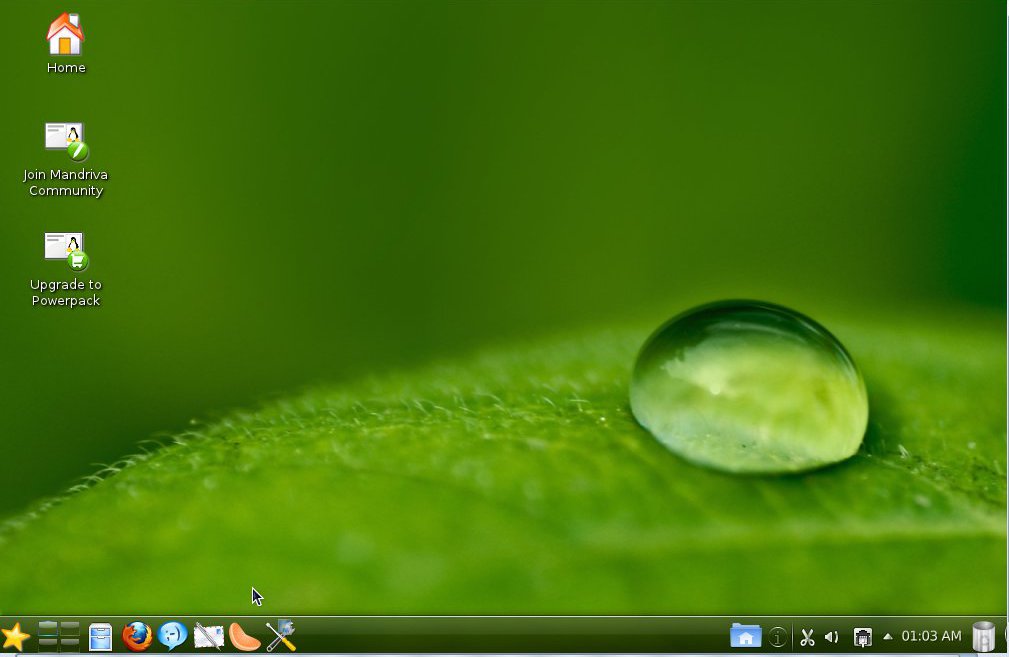
And this is why. Welcome to the new... desktop (?!). The trash bin is now located on the lower panel and there is a HOME icon there which gives you preview of your files. The lock/shut down buttons are gone from the lower panel. Besides noticing that the window with the ads is gone (yes, the one that opens the first time you boot Mandriva), I also saw that the icon of the launcher looked funny (not Mandriva's style):


You click on it and you get this screen, which made me wonder what Mandriva developers were doing:


So, I clicked on applications and got this:


With that, the truth slapped me: they are trying to emulate a smartphone UI (Ubuntu's Unity madness!). Well, it's a bet for the future of Linux, but I want a desktop, not that UI...


I tried to get the Kwin desktop cube back and got an error message instead :-(


I must admit that the tree structure in Dolphin is a lot clearer now:


But don't panic! There's hope for us, all users who don't want to a re-creation of a smartphone interface as the main UI of a PC. It's possible to get the standard KDE launcher without a lot of trouble. You can even get a Mandriva icon and the pager. Ah, and there's the Oxygen theme, too...If I only got the cube back! (Maybe one can enable Compiz effects later if Kwin is out of the question)


I can get used to the new lower panel (especially because it's completely flexible, so you can adapt it to suit your needs or preferences). I decided to make it look more like the Mandriva that attracted me to Linux:


I cannot but think that, although I am in no way a power user, I cannot do my work without multiple desktops and the convenient cube animation any longer. I believe Linux innovated computing with that concept and Microsoft will probably try to copy it for Windows 8. So, why hiding them to mimic a cellphone?

Netdrake is still operational, but the system network is fired up by the KDE network tool.
Oh, there's one last observation. I couldn't run my Japanese IME test because Mandriva Control Center wouldn't let me add new programs. That had to do with the repos and the move to RPM5, I presume?

sábado, 16 de abril de 2011

Testing Japanese IME in Mageia 1 Beta1 (with Libre Office!)

UPDATE:
After filing a bug report, the Mageia team fixed the problem in Mageia 1 Beta 2 Cauldron. Now Anthy works perfectly fine with SCIM. You also get the option of using iBus for Japanese IME, which is a lot simpler. Read about it here.

So, here I am, typing this entry from Mageia 1 Beta1.
Since I haven't encountered any problems so far, I decided to live dangerously and pushed my luck: how about testing the Japanese IME with SCIM? That works flawlessly in Mandriva with Open Office, but I haven't managed to make it work in Libre Office in this OS.

Given the fact that Mageia ships with Libre Office, I thought it would be a nice experiment to see if I can follow in Mageia the same process to activate Japanese input in Mandriva and type both in kana and kanji.

For those of you who might be interested, I described the procedure to follow in Mandriva 2010 here. However, Mandriva 2010.1 created some problems (that I could circumvent and described here).

So, I downloaded all the packages that are available in the Mageia repositories (I noticed that there was no SCIM-ANTHY, so I predicted problems).

Then, after using the SU command and inputting my password, I tried to add the required lines in the i18n file by using gedit, but the program wouldn't run:

[root@localhost sysconfig]# gedit
**
GLib-GIO:ERROR:gdbusconnection.c:2279:initable_init: assertion failed: (connection->initialization_error == NULL)
Abortado
[root@localhost sysconfig]#

Thus, I tried Kwrite, which has never worked for me in Mandriva for this particular purpose and I got another bash problem:

[root@localhost sysconfig]# kwrite
kwrite(4738): Session bus not found
To circumvent this problem try the following command (with Linux and bash)
export $(dbus-launch)

KCrash: Application 'kwrite' crashing...
KCrash: Attempting to start /usr/lib/kde4/libexec/drkonqi from kdeinit
sock_file=/root/.kde4/socket-localhost/kdeinit4__0
Warning: connect() failed: : No existe el fichero o el directorio
KCrash: Attempting to start /usr/lib/kde4/libexec/drkonqi directly
drkonqi(4739): Session bus not found
To circumvent this problem try the following command (with Linux and bash)
export $(dbus-launch)

[root@localhost sysconfig]#

Discouraged, I was about to give up, but decided to read the information that the terminal was giving me... and I saw that it was giving me the solution!

To circumvent this problem try the following command (with Linux and bash)
export $(dbus-launch)

So I typed
export $(dbus-launch) kwrite

and this was what I got:

[root@localhost sysconfig]#

I typed krwite and this is what happened:

Connecting to deprecated signal QDBusConnectionInterface::serviceOwnerChanged(QString,QString,QString)
kbuildsycoca4 running...
kbuildsycoca4(4901)/kdecore (services) KServicePrivate::init: The desktop entry file "/usr/share/applications/kde4/trash.desktop" has Type= "Link" instead of "Application" or "Service"

kbuildsycoca4(4901) KBuildServiceFactory::createEntry: Invalid Service : "/usr/share/applications/kde4/trash.desktop"

After which, kwrite launched and I could append the lines to the i18n file.

Then I proceeded and removed the Libre Office kde integration package and, after restarting the session...

やった!マジェイアは にほんごをかくことができますよ!


The problem:

Anthy is not working, so I'm using Canna...which is fine, but I cannot get Canna to change kana into kanji (this feature works in Mandriva/Open Office).

Oh, well, but I achieved something, didn't I?

jueves, 14 de abril de 2011

When formatting a flash drive doesn't erase a virus


USB viruses are very common and one of the solutions that Windows users resort to when facing one of those bothersome thingies is formatting.
Yes, the complete destruction of data on the device should be enough to get rid of any virus, right? After all, nothing can survive a nuclear bomb...except cockroaches, scorpions, and who knows what else.

Yesterday, a proud user of Windows 7 came to my office with an infected USB drive and, since he knew that Linux is more efficient to deal with those infections than Windows is, he used Mandriva to erase the virus and all the folders it created. However, when he tried to copy his files back into the drive, he got several error messages.

I took his pen drive and checked: some files were still masked and Mandriva would not let me erase them, so I opened Mandriva Control Center and formatted the drive as a FAT32 Windows partition. Yet, files still refused to be copied into this rebellious device, that was apparently clean, or should have been, as it had undergone a formatting operation.


THE VIRUS SURVIVED A FORMATTING OPERATION!

I suspected that the virus might have been hiding somewhere else. After all, there are computer viruses that allocate themselves in the boot sector, so you only waste your time formatting the HD to eliminate them.

I opened Mandriva Control Center again and reformatted the pen drive, but this time I did as a Linux EXT3 partition. When I finished,I could see a nice folder named "lost+found", which I tried to delete manually. I had no luck; the folder was locked.


THE TERMINAL: THE TRUE POWER OF LINUX!

I opened the terminal, typed SU, entered my root password and executed the command

rd --ignore-fail-on-non-empty lost+found

With that powerful spell, the folder was gone!


RESTORING THE WINDOWS PARTITION


After that, I reformatted the drive again as a Windows FAT32 partition and we got no problems copying information to it.


It's good to have the Linux terminal to handle viruses that resist GUI removal...

miércoles, 13 de abril de 2011

Mageia Beta1 in pictures

After getting my desktop back, I picked up Megatotoro's challenge and installed Mageia Beta 1 to give it a short test drive. Instead of writing extensively about it, I will show you some screen captures.

1. Installation:


Conclusion:
It's very Mandriva-like. Should I say PowerPackish? Well, since Mandriva might lose many of its distinct tools and looks, it's good to have a distro that might be more Mandrivish than Mandriva itself.


2. Mageia's own flavor:


My comments:
Although the artwork needs some improvement, the installation read-ons are very nice. Actually, not many distros thank people for their interest (and the "We will welcome you" is more than a motto, as I reported earlier). Thanks to those messages of appreciation, the HUMAN SIDE OF MAGEIA, I am starting to fall for this distro.

3. Points of convergence: Mageia Control Center and the DRAKES!

(The message says that RPMDrake must be updated)


4. Testing installed software: Frozen bubble

Installation of software with Mageia CC works!


5. Firefox 4:

A visit to three of my favorite sites:

Firefox 4 is FAST!!

6. Productivity Suite: Libre Office


Final Question: Is Mageia Beta 1 a Go or a No-Go?

I would venture to say that not only is Mageia promising as a distro, but that it will also fulfill the dream of keeping the Mandrake/Mandriva legacy alive. I, for one, will save a partition for Mageia.

viernes, 8 de abril de 2011

The inevitable...My return to Windows

Today I received a disappointing surprise when I turned on my desktop computer, which is a triple boot (Mandriva 2010.2 PwP, Pardus 2011, Windows XP SP3). It came as a cold shower after a day that started with gratifying experiences that skyrocketed...until I got home and tried to use the PC. But bear with me and let me describe how the day went, so that you grasp my tragedy in full form.

My day started with a class discussion on malware, lies, and false pretenses thanks to two texts that we read. It's a reading comprehension class and my students reacted with an awakened interest that you normally do not expect for a class that begins at 7 AM. After reading a poorly supported piece spreading misconceptions, we read Carla Schroder's post on FUD, which cracked a paradigm that many of us once failed to see. The session went great and was followed by a challenging task. Yes, two colleagues asked me to install Mandriva to their netbooks, a Toshiba and an Acer powered by that little gem of an OS that has prompted many to give Linux a try: Windows 7 Starter. I could have failed there had not been for the timely help I received from Megatotoro, who saved the day with his tactics to make Starter share the HDD.

The rest of the day was pretty normal until I went back home and turned my computer on with a fervent wish to post a festive entry. As usual, Mandriva started the computer, but there was something unexpected: the network applet, instead of showing a green check mark, displayed a red "X". Without caring too much, I clicked on the applet to launch Netdrake and fire off the connection manually. However, the X stood there, defying my clicks and laughing sardonically before my baffled eyes. "Mandriva is not working," I thought, after having checked the wires and realizing that everything was properly attached. "Well, there's always Pardus," I consoled myself, and rebooted the PC using the Turkish distro. But Pardus also told me that the connection was unavailable and a spiral of uneasiness ascended through my stomach. My two Linux distros had deserted me: only Windows was left, that long-forgotten OS that had rested unused for more than four months already. Windows was my last hope to connect to the Internet. I could not prevent it; I was shivering as I clicked the red button in Pardus and selected "Boot Windows".

Last time I tried to use Windows, there was a blackout, so I, logically, got a black screen asking me if I wanted to boot Windows normally, or with the last configuration that had worked, etc. I selected "normal" and saw with hope the XP logo...but the computer rebooted unexpectedly and threw me again to the same black screen. "OK, let's go 'last good config' this time," I mumbled and chose. And XP, for its part, chose to do something wonderful: it got me into a cute loop and refused to start. Isn't that wonderful? I have been using my PC all this time without even knowing that Windows XP had fried! Thus, my return to Windows was colored by the inevitable reminder of its many weaknesses.

Five years ago, this loop would have thrown me into a state of anxiety that easily justified my spending the whole night up reinstalling the darn OS. Right now, I just don't care. No anxiety build-up. The plain truth is that my computer works; Windows doesn't.

By the way, I realized that the problem with the net was because the hardware is malfunctioning. See, I'm posting this entry from the wireless connection. Tomorrow, I will get the hardware piece replaced :-)

sábado, 2 de abril de 2011

Mageia's The Wizards Lair, a forum for convergence

Today I registered in the Mageia forums. I was a little self-conscious because of my limited technical knowledge and because I'm an active Mandriva user. To be honest, I was expecting a degree of rejection due to distro fanboyism.

However, my fears were unjustified: the forum welcomes everyone and I, in fact saw many of the familiar names in the Mandriva forums!

I really hope Magiea brings the two Linux communities together.

domingo, 27 de marzo de 2011

Installing Linux to a Gateway NV53 laptop, a trial for five distros

Today, one of my sisters-in-law came to visit and brought her laptop because she wanted me to install Linux to it. She is fed up with the never-ending (and increasingly costly) rituals of updating anti-viruses that seem to be always one step behind in the eternal fight against e-threats. Her laptop is a Gateway NV53, 4GB RAM, 320 GB HDD, pre-installed with Windows 7 Home Premium and, despite all the praises that Windows fanboys sing for this OS, she was dissatisfied with its reality: you are always vulnerable to viruses, malware, and a wide array of threats.

Coincidentially, Megatotoro was around and his expertise with dual booting this selfish Windows Vista-with-make-up was truly helpful.

Now, I had dual-booted a Windows Vista7 desktop before with some minor problems. I used Mandriva 2010.2 for that operation, so we tested my favorite Linux distro and...we hit a major problem this time: no sound! Mandriva would not produce any sound out of the built-in speakers, so we decided not to install it.

Then, we tried the next candidate, Pardus GNU/Linux. Again, there was not any sound coming from the Gateway laptop.

Next came Ubuntu Lucid Lynx and, although Canonical's flagship product enabled the sound, MP3s were not natively supported.

The following candidate was Simply Mepis 8.5. As Warren Woodford states, Simply Mepis just works. I might add that, in this particular case, it worked flawlessly, too. It picked up the wi-fi, enabled sounds, etc., much to Megatotoro's satisfaction (his grin couldn't possible be more evident: rarely is it that his distro of choice fails). It's just too bad that people do not know this nice distro. The downside was that the effects in this release are not very polished. Megatotoro, as many Mepis followers, is waiting for the release of Mepis 11. To be honest, I am also waiting (I even reserved a blank partition of my netbook's HDD for it). Megatotoro has installed the beta 3 of Mepis 11 and he is happy with it, but, ethically, he did not want to install a beta to a computer that is not his own.

Therefore, we decided to test one more candidate: Linux Mint Julia. We ran the Live CD and the elegant Irish distro not only enabled the sound, but it also previewed MP3s and dazzled the owner of the laptop with the Compiz effects.

We asked her which of the two finalists she wanted to keep as her first Linux distro and, after considering the options, she asked us to install Mint.

Not to run any risk (as none of us has ever used Mint to partition a Windows Vista7 computer), we used Mandriva 2010.2 to resize the Windows partition and create the new one for Mint. Then we ran the Julia Live DVD and, in 25 minutes, the computer had a Linux OS. This is what her new OS looks like:
(The wallpaper was downloaded from www. art.gnome.org and modified with GIMP)

As soon as we started explaining to the owner how Linux works, she realized that many of the things she has heard about computers are myths and she questioned what the point of spending more money in new Windows OSs is. After all, she reasons, they all have exactly the same vulnerabilities than previous releases do. Ballmer probably won't like to hear this, but she discovered that she can have MORE than what Windows offers for free.

So, even though she did not choose Mepis and Mandriva did not work for her, both Megatotoro and I feel happy. Linux is all about freedom and now my sister in-law has the opportunity to see what a computer can truly do.

Some statistics for the record
Windows 7:
Boot time: 58 s. Shut down time: 20 s.
Linux Mint:
Boot time: 48 s. Shut down time: 4 s. (Yes, that's right. Like a bullet!)
Hibernation: perfectly functional.
Compiz effects enabled.
WebCam enabled with Cheese
Wi-fi working
Function keys responding
Card and flash drive reader working
No issues with the GRUB seeing Windows 7

UPDATE:
The owner found a problem. The laptop refused to shut down. I've heard this before: Ubuntu computers that don't shut down...Well, Mint is an Ubuntu-based distro. Is that the reason? I've never had this problem in Mandriva, Mepis, or Pardus.

jueves, 17 de marzo de 2011

Sorry, we don't sell flash drives anymore

A rather curious phenomenon has been occurring near campus lately: vendors are refusing to distribute USB flash drives, those handy devices for storing data. The first time I got a "NO, we don't have USB sticks" as an answer, I thought that the vendor had simply ran out of stock. However, time passed by and flash drives were not available. Not even one. What was going on?

This responded to the wrong "my-hardware-is-defective" assumption that is so common in a Windows monoculture. I have seen flash drives "fail" countless times. The most common problems are:
  1. Missing folders
  2. Missing files
  3. Impossibility to record data
  4. Failure to erase some folders
  5. Inexplicable virus alerts (with the subsequent affirmation "I scanned it with my anti-virus!")

I saw a young woman return her memory stick to a vendor that offered a warranty. She described some of the problems mentioned above. Of course, as Windows users never blame their OS, they have to blame this strange behavior on something and the poor hardware is the one that gets all the kicks. So they complain to vendors.

The vendor, inadvertently, falls into the trap. So, s/he either returns the money or replaces a USB drive that is perfect with a new one. This becomes a truly lousy business that, given the quantity of repetitions, was enough to show red numbers. Hence, the vendor decided not to sell that kind of hardware anymore.

With Linux, I have been able to show many USB flash drive owners that the memory stick is perfect and that the problems listed above are the consequence of virus infections. These infections happen thanks to the weak security of Windows and the ignorance of the user. To get rid of the problem, all you have to do is remove the pesky hidden files...which you achieve with two clicks in Linux. In Windows, well, you need to disable system restore, go to the registry, apply patches, reboot (can't do anything without rebooting, you know?)... You might also need a great deal of good luck and all the charms you can get.

I have a question. What will vendors do once that viruses become more common in, say, memory cards? Of course those will not be perceived as OS problems, either. Are those storage devices going to be banned as well? No wonder why Microsoft could come up with the stupid idea of banning infected computers from the Web...

sábado, 12 de marzo de 2011

Emergency at the University: A PC problem or an OS that is defective?

On Jan 20th, 2011, I posted an entry on my office network and, jokingly, put up a picture in which viruses were pawning the Windows computers. Well, that picture became prophetic: while the Windows 7 machine gradually collapsed, the XP one became a zombie that got the entire University Internet service in trouble for a whole week. However, my Mandriva box emerged pristine, completely unscathed. This is the account of what happened.

The main computer in the section is an XP system, which was later linked to the new Windows 7 computer that was bought. The computer I use was also an XP one. However, I installed Mandriva Linux to make it a dual boot and now I seldom boot it in Windows. After less than a year, the Windows 7 station started to show some strange symptoms: It would not start, the screen would flicker, or the machine would freeze. We asked the department technician to come to examine it and, as Carla Schroder said it back in April 2010 (read article here), the technician deemed the whole thing a hardware problem (he blamed it on the hard drive) and substituted the HD. I told him I had my reserves, but people in the office pretty much ignored me.

Last week, the Internet service of the University was in terrible shape. I wanted to go talk to the IT Manager of the Faculty, but it was not necessary because he stormed yesterday into my department. He was a rabid pitbull after something to bite and barked that a machine in my section was sending viruses non-stop and collapsed the University Internet service. His boss, therefore, gave him a furious call with an ultimatum: "Either you find the infected computer, or you pull the switch off for the entire Faculty". He went to my machine first, but I told him that I only run Linux on it, upon which he responded: "Linux? Then it's not yours!" and jumped to the other machines and found the IP of the culprit...it was the XP system. The result? The machine was unhooked from the network and will remain in quarantine.

But what happened to the Windows 7 box? I asked the technician in my section if he had actually checked the integrity of the hard drive to support his claim. I knew the answer already; he only supposed it had been a hardware failure, but never checked the disk! Carla Schroder was absolutely right: people assume that computer problems are necessarily hardware, not OS problems!

I asked him to put the disk back. He reformatted it and Windows 7 is behaving OK so far. I wonder if Windows does not check the integrity of the disk BEFORE install... Anyway, I installed Mandriva (no indication of disk problems whatsoever, by the way) and now that system is also a dual boot.

Maybe it's time for people to stop blaming computer problems on hardware and to begin seeing reality. In my office, there are three stations for three individuals who are not computer experts. The two Windows machines broke; the Linux one is still up to the job and has not failed, not even once, since its Penguin OS was installed.

As a simple computer user, what can I learn? Well, the lesson that I see is that if you want to have Windows as the OS of your computer, you must accept that its security is flawed by design, which eventually will cause problems for an user that is not an expert. You must then invest a lot of time to learn how to protect your system, how to correctly operate the antivirus, firewall, anti-malware, etc. You also have to refrain from downloading shiny animations and programs to enhance your desktop, as they can compromise your system. On the other hand, if you do not want to be bothered by common security problems, then you should use Linux. Thus, you will discover that many so-called PC problems are but Windows problems.

My First 12 Days with Mageia 10: How to enable repos with dnf5

Well, 12 days have passed since I migrated all of my desktop, laptop, and portable work system to Mageia 10. I have not used the work system...