Mostrando entradas con la etiqueta Mageia 2. Mostrar todas las entradas

miércoles, 27 de marzo de 2013

The GRUB Battle Again: Getting Mageia to Coexist with AntiX

Regardless of what people say about netbooks, their portable factor is very convenient for teaching.  However, I wanted to change some of the distros on the HD of my Dell Inspiron Mini 10. It formerly sported
  1. Mandriva 2010.2 (main production distro)
  2. Pardus 2011
  3. Mepis 11
  4. Mageia 2
  5. Mandriva 2011
The problem was that Mandriva 2010 was way too old and Mandriva 2011 way too heavy for the little thing.  Plus, I wanted a distro that could boot the small machine fast in case something popped up and all of the above distros booted in more than 1 minute and 15 seconds (well, except Mandriva 2011, which took a good 2 minutes on the modest specs of the computer).

So, I decided to clean up the partition table, which was a mess because all of  my grub learning has taken place in the netbook, basically.  Thus, I wiped out all the distros and created a new partition table to start afresh.

I decided to start by putting Mageia 2.  The installation was OK as usual.  Then, I installed AntiX because it picked up the Wifi of the machine and it includes LibreOffice (I tested Slitaz, but it would not pick up the wifi and Vector Light took 50 seconds to start).  The installation went perfect and I placed the GRUB on its corresponding root partition.

The problem was that AntiX boots with GRUB2 and Mageia's GRUB, sitting comfortably on the MBR, simply refused to see AntiX.  To make things worse, I have very little experience dealing with GRUB2, so I could not find the way to collect the information that I needed to edit GRUB manually.

Therefore, after trying everything I could think of and failing, I put the issue aside and installed Mepis 11 to see if its GRUB could pick up AntiX.  Although I did not have any installation problems, Mepis installed a GRUB that saw Mageia, but AntiX continued on the hiding.

However, I had an idea: given than AntiX and Mepis share several points, why not trying with the information on Mepis' GRUB using the AntiX kernel?

It was sort of crazy but I gave it a try.  So, once on Mepis, I went to /boot/grub and opened the file menu.lst with Kwrite and copied the entry for Mepis:

title Mepis at sda 8 newest kernel
root (hd0,7)
kernel /boot/vmlinuz root=/dev/sda8 nomce quiet splash
initrd /boot/initrd.img
boot

Then, I booted up Mageia and went to the same location (/boot/grub).  I opened Konsole and entered su, followed by my root password.
After that, I typed :

export $(dbus-launch)
kwrite

and pasted the entry twice (one for Mepis and the other for AntiX).

Then I changed one to read:

title AntiX at sda 7
root (hd0,6)
kernel /boot/vmlinuz-3.6.11-antix.1-486-smp root=/dev/sda7 ro splash
initrd /boot/vmlinuz-3.6.11-antix.1-486-smp
boot

and saved the file.  I rebooted and the new entries where shown by Mageia's GRUB.  I tried the one for Antix and voilà!  AntiX booted the netbook.
Table contrasting the distros on the HD
Yes, Mageia 2 can coexist with AntiX after all and the Dell netbook is now a triple boot.  However, I am saving partitions for Pisi Linux, the new Mandriva release, and Elive.

I guess I need to start learning how to work with GRUB2, by the way...

viernes, 15 de marzo de 2013

Connecting PCLinuxOS and Mageia to a WPA2 Enterprise Network

The University where I work has proudly put up a new network for remote access. Among its advantages, one can count that there are more access points, its has a more robust security, and that the user only needs to register once. 

One additional point for Linux users is that, as opposed to Windows, you do not need to download any software, install it and run it to be able to log in. It is a WPA2 Enterprise network that uses PAP for authentication. 

However, there was a problem: although the University provides a Linux guide for configuring the network, this document only describes the process for Ubuntu and network manager. 

When I tried to follow the instructions in PCLinuxOS 2013.2 and Mageia 2, regardless of my attempts, the connection would fail. Both Linux distributions use drakenet instead of networkmanager and the former simply refused to cooperate. 

Yesterday, I found the way to make the elusive WPA2 Enterprise network talk to PCLinuxOS and Mageia. All that is needed is to go to /etc and open Konsole to modify a file. So, you have to type su, followed by your root password. Then, as you need to open Kwrite to edit a file, you must type the following command to circumvent a problem that prevents Kwrite from launching: 

export $ (dbus-launch) 

Then, to open Kwrite, type:

kwrite 

After some warnings, the GUI of Kwrite pops up, so use the menu to locate the file called wpa_supplicant.conf. Go to the end of the file and append these lines there:

ctrl_interface=/var/run/wpa_supplicant
eapol_version=1
ap_scan=1
fast_reauth=1
network={
    ssid="Network-Name
    key_mgmt=WPA-EAP IEEE8021X NONE
    proto=RSN WPA
    eap=TTLS
    identity="name.surname"
    password="password"
    phase2="auth=PAP"
    pairwise=CCMP TKIP
    group=CCMP TKIP
    scan_ssid=1
    mode=0
}


Then, save the file and close everything. Reboot your machine and that makes PCLinuxOS and Mageia work with this new University network. 

The more I use Linux, the more I learn :)

lunes, 25 de febrero de 2013

Typying in Japanese with Firefox: SCIM in Mandriva 2011/Mageia 2

Yesterday, I shared how to get SCIM to behave correctly to handle Japanese typying in PCLinuxOS 2013.02.  Thanks to that discovery, I learned the way to enable SCIM when using Firefox in Mandriva 2011/Mageia 2.

First of all, let me say that while iBus does the same and can be installed fairly easy in both Mandriva 2011 and Mageia 2, the problem is that it ruins the keyboard accents in Spanish for those people who work in that language with LibreOffice.  Therefore, SCIM is a better option.

I am running Firefox 19.0 at the moment, but this trick works with previous versions of the browser and future ones, too (Aurora and Nightly).

To activate Japanese IME (SCIM) in Mandriva 2011 or Mageia 2, the following packages are needed:

1. Japanese fonts (Use MCC to get them)
2. Scim (and all of its dependencies)
3. Canna (and its dependencies)
4. Anthy (and its dependencies)
5. UIM (make sure that the bridging packages are included)

Once all the packages are installed,open the terminal Konsole and use SU to log in as root with your password.

Then go to /etc/sysconfig by using
cd..
cd..
cd etc
cd sysconfig

once there, activate Kwrite by typying
export $ (dbus-launch)
kwrite

The idea is to modify a file called i18n.
When Kwrite is functional, using the open icon, and locate the file i18n to open it. Once it is displayed, append the following lines to the end of the file and save it.

GTK_IM_MODULE=scim
QT_IM_MODULE=scim
XIM_PROGRAM="scim -d"
XMODIFIERS=@im=SCIM

Close the terminal and then go to usr/share/X11/xdm
Once there, open Konsole and type su and the system will ask you for your root password.  Enter it and then type
export $ (dbus-launch)
then type kwrite (to start Kwrite and edit a file)

Once Kwrite appears, open the file Xsession with it. You have to append the following lines before the line that starts with exec
SCIM working with Firefox in Mandriva 2011
 
export XMODIFIERS=@im=xim  
export GTK_IM_MODULE=scim-bridge
export QT_IM_MODULE=xim
export XIM_PROGRAM="scim -d"

Save and log out and back in to your session.  That's the end of the show.  From now on, your browser will accept Japanese input for searches, or searches in other languages (Korean, Thai, etc) as long as you have the fonts for those languages installed.

The good thing about this method is that it also enabled SCIM for LibreOffice 4 (which is not in the official repositories of Mandriva/Mageia yet).

SCIM working with LibreOffice 4 in Mageia 2

lunes, 24 de diciembre de 2012

A problem with iBus in Mageia 2 and Mandriva 2011

I just found an interesting problem in the way Mageia 2 handles typing Asian languages with iBus, the Input Method Editor (IME) that is configured easily during the installation of the distro.

For work reasons, I need my computers to be able to handle Japanese (and for fun, Korean and Thai).  You can do this with iBus (a more modern IME) or SCIM.  I chose iBus because you can install it during the installation process of Mageia. 

I had not seen this situation before because I have installed iBus only to computers that have an English keyboard.  However, since my main desktop computer has a Spanish keyboard, when I opened LibreOffice, I discovered that iBus was preventing the keyboard to display the accents ("tildes") of Spanish and those of French.

After using the SU command and inputting my root password, I wrote this in the terminal:
cd /etc/sysconfig

export $(dbus-launch)

kwrite

Then, when the graphical interface of kwrite came up, I opened the file i18n and found these entries related to iBus:


GTK_IM_MODULE=ibus
QT_IM_MODULE=ibus
XIM_PROGRAM="ibus-daemon -d -x"
XMODIFIERS=@im=ibus

I played with them a bit and the only thing I achieved was to break the IME, which slowed down the session start in Mageia.  Therefore, I tried to install automatically good old SCIM from the locale administrator in the Mageia Control Center.  It told me that there was no scim-tables packages, but I restarted the session anyway to find that SCIM was, effectively, not working

No problem.  I went to the file i18n in /etc/sysconfig again and saw that the following lines had been changed to make SCIM work instead of iBus:


GTK_IM_MODULE=scim
QT_IM_MODULE=xim
XIM_PROGRAM="scim -d"
XMODIFIERS=@im=SCIM

The problem was the second line.  It has to read
QT_IM_MODULE=scim

so I changed it.

The next step was to remove the libreoffice-kde4 integration package.  After doing that, SCIM started to work and I could type the correct Spanish accents.

Mandriva 2011 shows the same problem with iBus if you have a Spanish keyboard.  However, although the locale manager installs SCIM with the missing scim-tables package, it took me more time to get SCIM to work.  It so happened that Mandriva did not install several important dependencies (scim-bridge-gkt, scim-bridge-qt4) and libreoffice-gnome, which were needed for the IME to work (provided you remove the package libreoffice-kde4).

viernes, 21 de diciembre de 2012

Migration stories 3: Good Bye, Mandriva 2010.2!

MIGRATION STORIES, part 3

While my wife's migration was very successful, mine was not a smooth process.  But I know that is bound to happen when you change OSs.  

A.  Mandriva 2011
The day was yesterday.  I've been using Mandriva 2010.2 (Xmas) as the main OS of my desktop.  However, now that I finally reconciled with the Rosa SimpleWelcome, stack folders and rocket launcher, I decided that I wanted to try Mandriva 2011 as the replacement.  To this end, I looked for my Mandriva 2011 DVDs.  The Mandriva 2011 Desktop Live DVD has given my some performance issues in the past, so I settled for the PowerPack edition.

Inspired by my recent success with Mageia 2, I decided that I was not going to format my /home partition.

But this time the change did not go as smoothly as I had expected; I got a message indicating that one installation transaction was not complete.  I continued with the process anyway and, after installing the new distro, I saw that Mandriva 2011 would boot in a sluggish way.  I assumed that it was because of the indexing of all the files I had accumulated in two years, but I knew something had gone wrong.  First, for indexing, the user has to activate Nepomuk once the desktop loads and I hadn't gotten to my desktop yet.  Second, once the log in was complete, there was a bad problem with the graphical server: I had no visible desktop.  It seems that my previous user configuration (Kwin effects) and the new one were overlapping, so the Rocket bar was a real mess.

I gave it another try wiping everything this time.  That solved the problem of the misbehaving graphical server.  I tested sound, video, and the printer; everything seemed fine.  That was until I tried to activate the desktop effects: Mandriva 2011 would not refresh the desktop, so it was basically impossible to work.  I checked the graphical server and found out that, despite the proprietary drivers for my video card were installed, the card was not working correctly.  So, that was my option: Mandriva 2011 was fully operational without desktop effects...which I happen to be very fond of.

I tried the whole thing again using the Mandriva 2012 TP "Bernie Lomax".  Of course, I  know that using such a system as one's production OS is far from advisable, but I wanted to see it running on real hardware.  It ran beautifully, but the problem with the effects persisted.

B.  Mageia 2
Since Mandriva 2011 was not working with me, I placed a Mageia 2 installation DVD on the tray and began the installation.  As usual, this distro did everything it was meant to and in a matter of 45 minutes Mandriva 2011 had been replaced by Mageia 2.


I tested the effects.  They were working, but not to their full power.  For example, when one manually rotates the cube, it gets stuck. Grrr.

 But some effects looked better than no effects, I concluded.  However, I discovered one unexpected problem: the multifunctional printer.  My Epson Stylus TX200 was recognized as a printer, but not as a scanner.

Mandriva 2011 had no problems seeing it and configuring.  Mageia, on the other hand, lacked the drivers for scanning with it.  So, I had to go online to hunt for the appropriate drivers from the manufacturer's page.  That is not a great deal, but it reminded me of my Windows times.

Finally, I got the scanner working and looked at my new Mageia 2 desktop.  I still felt some nostalgia for the gone-too-soon Mandriva 2011 system...


And then I installed Mandriva 2011 back using another partition.  You see, that's the beauty of Linux: you can work with multiple systems if you feel like it.

So, right now I'm using the following OSs:
Desktop: Mageia 2, Mandriva 2011PowerPack, Pardus 2011
Laptop: PCLinuxOS, Mageia 2, Mandriva 2011 Desktop
Netbook: Mandriva 2010.2, Mepis 11, Mageia 2, Mandriva 2011 Desktop, and Pardus 2011.

I'm still waiting to see Mageia 3 and the new iterations of Mandriva and Pardus.  I just gave Rosa Desktop Fresh a run and I must say that it is very good, by the way.

jueves, 6 de diciembre de 2012

Mageia 2 on Acer Inspire One

Today I performed the easiest Mageia install ever.  It was on an Acer netbook (an Inspire One D257-1408 that came pre-installed with the curse of Windows 7 Starter).

The machine packs an Intel atom N570, 2GB RAM, and a 160GB HD.  When I first saw it, my worry was the strange keyboard configuration: there are functions scattered all over the keyboard.  Besides, I still had the usual concerns: Graphics server and effects, Wi-fi, sound, and the SD card reader.

Mageia 2
So, I booted it using a Mageia 2 Live USB drive (that part was a piece of cake) and, in few minutes, I was showing the owner of the netbook her potential new system.  I quick-tested everything in live mode.  She was very pleased and I was, to be honest, a little skeptical because everything seemed to behave correctly.  It is not that I am suggesting that Linux is inferior because one can run into a glitch here or there.  As a matter of fact, the owner was marveled when she saw some of the function keys that Windows 7 Starter never put to work being activated for the first time in almost a year!

So, after backing up the information on the HD, I wiped it and ran the Mageia installer and, when the process was over, I turned on the machine expecting to hit a boulder any second.

But nothing happened.  Wi-fi was working, the effects were active, sound was operational, hibernation worked, Youtube videos were showing, KDE was responsive...

We still have to remove the Starter letter, er, scarlet letter.
This is, by far, the most successful Linux install I have ever performed.  Of course, I had to get .mp3, .mp4, and .flv to work, but the process was easy because the repositories had everything I needed.

I took the machine home to restore the information and to update the distro.  The little thing is working perfectly and I am very happy.

I hope the owner enjoys her new OS.  She is a brave young woman who has decided to break away from the MS paradigm because she was fed up with viruses and tech service abuse.  But I suspect that her main reason to jump on board the Linux ship is quite different and has to do with...yes, Korean dramas!

I can't blame her. My Linux story is also strange.  Well, Ken, from the Blog of Helios, said it beautifully here: "many of us came to Linux via odd routes".   

That being the case, I'm sure she will benefit from the computer's new capability--Korean input :-)

So, congratulations, Mari, and enjoy your K-dramas on a computer that will not be afraid of that abundant Windows malware that drove you paranoid before. 

리눅스, FIGHTING!

domingo, 9 de septiembre de 2012

Our first UEFI challenge

Yesterday, Megatotoro and I helped a colleague who wanted to dual boot her recently bought desktop PC.  She wanted us to install Mageia 2  and we were confident because it is a process that we have done several times already.

However, when we hit the key to get into the BIOS... Surprise!  We were greeted by UEFI instead.

We thought the dual-boot enterprise was doomed.  We are not computer techies, to begin.  In addition, we had read all the problems that UEFI will give to people who want to try Linux, which was pretty discouraging.  Nevertheless, Megatotoro persisted and found the option to disable the secure boot.  Once this was done, the installation of Mageia 2 was easy.

I hope OEMs keep the option to disable secure boot.  

lunes, 23 de julio de 2012

The Quest of Getting Midi and Karaoke to Work in Mandriva 2010.2 and Mageia 2

There are times in which a seemingly simple task becomes a challenge.  For me, this happened when I was called to substitute a Japanese teacher and wanted to use a .kar file in the class to practice.

To solve this problem, I resorted to several programs: Pykaraoke, Timidity, VLC, Audacious, and Kmid2.  Here is the story.

Chapter 1.  The adventure of enabling midis/.kar files in a Mandriva 2010.2 PowerPack Desktop PC and a Mandriva ONE 2010.2 netbook


When I realized that I was not ready to play .kar files (nor any midi), I checked Megatotoro's entry here on how he had done it in Mepis.  The process seemed pretty straighforward, so I started by downloading Pykaraoke.  However, it would not run.  Pykaraoke was not my winning card. 

Then I remembered that Timidity was not installed, so I grabbed it from the Mandriva repos.  To my despair, although the installation was successful, Timidity simply refused to launch.

In my search for answers, I saw several plugins for midi in VLC and Audacious.  I gave those programs a try, too.  Concerning the latter, I installed first:
fluidsynth, fluid-soundfont-gm, audacious-fluidsynth, and whatever dependency that the system required.

Audacious playing a midi
With everything in place, I  ran Audacious and hit CTRL+P for the preferences dialog.  I navigated to "PLUGINS" and selected the tab "input".   There, I selected AMIDI-PLUG and clicked on the "preferences" button at the bottom.  Then I selected "Fluidsynth backend" for the AMIDI plugin and clicked on the Fluidsynth button next.  there, I used the add button to go to /usr/share/soundfonts and select the 2FluidR3_GM.sf2 file.  With that, Audacious started to play the midi sound, but no lyrics could be displayed yet.


The next candidate was VLC, which stubbornly gave me a warning that MIDI playback was not supported and that "there was no way to fix the problem", a pretty discouraging message that I chose to ignore because I had seen a plugin to that purpose in the PLF repositories (vlc-plugin-fluidsynth). So, I installed it, ran VLC and clicked on the Tools menu and went to "Preferences".  That gave me a window.  To the left, I saw the "INPUT AND CODECS" button.  However, before I clicked on it, I went down and selected "ALL" for the adjustments.   That converted the panel to the left in a tree-like structure with more options.  I selected "INPUT/CODECS", audio codecs, Fluidsynth and wrote the following path in the panel:   /usr/share/soundfonts/FluidR3_GM.sf2.  That enabled midi playback with VLS alright, but still no lyrcs were displayed.

Then I installed Kmid2 and all its dependencies.  When I ran it, I went to the Preferences menu and then "Configure Kmid".  When I clicked the button "synthetizers" and then went to the Timidity tab, I finally discovered what the problem with Timidity was: Kmid2 reported a missing timidity.cfg file in /etc/timidity/

My Mandriva PowerPack 2012.2 PC running Kmid
The reason why the file was not there eluded me, but I installed Timidity on the netbook from the repos and the program launched perfectly: the .kar file started to play and displayed the lyrics.  That took care of my work situation, but I wanted the Desktop PC to do the same.  So, in the netbook, I went to /etc/timidity/, snatched the timidity.cfg file, and dropped it to the same directory in the desktop PC.  That got Timidity running at last and Kmid2 could also play and display the lyrics in the desktop PC. 
 
Chapter 2.  Getting the Elusive Kmid to Cooperate in a Mageia 2 laptop

With all this learning, I turned on my Mageia 2 laptop and tried to install Kmid2.  At first, I did not find it in the repositories, so I enabled all the repositories I could and tried again.  The Mageia control center displayed it, so I selected it with all the dependencies (fluidsynth and its own).  After the installation, I started Kmid2 but it failed to lauch, reporting that the machine could not play midis or that snd_seq was missing in the modules (something about permission denied).  As the latter problem sounded unsurmountable to a non-technical user like me, I decided to rule out the former first.  Thus, I repeated the steps to enable midi playback in VLC and Audacious and, to my relief, both programs played the sound of the.kar file.

Without a lot of confidence in my ability to fix the missing module problem, I searched the Web and found that this had been reported as bug 5892 in Mageia.  According to the report, a user had solved the problem by going to /etc/module and simply adding the line
snd_seq

Although I followed the path, I saw no file called module, so I got the most similar one (/etc/modules.load.d) and edited the file modules.conf with Kwrite, adding the line to it.  That got Kmid2 to work in Mageia 2 as well.

I hope this experience helps those with some karaoke woes in Mageia and Mandriva.

domingo, 13 de mayo de 2012

Busy weekend with Mageia, LibreOffice, and Liberté

After an intense week, I decided to forget about work this weekend and have some time for my hobby, software testing.  So, I downloaded Mageia 2 RC, LibreOffice 3.4.5, and a Linux distro that I had never heard of: Liberté 2012.1.

Mageia 2 RC
I upgraded my Mageia 2 Beta 3 VirtualMachine and... absolutely nothing happened.  Before some hasty conclusions, I mean NOTHING BAD happened; all my software works, even the Japanese IME with iBus. I guess I will wait until they release the final version to try it on real hardware and to see if my netbook works better with Mageia 2 or if I should keep the previous release.

LibreOffice
I had a previous version, so I upgraded it to have the cool OpenGL effects.  However, I was impressed the most by the great PDF editing feature: with an office suite that can edit PDFs as easily as any other ODF document, MSOffice looks like a real software dinosaur.

The only drawback is that I have not figured out how to enable SCIM to work with it, so I must keep OpenOffice in my Mandriva 2010.2 box to type in Japanese.

Liberté
I must confess that I felt a little anxious about downloading a distro that is so anonymous that even its origin remains undisclosed in DistroWatch.  However, as it is 210MB, I gave it a try.  It enabled Tor and booted without any problem.  Web browsing is done with Gnome Browser.  Liberté includes Abiword for document production and Pidgin as the IM client.  There was no GIMP for image-editing software, which is logical because the purpose of this distro is private communication.  The best part for me is that this distro boots an IME in live mode that includes Anthy for Japanese writing and it works flawlessly with Abiword.  Vive la Liberté !

In my humble opinion, the three of them are promising.

Now I'm downloading the final release of ROSA Marathon...

domingo, 29 de abril de 2012

A quick look at ROSA Marathon EE RC

It's no secret; Mandriva S.A. faced difficult times and improving the company's poor interaction with the community is the latest goal they have established.  In the meantime, developers, users, and forum admins have gone (Farewell, Germ, and thanks for all of your work!).

As a Mandriva user, I am concerned because I would not like this beautiful distro to disappear.  However, I haven't heard of a new Mandriva release soon.  Mageia and ROSA, the two divergent lines of the continuity of Mandriva Linux, are buzzing with activity.  For the ones who are not informed, while Mageia 1 kept the line of Mandriva 2010.2, ROSA is intending to keep the line of Mandriva Desktop 2011.

When Mageia 2 Beta 3 made its appearance in the Linux landscape, I tested it and was satisfied by its new look and use of KDE.  In addition, the Japanese IME was working flawlessly, so I was very pleased there even if multimedia needed some tweaking to run properly.

ROSA, on the other hand, has unveiled its new release candidate of Marathon EE (EE is the version including non-free stuff, like the extinct Mandriva ONE). I downloaded, gave it a run in Live mode, and this is what I found:

ROSA presents some animated bars as the Live environment is becoming ready to launch.  After a while of waiting (the wait was shorter than with Mandriva Desktop 2011, I must say), you are greeted by this desktop:


It is very responsive for a Live CD and the Spanish localization is very good.  The most obvious change is the indicator of the KDE desktop.  When you clic on the ROSA button, you see the well-too familiar ROSA launcher and SIMPLE WELCOME found also in Mandriva 2011:


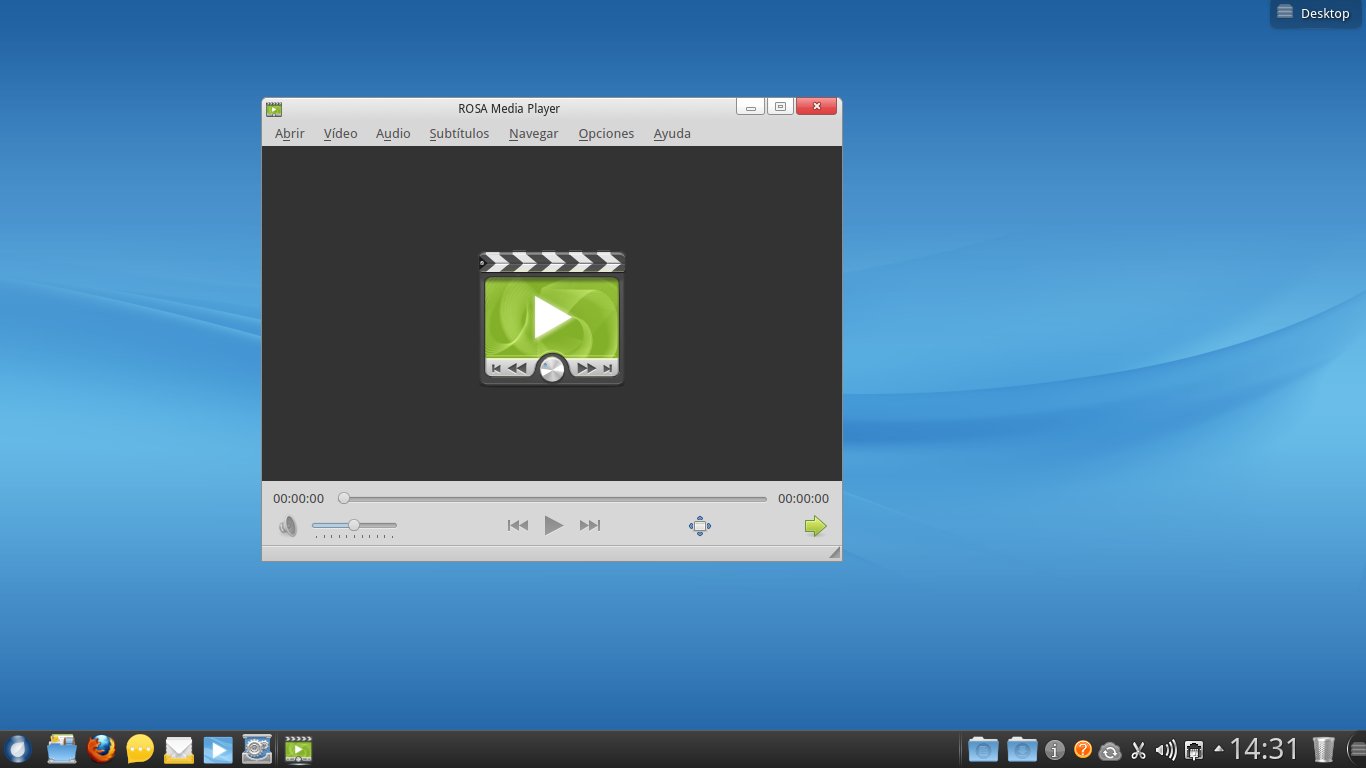
You have a ROSA sync icon, but I noticed the lack of software for a distro this size.  I mean, you get a full LibreOffice suite, but in graphics or multimedia, the options are scarce.  However, the ROSA player is promising:


The ROSA player works well with mpg and avi video but, when playing mp4's or flv's, there was no sound although it displayed the video.  This was curious because YouTube worked fine out of the box.

ROSA Marathon EE also recognizes and mounts all the partitions on the hard drive in Live mode.

On a different note, the Mandriva influence is visible.  For example, to configure the system, you type MCC (Mandriva Control Center), not RCC, and the ROSA control center opens:


You can also see the "M" in the icon ;-)

Overall, I think that this is a heavy system, but it is beautiful and usable for newbies.  ROSa is beggining to capture some attention in the world of Linux, too, as seen by its quick moving up in the DistroWatch chart.  I wonder if there is a ROSA community, though.

Now I will wait for the Mageia 2 RC to run a comparison.

sábado, 17 de marzo de 2012

Some reflections on Mageia 2 Beta 2

As a non-technical user of Linux, and after reading several posts about the battle between developers and users who feel neglected by them, I could not prevent myself from worrying a bit about the soon-to-come release of Mageia 2. You know, maybe Mageia also jumped on board that train that takes you to DumbOSland, where you "use-your-computer-as-if-it-were-a-cellphone".

So, I downloaded the beta2 to have a preview of what Mageia offers to users of Linux who are not computer gurus by any standard, but who like computers to behave as what they are.

DISCLAIMER: This is not a technical review, so I'm not getting into codecs, Flash, boot-time, and the like. As a simple computer user, I wanted to check on the progress made by Mageia and I saw both positive points and negative ones. This is what I found on the negative side:

1. The artwork needs some, er, work!

I am inclined into thinking that OSs must keep a balance between efficiency and beauty. While I do not find myself necessarily annoyed by the color scheme or login screens of Mageia, I do believe that lack of consistency might make potential users to refrain from using a system because simple users, when seeing an inconsistency in the booting process, tend to think of it as "a problem". The graphical screen of Mageia 2 Beta 2 overlaps the text screen and it looks strange. Of course, that is not going to make a computer blow up, but still...

2. A hideous bug crawls through Mageia Control Center/ RPMDrake

Although the installation was smooth, when I opened Mageia Control Center to start adding programs, it told me that RPMdrake had to be updated. That is normal, so I marked some packages for install and waited.

The installation was successful and so was the updating of RPMdrake. The latter was the problem: after the updating, RPMdrake became unusable, which prevents you from performing any further software install operations.

Now, this is what I really call a problem. I presently ignore if it is a localized issue or many users experienced it, but this is not good. I tried three different combinations and all of them led me to the same dead end:

a. Install Mageia, select no upgrades, refresh repos (leaving DVD), install software from MCC=locked RPM db

b. Install Mageia, select upgrades, refresh and select some additional repos, install software from MCC=locked RPM db

c. Install Mageia, select no upgrades, refresh repos (unselecting DVD and selecting some additional repos), install software from MCC=locked RPM db

However, this worked:
Install Mageia, select no upgrades, refresh repos (unselecting DVD and keeping the default active), install software from MCC. I suppose this problem is going to be taken care of with the RC.

3. Japanese IME with iBus: Dekiruka, dekinaika?

This is perhaps the most technical requirement I have for selecting an OS: I need a free and efficient way to write in Japanese. There are many functionalities I can live without (games included), but my computer has to accept Japanese character input.

Mageia 1 Beta2 astonished me when I saw that iBus worked flawlessly out of the box, something I could never achieve in Mandriva 2010 regardless of all my efforts (iBus works perfectly in Mandriva 2011, though).

Since Mageia 1 Live CD removed this functionality (I must use SCIM for Japanese IME with that version of Mageia), I was a bit concerned of whether or not iBus will work in Mageia 2. I tried the beta 1 and, to my disappointment, although iBus seemed to be activated, all the languages were shown in light gray, the "conventional" color for unavailable features in a menu.

iBus in Mageia 2 Beta 2 showed the same. However, I discovered that, although they were displayed in a lighter color, if you click on the arrow preceding each language, a tree opens and you see the possibilities... Wheeee! My bad, really. After my battle with MCC, I downloaded all the packages to get Japanese working (Anthy, ibus-anthy, Japanese font) and tried iBus. It works... sort of. Now, although you see the ibus keyboar in the taskbar, you must restart it to get Anthy running. And you must install the java packages for LibreOffice, too. Interestingly, iBus works in LibreOffice even if you do not uninstall the Libreoffice-kde package. Another issue: it does not seem to work with Firefox.

Mageia 2 beta 2 で、日本語のIME、できるか、できないか?できそう。

----------------------------------------------------------------------------------------------------------

On the other hand, Mageia 2 Beta 2 brings onto the table some tempting features for simple computer users like me:

1. New KDE
I really like the way in which Mageia 2 is working with KDE 4.8.1. Let me say this and, please, computer experts, do not feel offended. I simply do not care if KDE is a resource hog or not. I mean, KDE runs perfectly on my 2GB RAM, 500GB HD, even if I have several programs open (including Firefox with 6 tabs). It also looks beautiful with all the eye candy and plasma widgets. People can get systems with twice the horsepower of mine to run another OS that requires a ridiculous amount of resources and they are happy that way. So, to be honest, I find KDE's demands reasonable (again, I am a simple computer user, not a technical expert). Stability? Well, I haven't experienced a single KDE crash in a very long, long time. Yes, maybe it's because I do not use each and every KDE application, but I use the ones I find indispensable. That being said, I think that the prize KDE obtained was well deserved and using it is fun.

By the way, now the bottom panel marks with indicators the programs that are active and it also offers you an instant full-screen preview of the applications that are running. Some people I know are going to be crazy about these new features...

2. A satisfactory assortment of programs

Mageia 2 Beta2 packs LibreOffice 3.5.1.2, KOrganizer (I cannot live without it!) Okular (another gem), Scribus, Amarok 2.5.0, which nows incorporates the Amazon Store... I don't care because it works in some countries and mine is not included), Kdenlive, the players Dragon and Totem, and Gimp 2.7.4 with its new "export as" instead of "save as" dialog and image transformation tools.

3. Solid translations

As a Linux user, I cannot emphasize this point enough. Linux distros that provide only a couple of languages or inconsistent translations might not realize it, but they are reducing their possibility of adoption. Not all computer users speak English.


I believe that Mageia wants to offer a nice usability/freedom blend. Yes, I know that many Linux distros use the same motto, but they do not deliver; some say "We are the easiest computer experience", but then they switch your desktop for something you had never seen before and you are stuck with a desktop that that you simply don't understand. Mageia developers seem to understand that non-technical computer users need an OS that works with them, not against them. Thus, instead of "dumbifying" the user interface to the maximum, which is rather popular lately, they are following KDE's progress while keeping the same installation process. For computer users who lack technical training, that is certainly the right approach: I can follow the same steps and obtain a familiar, more polished desktop in the end. I can use it in my own language; it has the appropriate tools, and it requires little effort to use as I am not expected to relearn everything.
...A desktop that tells me I'm using a computer, not a gigantic cellphone. Thank you, Mageia!

My First 12 Days with Mageia 10: How to enable repos with dnf5

Well, 12 days have passed since I migrated all of my desktop, laptop, and portable work system to Mageia 10. I have not used the work system...