A blog to compile what I have learned (and what I am learning) about Mandriva (and GNU/Linux in general) since 2009, when I migrated. Current distros I'm using: OpenMandriva Lx ROME 5.0, Mageia 9, MX 19, Manjaro 23.1, and Elive 3.
jueves, 8 de junio de 2017
UEFI and Mageia 6 RC Adventure
viernes, 5 de mayo de 2017
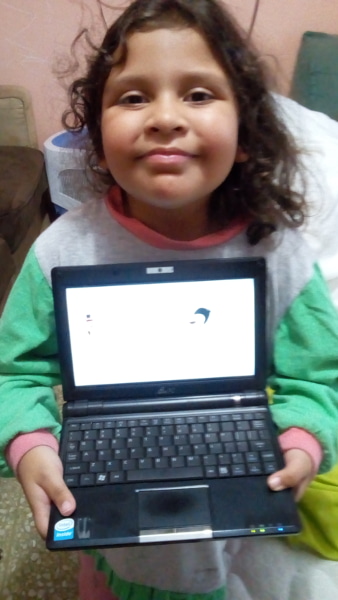
The Return of the Asus Eee PC 900 -- with PicarOS!
It was an amazing little machine that helped me get my tenure at the University where I work, but that I gave away later to a person who needed it to keep studying.
Last month, by pure serendipity, I saw another Asus Eee PC 900 sitting on the display window of a computer repair shop.
I bought it for my daughter, expecting to change the Windows OS to Sugar since her school decided not to lend the OLPC XO computers for take out.
Even though I had my pendrive ready with Sugar, my plan did not work because I failed to consider that the machine is very old and, hence, its architecture is 32 bit. Most Linux distros abandoned 32 bit to concentrate on 64 bit. Sugar does not support 32 bit.
I put old Mandriva 2010 on the HD and, sure enough, the netbook came to life with Linux. There was another problem, though. When I tried to watch Youtube videos, Google told me that the browser was no longer supported and urged me to upgrade to a more modern browser. I checked Firefox and... it was version 3.5.3!
Of course, getting a more modern Firefox from the repos was impossible as Mandriva repos went to nothingness. It was a dead end.
Then Megatotoro reported that PicarOS was out. PicarOS is a fantastic Linux distro that is designed for children and my daughter loves it. Besides, this beautiful OS has a small system footprint, so it was a good option because it still supports 32 bit architecture.
I downloaded the PicarOS Diego 2017 image and, using ROSA image writer, a great USB live OS creator, stuffed it to a 4GB pendrive.
Although the OS booted perfectly, the installation was problematic. I tried the advance mode and, after completion, the machine simply showed a GRUB error.
I tried the automatic mode. No luck: the netbook did not boot.
I tried the manual mode. Same problem.
I booted it live and, starting to feel defeated, looked for another install method. In the menu, under Minino Tools, there was this suspicious entry that I had not seen in PicarOS before. It was for copying the system to an USB or HD, it said.
I tried it. when prompted, I selected the HD of the netbook and waited.... and waited.
A window with a progress bar was there. The window read "Oh. The /usr folder is so full of things!" After a while, the message changed to "Less work to do now" until it finished copying. I really appreciated the humor.When it was done, I rebooted more confidently (perhaps thanks to the humor?) and... GRUB was there, offering me three options: 64 bit, PAE, and 32 bit.
I selected 32 bit and PicarOS Diego became alive!
The tiny machine has everything one needs to work and play. And it loads YouTube videos, too!
My daughter, Eimi, liked it a lot. She got a bit disappointed when I told her that the little machine does not have enough power to play Among the Sleep, her favorite Steam game.
However, she was very satisfied when she could practice her reading using GCompris and got a perfect score, hehe.
![]() |
| Eimi holding the tiny Asus Eee PC 900 with PicarOS |
lunes, 1 de mayo de 2017
Another Year on the Blogosphere
I had started using Linux a bit earlier (2009), thanks to an Asus Eee PC 900 that came with Xandros Linux pre-installed. I did not like the OS, but decided to give Linux a chance after the complete failure Windows was on that tiny netbook.
I changed the OS to Mandriva 2009 and so I became a full time Linux user. No one asked me to migrate; I came to Linux by myself.
![]() |
| Mandriva 2009: Default wallpaper |
Seven years have already elapsed! Seven years in which I have used my computers without worrying about viruses, of seeing computer myths exposed, of watching the world spin from a different standpoint.
Seven years of learning...
domingo, 30 de abril de 2017
KDE Connect from the eyes of a newbie... What sorcery is this?
Of course, I inferred it was something to connect a phone and a PC in some way and enabling the swapping of files in between the two devices, but I really did not care much about it. After all, that is what bluetooth is for, right?
Today, I decided to give it a try on PCLOS.
The first thing I got was a message saying that "No paired device was found" and that I had to install the android KDE Connect app on my phone first. So, I got the mobile app and ran it on the phone. It picked my PCLOS laptop and asked me if I wanted to pair the devices.
I accepted, expecting the app to crash. However, my PC showed me a notification asking me to pair it with the phone. Apparently, the app had worked!
The first option on the phone was to send files, so I selected a picture of Buachompoo Ford, a Thai singer/actress, and sent it to the PC, but I saw nothing happen. "A-ha!", I grinned, thinking that the app had failed on PCLinuxOS. So, I closed it on the phone.
I was getting ready to reboot in OpenMandriva to perform a second attempt when, inside of a folder, I saw Buachompoo smiling..."What??!!"
There was no doubt; that was the file I had sent from the phone with KDE Connect.
I turned off the phone's bluetooth and rebooted the laptop in OpenMandriva.
After pairing, I saw something that read "Remote input".
I tapped it and got a screen with a message giving me instructions on how to control my laptop from the phone.
Again, without expecting it to work, I moved my finger on the phone screen and the computer pointer mimicked my movement. It was nice, but I was not very impressed because I had used a LibreOffice remote app before. This remote, however, let me operate all of my computer: I rotated the workspaces, changed the activities, fired up the browser... and the bluetooth on the phone was off!
"Sassy app, hu?", I said to myself. "So you work via Wi-fi. Let's see you crash when I use the Japanese keyboard on the phone in LibreOffice." I need to clarify that I do not have a Japanese IME on PCLinuxOS right now, so there was no chance typing in that language was supported...
I opened Writer and chose the keyboard on KDE connect. As I expected, the Japanese keyboard popped up on my phone and I typed with a smile that became petrified when I saw hiragana characters appear on the blank page of Writer and change to kanji.
This meme describes my reaction perfectly:
I have to admit that I have seen something impressive on Plasma 5 at last!
jueves, 13 de abril de 2017
Time for a change
Three days ago, I decided to abandon my efforts to rescue my PCLOS KDE4 install, which was destroyed by a connection disruption while updating. I lost my connection for over a week and, when my ISP finally solved the problem, my desktop was so messed up that I gave up on it and decided to give PCLOS KDE5 a chance.
I must confess that I am not a real fan of Plasma 5. However, as KDE4 is going the way of the dodo, I thought that it was better to take the leap and see how this beautiful Linux distro works with KDE's new desktop.
The installation was as easy as it gets. Everything was functioning after completing the process.
With PCLOS, this is my third distro with Plasma 5: Openmandriva and Fedora also have it. Mageia 6 will have Plasma 5 as well.
I am going to miss the independent wallpapers on the different workplaces.
viernes, 17 de marzo de 2017
Update Shyness
![]() |
| Updates? I know you mean well, but... |
It all started when I fired up Synaptic on PCLOS to update packages. Normally, the process is completed with no hassle. This time, however, there was a message about "broken" packages and, since I had never had broken packages before, I decided to log out and back in to see if everything was alright.
It was a poor choice. The DE did not load, so I ended up with a black screen in front of my eyes and desperation all over me. Fortunately, when I logged in as root, the DE was operational, so I fired up Synaptic again and fixed the broken packages. That rectified the problem.
But the update madness had just started. A couple days after the PCLOS incident, I booted OpenMandriva and Discover notified me that there were updates. I must confess that the update process in OpenMandriva has not been easy for me: I prefer to use the Control Center, but sometimes it cannot install some packages and those have to be installed with Discover. Sometimes, the latter simply refuses to load the package list.
In an attempt to circumvent the duality, I used urpmi instead.
I ended up with a system that refused to boot and had to reinstall from scratch. Oddly, after the reinstall, the update went fine. Go figure.
To finish my story, I started Fedora 25 and, again, Discover told me that there were updates. I updated confidently because Discover has never failed in Fedora. The process seemed smooth and I went to sleep, but there was a surprise for me the next morning: Fedora was unable to see the wifi. In fact, there was no kernel module for wireless connection at all!
![]() |
| Then fall, Caesar |
I saw that the problem was that, by an unknown reason, Fedora had installed a very old kernel and was booting with it by default. When I tried the advanced options and booted a different kernel, the wifi worked without a problem, so I specified this kernel in GRUB2 to boot it by default.
Curiously, when Discover updated packages again, there was no problem.
****
So, my distros are working fine now.
But I do get a bit anxious every time I see that there are updates. Even so, it is comforting to see that the problems are temporary.
miércoles, 1 de marzo de 2017
Kdenlive and Audacity... A Powerful Combo for Education
I am very critical of those learning environments because it is easy to claim that technology enhances education without considering the dark side of ICTs.
It was time to give the platform a try. After all, the university is also advocating the use of FLOSS, so...The creation of a virtual environment was rather easy, but to produce content is perhaps the most time-consuming activity. Fortunately, my basic GIMP skills gave me a decent standing concerning the presentation of the different sections.
Then I decided to go ahead and produce a simple video. For this task, I selected Audacity (for recording/editing sound) and Kdenlive (for the video sequence).
I was expecting many problems because I am not an expert in sound/video. In addition, it was my first time with Kdenlive.
The video-creating process was pretty straight-forward, however. I got the still images and organized them to fit the sound track that I produced with Audacity and I never felt confused or got stuck; everything was intuitive.
Of course, my video was very simple, but I can say that Kdenlive and Audacity make a powerful combo for beginners who need to produce a quick video for a presentation.
I need to keep experimenting with them.
martes, 14 de febrero de 2017
A Glimpse of Mageia 6: Mageia 6 Sta2
Of course, I downloaded it and put it into a pendrive to test it on my ZaReason Strata. It booted normally and, after a while, I was greeted by Plasma 5.
![]() |
| OK... where's the cashew thingy? |
![]() |
| The new menu... Very Plasma-like. |
I used the system a bit to see if I could detect certain glitches even though I know this is not a final version. My intention is not to write a review, but to assess potential problems and, most importantly, to get more familiar with Mageia running Plasma 5.
In general, and thanks to OpenMandriva Lx and Fedora, I can say that using the DE was not as awkward as the first time I ran a system with it. However, there are some questions that my test drive is forcing me to ask:
1. Where is the cashew control? The DE was locked to Folder view, which is fine with me, but I could not add any plasmoids to see what gives.
2. Will netdrake be replaced? The network applet was dead. To use the Web, I had to add a new wireless network from MCC. Both OpenMandriva Lx and Fedora use now KDE's network applet... Is Mageia following suit?
3. Is Mageia discontinuing the desktop cube? The effect could be activated, but it was not responsive. I hope it is due to something that needs ironing and the desktop cube will be back in the final release.
Of course, this is a Live DVD. Maybe the Install DVD will give more options.
Upgrade to OpenMandriva Lx 3
The move was sensible; I needed the machine to work in my office at the university and, as they are shaking IT everywhere, I wanted to have software that was more up to date.
However, the upgrade was complicated. The installation part was flawless and fast but, after finishing, when I attempted to upgrade the packages, I would lose display at a given point.
I remember that something like that happened to me when I tried to upgrade OpenMandriva Lx 3. on my ZaReason Strata the first time. Eventually, I solved the problem then. On the HP Pavilion, there was no such luck.
I tried installing from scratch multiple times, both with MCC and Discover, and even with urpmi on the CLI. It seems that the culprit is a package called gtk-lib.
Oh, well. I decided to leave it like that while I figure out if that was a bad repo sync or what. The machine works nice and, if I could survive last year using a 2-year-old system, I guess OpenMandriva Lx 3 will be fine.
miércoles, 8 de febrero de 2017
sábado, 28 de enero de 2017
Almost a month with Fedora...
The experiment ended with the printer/scanner working on OpenMandriva Lx 3.1, PCLinuxOS and, later, on Mageia 5.1. Oddly, although I could scan without any problems on Fedora, the printer was not operational.
I knew nothing about Fedora. After some reading, however, I managed to get everything running, except the Japanese IME, which has eluded me. I hope I will manage to get it to work soon.
It seems Fedora 25 has earned a place among my favorite Linux distros.
My First 12 Days with Mageia 10: How to enable repos with dnf5
Well, 12 days have passed since I migrated all of my desktop, laptop, and portable work system to Mageia 10. I have not used the work system...
-
A few days ago, thanks to one student, I realized that something funny was happening with my Linux netbook. He said that it was weird that I...
-
That's right. My desktop, which runs Windows, is infected and I blame Linux. As it normally happens in these cases, this new infection ...