domingo, 14 de febrero de 2021

OpenMandriva Lx 4.2 "Argon": First Impressions after Install

Today is my second day using the newly released OpenMandriva Lx 4.2 Argon in my desktop computer and I'd like to start by saying that this is NOT a technical review. 


Please do not misinterpret me.  I do not mean that I under appreciate the hard work of the OpenMandriva developers and community in making sure that everything under the hood of this distro functions smoothly; it's quite the opposite.  I, for one, truly value their commitment and effort.  However, I cannot pretend to grasp the technicalities.  I am one of those users who do not understand what "Qt Framework 5.15.2, LLVM/clang 11.0.1, systemd 247, Java 15, Calamares 3.2.35, binutils 2.36.1, gcc 10.2." imply on the system.

My perspective is, then, one of a non-technical user and this is what I have seen so far:

1.  Installation

After booting the live usb on a computer with secure boot and UEFI, I ran the installation process, which I found considerably faster this time.  I believe that the whole process took less than 15 minutes from start to end and it was very straight forward (well, providing that I have some experience installing other distros and OpenMandriva Lx in the past).  The only weird thing was that, when the installation was complete, despite I clicked on "restart the system," nothing happened and I had to reboot the computer manually.

2.   Configuration

I chose to wipe out the root partition and keep the home partition.  In the past, this has given me some problems but this time was different.  Argon kept my desktop settings (wallpaper, effects, panel configurations, etc. with the obvious omission of the programs that were not installed) to the point that I doubting if I had booted to 4.2 or if I was still using 4.1.   Had not been for the Falkon icon pinned to the task bar, I would have assumed it was 4.1 even though I saw 4.2 in the splash screen.  

After I installed my personal use programs (Firefox, Steam, Insync, WINE), I was pleased to see that everything was preserved: bookmarks, games, and synchronized files.  This means that my computer was practically the same after less than an hour.

3.  Responsiveness

The system is working faster than before.  However, I did notice two issues:  the wired connection would come to a halt and the print screen key was not working.

I launched the network configuration and browsed over the tabs without knowing what I was doing.  Yet, I found that, under general configuration, the priority of the connection was set to -100.  I changed it to 3 and the issue was fixed.  

Regarding the print screen key, the situation is that the key assignation for that key points to "launch screen capture tool" and this instruction does not seem to call KDE Spectacle.  I reassigned that to "launch spectacle" and it took care of the problem.

There were some problems getting some Steam games to run.  Those are Windows games but I tweaked some WINE settings and managed to get Tomb Raider IV to function.  I did not have luck with Crayon Physics Deluxe.  Even so, the rest of the programs that I run with WINE are fine.   Bendy and the Ink Machine runs fine out of the box.

Conclusion

From my humble perspective as a non-technical user, I find OpenMandriva Lx 4.2 a solid release and I am extremely pleased with its practically seamless transition and usability.  It is going  to stay as the OS of my production desktop computer for sure.

Kudos to everyone who made it possible and BIG THANKS!!


sábado, 13 de febrero de 2021

Getting Ready to Deploy OpenMandriva Lx 4.2 "Argon"

 Yesterday, the release of OpenMandriva Lx 4.2 was announced.

I already downloaded the .ISO and right now I am putting it into a USB drive (with ROSA Image Writer, which makes the task very easy).

Unfortunately, I do not have time to install it now, so I will do that later today.

The RC was very good.  I hope that the last release is great.

domingo, 7 de febrero de 2021

Test driving Mageia 8 RC

After learning that the Mageia 8 RC is available, I downloaded the live .iso and gave it a quick run.

I must say that, as a user that has been on the Mageia ship since the release of Mageia 1 back in 2010, one of the features that I appreciate from the project is its consistency and visual stability.  

Please do not get me wrong: of course I appreciate innovation!  However, non-technical users of Linux tend to get puzzled after becoming familiar with a distro just to find that developers, in subsequent releases, change the UI so much that they feel alienated by the OS.

Most of the changes in Mageia happen under the hood, so the UI has remained pretty stable from the beginning.  In fact, upon booting Mageia 8 RC, my untrained eye sees no big difference other than the updated wallpaper: Mageia just feels familiar and keeps the consistent Mandriva PowerPack UI (license, country, language, etc).   This is great as I will not feel lost when I decide to install it.

The booting is a bit faster and, soon enough, one is greeted by the Mageia Welcome window. 


I had my usb gaming headset plugged in and it worked out of the box.  I next tried the effects and everything is working fine.


Net_applet picks the wired connection without any hassle and it sees my wireless connections, so I choose one to connect.  Although the icon does not update and indicates that I have no connection, I am online.  In fact, I am posting this entry from the live Mageia RC usb drive.


So, that is the only thing that I was able to see.  No lags, no crashes whatsoever.

This looks like a solid release.  In fact, this RC really feels and behaves like a final release.

Kudos to the Mageia team for their effort!


sábado, 6 de febrero de 2021

Mageia 8 is closer and closer!

Yesterday, I was saddened by the official announcement of the death of PicarOS, the best distro for children.

Today, I read that the RC of Mageia 8 is ready for testing.

This is good. 

I am going to download it and give it a test drive.... Perhaps I will use my daughter's new Windows 10 laptop, hehe.

If my ZaReason Strata dies, I guess I will have to buy a laptop with Windows and dual-boot.  I need to practice...


viernes, 5 de febrero de 2021

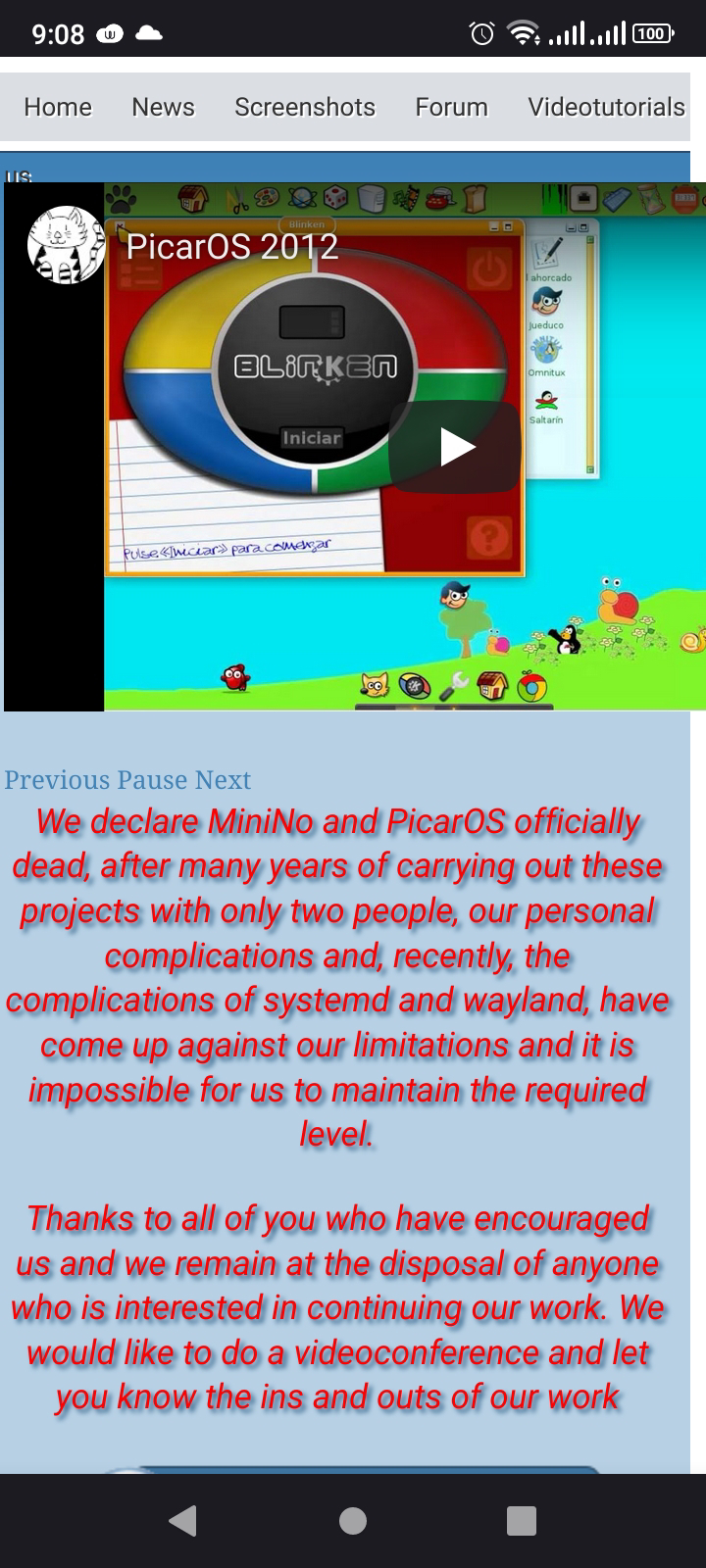
PicarOS and MiniNo are dead!

Today I read the sad news that MiniNo and PicarOS are officially discontinued.  This is a great loss as PicarOS was, by far, the best children-oriented distro I ever used.

I will never forget my daughter's reaction the first time I booted a laptop with PicarOS and how much she enjoyed using this computer!

Bye, MiniNo!  Bye, bye, PicarOS!

sábado, 2 de enero de 2021

First Distro Testing of 2021: OpenMandriva Lx 4.2 Argon RC

Yesterday, I read the DistroWatch announcement that OpenMandriva 4.2 RC had been released, so I decided to download it to give it a quick glimpse.

All the technicalities are found here.  To a non-technical Linux user like me, they do not say much, except for the upgraded versions of the programs I use, like Firefox, LibreOffice, etc.

I really want to see how this new release looks on my desktop, so I used the Rosa Image writer to create the live USB and ran it.  This is what I found:

1.  It does not have any problem to boot with my nagging UEFI PC.  That's great! 


 Notice the "rolling" text...

2.  OpenMandriva Lx 4.2 RC boots fast.  The DE was ready in the live session in around 30 seconds.  Is this what the zstandard does? The description reads "zstandard - new real-time compression algorithm, providing high compression ratios implemented in our kernel, provides faster boot- new real-time compression algorithm, providing high compression ratios implemented in our kernel, provides faster boot."  I remember the old days of Mandriva, when I had Mandriva InstantOn, which booted the computer in 30 seconds or less.

3.  Everything is working: sound, effects, USB headset, and even the WebCam (with VLC)

4.  It comes with the OM Feeling-like user interface changer, so that different users can quickly turn the DE into something that resembles Ubuntu, Windows 7, Windows 10, or Mac OS.  


5. You must install Firefox and GIMP because they do not come with the live version.  But Kdenlive has been upgraded to version 20.12.0!


All in all, this seems very promising!  Great job!!

UPDATE:  I also booted the live USB on my laptop and everything is running smoothly (including the wi-fi and the webcam via Kamoso). 


jueves, 31 de diciembre de 2020

Good-bye, 2020! Thanks for the lessons!

2020 was a year to remember.  It started well too normally, with some distant news about a suspicious disease in Asia.  

However, we had heard similar news before, so nobody here paid a lot of attention.  

Everyone was in a rather hopeful mood.  It was the Year of the Metal Rat and sites were anticipating great luck to the natives of this sign, such as myself.

Little did I know how this year was going to affect me and everyone around me.

Soon, everything turned upside down, uncertainty was oozing from every wall as I was trying to find my way through a slippery moss-covered maze that seemed never-ending.  

I lost money, work increased three-fold and became an alien activity, family members got very sick, and, in general, stress and anxiety became the two monumental columns upon which collective experience rested... 

Some goals had to be postponed, daily life was interrupted and contradicting instructions were issued regularly, adding up to the reigning confusion.  Even my blog was almost abandoned!

When I look back, 2020 does not feel like a year; it is more like a zipped quinquennium, one that got the best of us and wrecked many lives.  It's the zombie year.

But today is the last day of 2020 and I would be truly ungrateful if I said that it was a year to throw away and forget.

This year pushed me to experiment with video/audio resources in Linux in a way that I never thought possible.  Kdenlive, the program that I never understood, became a friend for me and my everyday support for work.  My dream of working from home became an odd reality.  I intensified my home training physically, technically, and intellectually.

This year also drew me close to my loved ones in a way that it is very difficult to put in words...  Family and friends... But I am talking about the good friends, the ones that see you through in dark times.  "The strength of the wolf is the pack", said the wolves in The Jungle Book.

And I would not be lying if I said that there are things that 2020 brought that I do not want to lose when "normal" comes back.

The overwhelming events today feel like heavy, absurd gifts that I do not know how to use.   Like a rain of gigantic popcorn that buried me.

Yet, at dawn, I can say...


martes, 1 de diciembre de 2020

Good-bye, ZaReason!

 I had seen this unfortunate day coming...

The best laptop I have ever owned (and still own, despite being purchased 6 years ago) is a ZaReason Strata.

It is still working great, but I was one of these days fishing the market for Linux laptops, just in case.

When I visited the ZaReason page several months ago this year, I saw that they had very few products.  This year has been tough.

Today, I saw this message on their site:


I must admit that this made me sad.


domingo, 29 de noviembre de 2020

Problems with Video Files and a Nice Solution

Because of the sanitary emergency, I have been teleworking all this year.

For me, this has implied making lots of videos for my students, so I use InShot and Textro on an Android phone to record/ add effects and then I work on the computer for the post production.  I have been relying on Kdenlive (on PCLinuxOS) and OBS Studio (on OpenMandriva and MX Linux, for live streams).

But then, half way this year, I noticed that sometimes the audio of the videos that I edited on the phone with InShot was out of sync when I loaded them to Kdenlive.

As a solution, I used Pitivi on Mageia to convert the videos, which fixed the problem.  This additional step, however, is time-consuming and time has become an even more precious resource right now when one is teleworking. 

Today, I shot four videos and edited them on InShot.  When I loaded them to the Kdenlinve project, to my distress, the audio was not in sync.

I could not afford to run them through Pitivi and use up an average of 15 minutes on the conversion of each clip. I thought that, if I could join the clips together, the audio might be OK in Kdenlive.  I was worth giving it a shot.

I did a quick search for a Linux tool to merge the four clips together.   I found this page here.

The section on MKVToolNix caught my attention.  I installed it on PCLinuxOS and tried the GUI version.  I could not figure out what I had to do (I was really in a rush), so I closed it and, after opening Konsole, I typed the command (substituting the file names, of course):

mkvmerge -o output.mp4 file1.mp4 \+ file2.mp4 \+ file3.mp4

The konsole window displayed some info in less than five seconds and told me that the operation was completed.

In disbelief, I opened the output video file and... yes, the four clips were there in one.

I put that output file on my project folder in Kdenlive and ran the preview to see if the audio was OK. It was perfect.

This helped me finish the post production a lot earlier.


sábado, 24 de octubre de 2020

Japanese IME on PCLinuxOS 64 KDE5 Magnum 2020 1015

I recently saw that my install of PCLinuxOS was behaving funny after and update: the effects ceased working and web pages were loading slowly.

Last time this happened to me, I had to install a new iso because I had been working with a very old one.

This time, however, I had kept up with all the updates thanks to the convenient Simple Update Notifier, but something was not good.

Anyway, I decided to install the new PCLinuxOS 64 KDE5 Magnum 2020 1015.  The installation went well, but I was worried because I normally install the PCLinuxOS GRUB2 on the distro partition, not on the MBR, but it was not possible for me to do it this time, so I was predicting a mess trying to boot OpenMandriva, Mageia, MX Linux, and Elive.

When the installation finished, saw the PCLinuxOS GRUB2 replacing my old Mageia GRUB2, so I booted all the other distros to see if something was broken.  Nevertheless, there was neither a kernel panic in OpenMandriva nor a horrible delay to boot in Mageia.  All was well!  YAY!

I then booted the new install of PCLOS and I was greeted by a more dynamic splash screen and neon icons on a new wallpaper:


The effects were not working, but it was a matter of activating them.  I read the solution in the PCLOS forum:

System Settings>Hardware>Display and Monitor>

The only problem I had was getting the Japanese IME to work.

After trying, I managed to get iBus working with Mozc.  So, everything was good.

But then, after a KDE update, the iBus icon disappeared.

I have tried everything to make it come back with no positive results.

Even so, and although it's a bit inconvenient, I can still invoke iBus from the terminal with these commands:

pkill -9 ibus 

ips -ef | grep ibus  

/usr/bin/ibus-daemon --xim &
 

miércoles, 5 de agosto de 2020

It's the Ides of August!

In Shakespeare's Julius Caesar, Roman general Julius Caesar is given an ominous message by the Soothsayer.  The message is a simple warning:
"Beware the ides of March!"  The ides means the first fifteen days of the month and, come the third month, Julius Caesar is stabbed to death in those first fifteen days.

However, it seems that the ominous month for electronics is not March, but August.  In 2015, I had shared the story of how Nixie Pixel's cellphone, laptop, and desktop broke as soon as August started and how some people believed that this eighth month seemed to bring the death of beloved electronics. I even had to replace my laptop screen that month!

Well, today I woke up to the battery indicator of my ZaReason Strata 7140 sending out an intermittent red flash.

It was the laptop's way of saying to me "Aye, the ides of August have come!"

I turned on the machine and discovered that the battery is at 20% health and needs replacement.

This is pretty expected since the Strata has been working since the first half of 2014. 

Getting a replacement battery for this machine is not going to be easy, though... much less now that the government has shut down many commercial activities due to the Covid-19 emergency.

So, I took out the battery and connected the laptop to the backup power supply for the time being.

While I was doing that, I can swear I almost heard the voice of the Soothsayer delivering the ominous reminder: "Aye, the ides of August have come, but not gone!"

Brace yourself!

My First 12 Days with Mageia 10: How to enable repos with dnf5

Well, 12 days have passed since I migrated all of my desktop, laptop, and portable work system to Mageia 10. I have not used the work system...