domingo, 12 de septiembre de 2010

I got Seven from 7

Last week, as usual, my USB drive got infected from a public computer. What is interesting here is that this was a Windows 7 system. Coincidentally, the malware that jumped to my USB drive was called seven.exe so I checked online to see what it does, partly in jealousy because Megatotoro reported that he got his first beacon.

It turns out that seven.exe is a worm that has been around since 2007 (hence the name) and, consequently, predates Windows 7, which was released in 2009.

Because of this incident, I indulged in some irrational thoughts...

How come a two-year-old threat is still capable of infecting Windows systems in September 2010? I should have expected the so-acclaimed Windows 7 to be immune to the diseases XP and Vista suffered. After all, they called 7 "an UPGRADE". So, what qualities make it an "upgrade"? Apparently, security is not one of them. Spare me the new bar! What is so glorious about Windows 7 if old malware still compromises it? Where are the security improvements? MS Essentials? They take you to fake antiviruses to infect your computer with ransomeware!

I get a new virus from that computer every week and, every time, its owners claim that the system is well protected. It is until I plug the USB drive in Linux that I see the protection Windows systems give me.

No wonder why people are so reluctant to migrate from XP to 7. After the XP dynasty and the failed reign of Vista, one would have expected Windows 7, the successor, to be made of sterner stuff...

jueves, 9 de septiembre de 2010

Las particiones de Mandriva: ventajas y desventajas

Las HP Mini me están empezando a cansar. ¿Por qué HP vende netbooks con el disco duro tan particionado? Cuatro particiones (y dos prácticamente inútiles) son demasiadas. Además, eso impide que uno pueda fácilmente instalar Mandriva, ya que esta distribución Linux crea tres particiones: la partición de sistema, la de swap, y la de home (datos del usuario)

La ventaja del particionado de Mandriva radica en que, si por alguna razón uno debe reinstalar el sistema, sencillamente puede hacerlo formateando la partición de sistema. Todos los datos, elementos personalizados y archivos del usuario se mantendrán intactos. De esta forma, su computadora estará TOTALMENTE lista en cosa de media hora.

La desventaja es que, cuando el OEM misteriosamente crea cuatro particiones, es más difícil para un usuario inexperto instalar Linux. ¿Será esta una nueva técnica para impedir que los "usuarios satisfechos" con Windows 7 Starter migren a Linux?

domingo, 5 de septiembre de 2010

A prickly questionnaire

When people see my OS, they always ask the question "What version of Windows is that?" I answer that I use Linux and most of them look at me as if I had spoken a word in some sort of an alien language. Then, afer I tell them what Linux is and what it can do, most of them give me a funny look, that funny look, as if I were delusional.

I understand that people feel comfortable with Windows, despite the fact that this OS has a talent for hiding or corrupting files, failing to rescue documents, getting all sorts of infections, and "upgrading" to mostly cosmetic features instead of significant ones. After all, under Windows, you can bloat the computer with third-party software to patch holes or obtain the benefits that an OS should give you...or, at least, to try to get very close to that.

However, without third-party solutions, Linux can rescue your files, even when Windows gives up on you. Read this. In addition, Linux has a price that is difficult to beat , and its learning curve has been grossly exaggerated.

I created this questionnaire (based on my experience with Windows) to ask back to those people who think that Linux was not a good idea for me. Maybe, this is going to explain my choice more clearly to them.

A Questionnaire for Windows Users--from an ex Windows user

1. When was the last time that Windows succeeded at rescuing your files?

2. Was the need to rescue files derived from a virus infection, a hacker intrusion, or a normal crash of your OS?

3. Do you truly think that your OS crashes should be considered "normal"?

4. What OS were you using last time you got a virus in your computer?

5. If your antivirus detects a virus but can't remove it...do you know how to remove the threat manually?

6. If you do... Is that an easy process that you can repeat in exactly the same way for all viruses?

7. How long does it take to remove a virus (in average) using your AV software?

8. And without it?

9. Are you happy when you add up the cost of the OS, the office suite, and additional security software?

10. Do you pay for all that?

11. If you pay for your OS, do you do it because you are entirely satisfied with the product, because you are a loyal costumer, or because you have no choice?

12. If you did not pay for your OS, are you a proud pirate?

13. Would you like to get a legal suit from an economically-powerful software company?

14. What would you do if you got one from the company that makes your OS?

15. If you pirate not to pay for software...don't you think that using only free software makes more sense?

16. When was the last time you had to pay for your hard disk to be formatted and your OS to be reinstalled?

17. Do you feel satisfied calling formatting and reinstalling "regular maintenance operations"?

18. If you install your OS yourself...how long does the process take?

19. Did you include the time for the office suite and all the programs that you like in your answer for #18?

20. Do you have any guarantee that the next version of the OS you use will support your printer, scanner, and other hardware?

21. How about the files you made with the office suite you paid for? Will those be supported, or are you going to be expected to buy a new office suite?

22. If you consider carefully your answers for #20 and #21, do you think that the company that makes your OS really cares for your needs as a costumer?

23. If you understand that the company wants to make a profit at your expenses and it overlooks your needs, why do you support it with your money and why are you even willing to pay others to solve the problems that the company's products create?

24. If your answer was "because there is no choice", you know there are other choices. If fact, you are seeing one. Why are you brushing off the question?

25. How much more are you willing to take in the name of your OS? Let me rephrase that, "What does it take for you to try other choices?


I asked myself all those questions a year ago and that explains why I am using Linux today. Of course, I had to learn to operate this new OS and I made mistakes. However, in all this time, I haven't had anything that resembles--even remotely-- all the problems I had with Redmond's OSs. Nothing justifies all the money and time I wasted with Windows in 11 years.

One thing is sure: when my Linux computer finally stops working, at least I will know that my OS did everything possible to keep it alive. Windows, on the other hand, just tells you that your computer is not "good enough" to run the OS. But I learned that, for Microsoft, no currently available computer is good enough to run the latest version of Windows anyway. Mark my words: your nice computer running 7 today will be "obsolete" by the time Microsoft releases Windows 8. However, we know that, although some of the hardware might have become "older", what is actually obsolete for the Redmond software company is their OS, not the computer itself. And they have no regrets about spending any amount of money to fool you into believing that your hardware is to be blamed!

viernes, 3 de septiembre de 2010

Confessions from a Relatively New Linux User

I was a Windows user once. Well, I still am to a certain degree: in my work, I sometimes have to use the XP platform that, with iron claws, resists the burial services that Microsoft has sung in its memory more than twice.

I began my Windows experience with Windows 3.11, jumped to 95 (I still keep the upgrade CD that rendered my computer useless), bought my copy of 98, and even learned to coexist with the rather recurrent BSODs of Windows ME. During those days, my brother received a bonus CD that included promotional software. I remember seeing the word "Linux" there for the first time but, although I felt tempted to try it, I never did. This way, Linux became a distant toll of an unknown bell in my head. To be honest, Windows "Mistake Edition" had grown so dear to me that I stubbornly refused to abandon it to try XP. Yet, my determination failed with the purchase of a new computer and XP became my system of choice. Back then, Microsoft would still let me "choose" my OS...or so I thought.

As a plain user, I spent more than eleven years of my life mastering life-saving secrets to protect my Windows system. The peak of my learning took place during the XP dynasty; my brother, who has always been two steps ahead of me, gave me fine weaponry that included a zombie monitor, an antivirus solution, a firewall, a malware monitor, multiple vaccines for USB drives, programs for regaining browser control and many other third-party software solutions that supposedly transformed my Windows system into the desktop equivalent of an M1 Abrams. Yet, regardless of all protection, my computer was still vulnerable. Mysterious viruses would easily filter through cracks invisible to the untrained eye and nest in the untouchable brain tissue of the OS. Therefore, shamanic rituals were required to keep my desktop usable...some more aggressive forms of therapy, like formatting, had to be repeated once every three months to keep malware from growing and spreading.

Then, Vista came along with its bothersome "Are you sure you want to to this?" and virtually the same problems XP had. I began suspecting that there should be more to life than that never-ending sense of vulnerability.

Thanks to a netbook, I had contact with the Penguin again. This netbook was powered by Linux Xandros, an OS that I decided I loathed despite being invulnerable to well-known threats, so I replaced it with the familiar XP. It was a deadly mistake: because of the modest metrics of the netbook, XP would take five minutes to boot, menus would freeze, and XP ate disk space avidly...not to mention that I had not even installed the office suite! With Xandros, the computer was fast as a bullet (30 sec to boot), had enough disk space to work, and even received voice command! Thus, I decided that, if I was to use Linux, I had to find a Linux that I liked.

I knew nothing about Linux then, so my impractical (yet fun) plan was to download distributions at random and to test them one by one. Thus, I got Kubuntu first. I liked the way it looked, but there was a terrible flaw: it did not activate the wi-fi.

Hence, I downloaded Mandriva 2009. If it failed, my next choice was Linux Mint Gloria...but Mandriva picked up the wi-fi without my intervention. For me, that settled the matter and I installed Mandriva to the netbook. With it, the machine worked almost perfectly, except for a nuisance: one had to turn off the computer manually. "If I could live with viruses all this time, I can certainly overlook that problem", I said to myself. Nevertheless, I did not have to deal with that issue for long. In November 2009, Mandriva 2010 ("Adelie") was released and this new version took care of the shut down problem.

I cannot say that my journey with Linux was a rosy road. I have discovered that Mandriva has several flaws (the way of handling uninstallation of dependencies is, by far, its Achilles' heel). However, my determination not to go back to the world of viruses has pushed me into learning about Linux. Today, I'm using Mandriva 2010.1 ("Farman") and I'm the happiest camper.

Although my brother was reluctant to try Linux at first, he discovered SimplyMepis and fell for it. And, despite his somewhat tardy start, he is still two steps ahead of me.

Some weeks ago, he asked me if I remembered that almost-forgotten bonus CD with Linux. He said that he ran it to see which Linux distribution it contained.

"So, which distro was it?", I asked.
"Mandrake", he replied.

When the disciple is ready, the master will come.

sábado, 28 de agosto de 2010

Are these actually PC problems?

When this blog was born, I wanted to record everything I was learning from computers. I believe that a computer is a great tool when it works on your side and not against you.

Since I started recording my experiences here, I have seen many problems and read a lot online about many more threats. Interestingly, they are all reported as PC issues. Among the most common situations one can find:

1. Rarely are USB drives clean. It doesn't matter what your antivirus software tells you (AV technologies catch in average 19% of threats according to statistics). Once those jump into your HD, prepare for a whole lot of fun trying to remove them.

2. Portable Hard Disks are not immune to USB viruses. USB viruses think of them as gigantic flashdrives.

3. Security is almost a synonym of insecurity. Even the highly-praised MS Security Essentials got hit and cooperated with viruses!

4. You must be prepared for your system to fail, be it due to a system failure or a user-caused problem. Sometimes it will happen sooner than expected. How about four months (as in this case)? Well, that should give you a reasonable time span for you to make your back ups... Being computers fallible and vulnerable, users should bear and grin when these problems occur.

-------------------------------------------------------------------------------------------------------
Well, I disagree. I also bought a netbook four months ago. It is, by definition, a PC, but it has not crashed so far. It does not get infected regardless of how many hours I spend online everyday or how many infected USB drives I plug to it (I have seen 53 different viruses in two weeks). So, it is secure. When people ask me about my efficient antivirus, they open up their eyes in astonishment as they hear that I do not have an antivirus because my OS protects me; it is is my antivirus.

An experienced reader who goes online under PJCOLON once said: "It's disconcerting that when the so-called technical publications report on malware, trojans, botnets, etc, it is always a PC problem they never call it out for what it really is: A Windows OS/application problem. I'm using a GNU/Linux powered PC and I do not have any malware problems. Do you?"

So, PJCOLON is right. Those in the list are not PC-bound issues, but OS problems. The press should start reporting them as what they really are: the intrinsic flaws of Windows, not of PCs. My Mandriva desktop has none of those. Nor does my Mandriva netbook. As far as I have heard, the other members of the Linux family (Mepis , Pardus, Ubuntu, Linux Mint, Fedora, Sabayon, Arch, and the rest) that run on PCs stand solid against viruses.

However, before you migrate to Linux, you must know that, as in any change of OS, a successful migration depends on intelligent choices and understanding of the situation. I will discuss that later.

martes, 24 de agosto de 2010

My Linux Computer is Acting Weird


A few days ago, thanks to one student, I realized that something funny was happening with my Linux netbook.

He said that it was weird that I was unafraid of USB viruses when I used my computer. Because of that comment, as in a Joycean epiphany, I discovered that THERE MUST BE SOMETHING TRULY WRONG with my netbook. Let me explain:

Since I installed Linux, I haven't seen a blue screen of death--Not even a flash of the scary blue. That's WEIRD.

It is also very strange that my Linux system keeps showing me invisible files stored in USB drives. I am not talking of hidden files. I am talking of many folders that I haven't created; they appear spontaneously when I plug in my USB drive onto any Windows computer. Of course, in Windows, I have no problem because the hideous files remain unseen. What's more: the antivirus constantly tells me that my USB drive is clean. Yet, when I use the flash drive in Linux, I can see them: lots of folders, sometimes with cryptic names, sometimes executable files with the name of my real folders. They are viruses! How am I supposed to have peace of mind if this Mandriva Linux OS keeps showing me how infected my USB drive actually is?

Moreover, it's very weird that my Linux computer refuses to behave as a normal Windows computer. I can get rid of those viruses in two clicks. I do not have to disable system restore...I do not have to boot in safe mode, mess up with the Windows registry, nor run full scans that take forever. Why is Linux so strange?

But here comes the most remarkable thing: my computer, regardless of the quantity of viruses I store in my USB drive (if I decide not to delete those files, of course), keeps WORKING, unaffected by the frightening threats! Now, that is TRULY WEIRD. Why would a person want to have a computer like mine, that is invulnerable to the scourge of USB viruses?

I turned to my student and said to him: "You think that my keeping of the USB viruses is weird. Well, they are harmless in my computer. I believe it's weirder to know that these viruses can destroy your OS and you, as a meek sheep, simply accept to live with that condition".

I saw something sparking in his eyes as another student asked me to help him install Linux in his computer.

sábado, 21 de agosto de 2010

I Lost the Discs (with the drivers)

Today, as I was moving all the furniture to another room in preparation for the coming of the baby, I had to put together my wife's deskptop. The last thing was the installation of her new Logitech WebCam. To say "install" is an exaggeration because all I had to do was plug it in one of the usb ports of the desktop computer and open the program named Cheese! (Yes, as many other women, my wife also uses Linux and understands it pretty well, although Mark Shuttleworth might not believe it). That was all: plug and play. Nothing complicated to do.

Then I rebooted her computer in Windows and placed the CD with the driver on the tray to install it there. I cannot say that it was necessarily difficult, but I had to reboot three times following the instructions to get the device running.

The interesting part of the story took place when she told me that she wanted to give the old cam to her sister. So, I packed it inside the box of the new one and remembered that I needed the CD with the driver for the cam I just removed. When I asked my wife for the CD, she simply said "It must be in the box where I keep all the things for the laptop. If not, I don't know where it is".

As she is 37 weeks pregnant and cannot move much, I found the box and checked it, but the camera driver was missing. For a split second, a flash of an ancient fear traveled through my body. My wife saw my face and calmly said to me: "Maybe I lost it..." I immediately understood my wife's peace. SHE NEVER USES WINDOWS ANYWAY. If ALL the drivers are lost, what is the problem? No worry whatsoever. A Mandriva install gave her everything she needs to use her computer.

Too bad for her sister, though. She uses Windows and must either download the lost driver or wait until my wife finds the disc.

sábado, 14 de agosto de 2010

Windesperation

As I was browsing the Web, I read this comment of a user who considered that Windows is a necessary OS "to get things done". He said this in the context of his disappointment with Linux because of the need of the command line (it was actually Ubuntu that he meant, but people very often fail to understand that Canonical's distro does not represent accurately all other Linux distributions).

At home, I have a dual-boot desktop PC that starts by default with Mandriva Linux 2010 Spring (PowerPack). The other OS is Windows XP SP3, which I had not used for more than three months until today. After I read the comment, and since I hadn't used Windows at home for quite a long time, I thought that it would be fun to boot my desktop in XP to finish installing all the software that was pending after my last formatting, so I restarted the system in Windows "to get things done" and this is what happened:

The First Woe: Fear the Curse of Fear
The PC greeted me with the long-forgotten warning: "Your Antivirus is outdated. Click here to update it". After enjoying antivirus-free Web browsing with Mandriva, one quickly forgets that this warning is the second display of affection that you obtain in Windows after not using it for a while. Well, I complied and clicked for the update. In so doing, I remembered that Spybot Search-and-Destroy was also outdated and, logically, I asked for an update of that program, too. After a five minute wait, both programs were ready, so I immunized the browser with Spybot and decided to run both Spybot and the antivirus to see if they could catch something...an action that took me to woe number two.

The Second Woe: Do You Care for a Byte of Memory?
The download of the AV updates was acceptable, but you know that scanning for viruses is not usually a five-minute operation. Thus, I braced myself for a rather long wait...But why waiting? I did not turn my computer on to WAIT, but to GET THINGS DONE! So, I boldly opened Word...well, "tried to open Word" is more like it. XP eats memory like candy and, when running two different scans at the same time, you understand how slow your PC can become. I took a peek at the progress of both programs and the bar discouraged me. Hence, I forgot about Word and decided to kill some time with a game that is not too heavy on resources. That lead me to woe number three.

The Third Woe: Can the Taskbar Multi-task?
The answer is NO, of course. Since the two scans prevented me from working, I opened a game. But I silenced the effects and the music and opened Winamp (a very old version that I like because of its light weight) to play music. When I was surrounded by twelve flying insects on Planet Formica and the battle was becoming interesting, XP closed the game. The reason? A memory violation...

I thought: "OK, if XP does not want me to play, I'll GET TO WORK!" I located an anti-malware program and decided to install it. But first I waited for the scans to finish. After 40 minutes, they stopped and reported no threats. So I installed the program only to remember woe # 4

The Fourth Woe: Karate Kid Computer, Turn on / turn off
In Linux, the ritual of rebooting after an install becomes a hazy memory buried in the back of your brain. But this WAS Windows, not Mandriva Linux. With full lungs, XP said to me, "I don't care what you do in Sparta, but THIS-IS- BOOTLAND!!!" and I had to reboot to try the program... After almost an hour, I was getting closer to getting things done at last.

But then the firewall blocked the anti-Malware program. When I was trying to solve the problem, the firewall showed an alert of a high-rate attempt to access my computer from the outside. And then, it flashed a warning: "the Win32 Sality Virus that disables antivirus programs is becoming too common. Your version of the firewall cannot stop it, but an upgrade of the program can. Do you want to upgrade for free?" A year ago, I would have clicked YES immediately. However, more than an hour and 15 minutes had elapsed and I had not accomplished anything. The missing installation required me to knock off the firewall, but the firewall was asking me to update! This was too much. I felt completely unproductive in front of the computer. I was mad while I thought that this was XP, the most popular OS today. From what I have seen happening to happy users, Windows 7 performs pretty much in the same fashion, except that it requires more computer resources to run properly. That, in itself, is a funny paradox. I buy clothes that fit me; I do not buy shoes too wide for my feet hoping to fatten until the shoes fit. However, Microsoft expects you to drop XP and buy Windows 7 and to buy new hardware if your PC does not fulfill the requirements for 7. So, Windows is an OS to which the computer has to accommodate! Shouldn't it be the other way around?

Overlooking that fact, you still have the same rebooting rituals and security problems in Windows 7. But wait, there's MS Security Essentials! As it is stated here, it is a paradox that the Essentials are not included with the OS. I laughed in relief at the fact that Microsoft does not make cars for, if the Redmond company did, you would probably have to go to MS EssentialsGarage after buying your car to get the brakes and the door locks! Of course, you would be very happy because you get them for free. (?!)

Following a freeze during installation and a reboot, the program finally decided to launch. I updated it and guess what? The computer asked me again for a reboot. So I rebooted it... only that this time I started Mandriva.

Windows for getting things done? Good joke.

sábado, 7 de agosto de 2010

Some Notes on Linux Effects

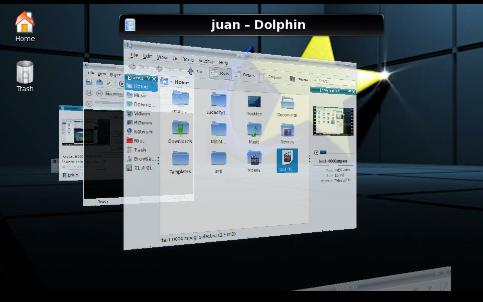
One of the many attractive features of Linux is the possibility to add beautiful effects to the desktop. Compiz provides the best known set of effects and they can be used both in Gnome and KDE distros. You get this set by installing it from the distribution repositories. However, KDE has its native effects, which are also nice although a bit stiffer: Kwin. (This is Kwin's flipswitch, an application switcher effect that is is also seen in Compiz and in Windows Vista)
However, Compiz also has the Ring Switcher, the Fire-writing, and many other effects. The problem is that some of the possibilities are mutually exclusive. For those who like this kind of eye candy, I'll point out two features in which Compiz and Kwin differ:

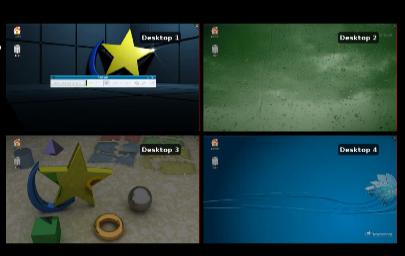
1. Different wallpapers in the multiple desktops
As far as I know, this is only possible if you are using Kwin effects. Somehow, the plasma environment does not enable the different wallpapers with Compiz. Here's the desktop display in Compiz. All wallpapers are the same:

2. Skydome
A skydome is the animated background that moves as you rotate the cube in Compiz. It is pretty impressive when you have a background image that merges on both sides.
However, if you have Kwin, although you can change the background, you cannot animate it to follow the rotation of the cube. This is the Kwin cube with its fixed background:

Of course, the Compiz set has a lot more effects than Kwin does. Nevertheless, I've seen that Compiz makes KDE unstable in certain computers. Kwin effects, on the other hand, do not seem to cause this problem.

So, if you want to beautify your KDE distro, take this information into account and remember: No four wallpapers if you get skydome. And yes, there are other effects, too, like the ones that Metisse incorporates. However, that is the matter of a different discussion.

Some people consider effects a waste of computer power. They may be right but, in my modest opinion, the cube, the multiple wallpapers, fire-writing, water, and snow make my computer environment more appealing to me. I find this aspect significant because, believe it or not, those pieces of eye candy become quite relaxing when you are trying to write an article on, say, Japanese acceptance/rejection ambivalent syndrome or the dark night of the soul in T.S. Eliot's Four Quartets and the muses decide to hide from you. Plus, when the poor souls trapped in Windows 7 Starter see me enjoying my writer's block by playing with the desktop effects, they always ask themselves why I get so many cool features for free and they have to pay to be able to use the over-rated Aeroshake.

martes, 3 de agosto de 2010

窓辺ななみがしょうじきですね

これはおもしろいです。知らなかったけど、日本では、Windows が アニメ の せいかく が あります。


しょうじきですね!WIN7の窓辺ななみ は やっぱり しっぱいしますよ。でも、これは一番おもしろいだと思います。いろいろなOS が でてきて、たのしそうです。分かった、WINXP は 美人ですが、WINME は 本当にかわいいですよ!! 


おもしろいでしょう?

lunes, 2 de agosto de 2010

If Linux is not for Everyone, Neither is Windows

When contrasting Linux and Windows, one frequently hears the fallacy that Linux is not an OS anyone can use. Read this reaction about it. That recurrent argument is based on several misconceptions that I would like to discuss but, first, let us clarify something: there exists no such a thing as an easy, perfect OS. There is always a learning curve when using a system and the more you get exposed to an OS, the more "manageable" it seems. But easiness of use is only a perception, a mirage. Now, let us take a look at the misconceptions.

A. Simplicity:
Some people believe that you need to know many of the hidden arcane secrets of computer sciences to be able to operate a Linux system. They say "You must know command line to use Linux". That is not necessarily true. I will present you two cases in which Windows cannot beat the simplicity of Linux:
1. Erasing USB viruses
Those pesky .exe files become a real nightmare in Windows once they jump from your USB stick to your hard drive. Talk as much as you like, but neither MS Security Essentials, nor antiviruses beat the two-click solution in Linux to get rid those annoying viruses. Yes, in Linux, you just select the virus and delete it from the USB drive and the problem is gone forever. You need no scans for reassurance, with the implication of the waste of time. Clean and fast. A simple five-second operation...or maybe less than five seconds (that depends on your trigger-happy abilities with the mouse).
2. Installation
In Linux, you install only once and you get pretty much everything you need: the OS, the Office Suite, and a good assortment of useful programs, not demos. After installation, you just have to start using your system. No need for entering long strings of numbers to activate anything... In Linux, you forget about registering software, or unlocking, or downloading additional programs to unlock the OS features that you were supposed to get in the first place.

It is true that you might need the console if you want to do something additional with your system. However, that depends on two factors: what you intend to do and the Linux distro that you are using. About the former, most people I know only use the computer to do simple things, like browsing the web, making documents, and keeping in contact with others. All Linux systems excel at that, with the additional plus of security. Concerning the latter factor, if you use Mandriva, Mepis, Pardus, or PCLOS, chances are that you might not need to use the console. I'm not sure about Ubuntu, as it is based on Debian testing, but if you do not stumble with your hardware while taking your first steps, I think that even Canonical's distro can work for you.


B. Support

Who hasn't heard "Windows is backed up by Microsoft" as some sort of unquestionable guarantee of support? Linux, some say, does not have a company behind to help you when you have hardware problems. Now, we have to be open minded here. Who says that Windows will not give you hardware-related headaches? Remember that Windows produces the illusion of being efficient on hardware BECAUSE of the drivers released by hardware manufacturers, not because of the OS itself. What if your shiny Windows 7 lacks the driver to use, say, your scanner? That being the case, your scanner becomes an expensive piece of garbage in Windows. If there is no driver, then you either have to get new hardware or to downgrade. Do you remember Vista and its infamous hardware incompatibility? Many people were furious because, after paying for Vista, their printers did not work. But, if there IS a driver, (and you are sure because you had it on the DVD that you lost) then your option is to go driver-hunting online. If you are lucky and find it, then you have to install it... Going back to reality, the vast majority of people are so uninformed that will end up depending on a technician (who will rip them off) or on a friend who has more experience. I wonder how many of them actually depend on Microsoft every time they have a problem with their computers... I challenge you to try it: Next time your computer breaks, instead of calling a techie or a dependable friend, call Microsoft for support...as in the case of Windows 7 and the laptop batteries that has been discussed to exhaustion...

I would like to finish with an anecdote. Last week, a person came to my office because he wanted to show me something online. I let him use my computer, which was running Mandriva 2010 Spring and, after ten minutes of use, this person realized that he was not using Windows because the ALT+64 keyboard combination did not give him "@"...He used Mandriva Linux for ten minutes and did not notice it was not Windows!

If Linux is not for anyone, I guess Windows domestication is not for all of us, either.

My First 12 Days with Mageia 10: How to enable repos with dnf5

Well, 12 days have passed since I migrated all of my desktop, laptop, and portable work system to Mageia 10. I have not used the work system...