jueves, 29 de noviembre de 2012

Going from A to B in KDE, GNOME, and Windows

As a Linux user, I've learned to appreciate the differences of doing things using the different desktops available.

I started thinking of how one can see going from point A to point B in KDE and GNOME and I could not help to find some amusement in this metaphor.

Ready for the ride?  "How do I go to B?  Let me count the ways:"

KDE: 
Wanna go to B?  Take this path...or maybe the one less traveled by.

The KDE way(s)
KDE is famous for having multiple paths for traveling.  Do you want to turn off the computer?  Well, you can use the menu, or you can right clic and select LEAVE, or use the widgets that are normally placed next to the clock on the bottom panel.  Hey, even the cashew gives you an option to turn your computer off!  KDE developers want to keep choices for users.  I personally like that approach because, despite what some people say, it does not reduce my productivity.  Actually, it keeps my brain sharp.

However, I must admit that, when you first travel the KDE path, it can look remarkably like this:


GNOME: 
Wonderland?  Simply go down the rabbit hole, Alice.
Simplicity is Gnome's motto.  To travel from A to B in Gnome is like taking a pleasant walk inside a cool, futuristic tunnel: only one path, shielded from outer interference, conveniently signaled and illuminated for you.  You cannot get lost!

There is a downside to it, though.  In fact, some experienced users find Gnome's approach over-restrictive, almost claustrophobic.
Follow the path.. You cannot miss B!

I am not writing this as a complaint, for I am sure both approaches appeal and satisfy different users.

How could I complain about choice?

Wait, I do have a complaint!

I used it for over 13 years, but I still resent the Windows way!

Windows: 
Thou shalt not go to B (unless you disobey the rules) 
Windows would tell me that going from A to B was either impossible or forbidden.  Want your computer to wake you up to a song?  To have a wallpaper?  Or more recently, to have a menu?  No way!!

But you could always circumvent the prohibition with third party, often cracked software.  Then, why blocking the road in the first place?
Microsoft, you might not want it, but users want to go to B!


sábado, 17 de noviembre de 2012

That's the plan!

Well, the end of this semester will mark the end of an extremely busy year that kept me away from this blog.  So, I wrote this quick post to remind me to come back once the craziness has subsided.

As soon as I get some time for myself, I plan to:

1.  Read-- and write some articles!

2.  Watch some Asian films or TV programs

3.  Try out some Linux distros.  The priority list includes Pardus Debian, Pardus Anka, Moondrake (unnamed loser or whatever Mandriva 2012 gets to be called), Parsix (the return of Gloria, hahaha), MiniNo,and Mint "Nadia"-- I lost count of the version already!

4.  Migrate my desktop from Mandriva 2010.2 to ... I haven't decided yet.  It is going to be wise to decide on an OS BEFORE migrating :P
One thing I know for sure, it won't be Windows 8 ;-)

Although I tried to see the second alpha of Mandriva, success has eluded me so far.  I managed to get it installed on a 64b VM, but  I could not see much of it without an X server.  It's too bad I presently do not have real hardware to test the distro.

I already tried the second alpha of Mageia 3 and it's looking good.  Sadly, I couldn't post anything about it because of... yes, lack of time thanks to the reports I have to prepare for the end of the semester.

But Megatotoro and I will try another experiment involving free software during the International Congress at the university where we work.  That might be a little daring, but it will be interesting.

Let's see how everything goes.


sábado, 27 de octubre de 2012

From Junk to a Security Station; How Mepis Gave New Life to a Discarded Computer

Last week, a project that had been brewing for quite a while became a reality. 

We wanted to set up a basic security camera for the office where I work but, as the University is short of budget, all we were given was a webcam.   With that contribution, the whole idea was pretty much a long-term goal (or a dream, to be more honest, given the circumstances).

However, I learned that they were discarding some "old equipment", which included computers.  I asked for one of those machines marked as "not-working" and could get a computer in which Windows XP ran so slowly that you could literally age before being able to type a letter with it.

With that poor wreck of a system, the webcam, and Megatotoro's help, we could make the security system dream a reality.

First, Megatotoro wiped out the HD and installed Mepis 11 to it.  Boy, what a difference a good OS makes!  The computer started performing decently.  To use an analogy, it went from snail speed to that of a marathon runner. 

Second, as the webcam was a Logitech model, Mepis recognized it instantly, without the pain of go driver-hunting.  Ah, and since Mepis has VLC, everything was ready for starting the security cam project.

The streaming capabilities of VLC made it easy to capture video from the webcam and store it as a local file.  I learned how to do this by accident a while ago and the process is rather simple:

1.  Under the menu FILE, I clicked on streaming.
2.  In the window that opens, I selected the tab CAPTURE DEVICE
3.  Now, this is the interesting part.  In the line SELECT DEVICE, I typed /dev/video0, and then clicked on STREAM.  A new dialog (Streaming output) opened and I clicked "next".
4.  Then I selected "show locally" and used the drop-down menu to select VIDEO THEORA+VORBIS (OGG)
5.  Finally, I clicked STREAM and voilà, the webcam started showing and recording video!

The humble computer is now there, working non-stop, like a true champion...And the rest of the workers became interested in Linux when they saw what it can do.

After all, who would have said that a discarded computer was going to resurrect as a modest, but effective security station? And for a total cost of $0? All thanks to Linux, free software, and people who know that the Windows paradigm is not the only reality that there is.


miércoles, 10 de octubre de 2012

Children, beware! This monster came for you!

During the celebration of the Software Freedom day, there were several activities in the University where I work.  I realized that day that the One Laptop Per Child project was working in my country.

The Browser came to get ya!!!
Today, I discovered that the Quiros-Tanzi Foundation, the NGO that handles the XO computers of OLPC, launched its first TV campaign to promote the goal of distributing the inexpensive computers.  The TV ad features a simple concept: children are afraid of a hideous creature called "The Browser," who can find them anywhere.  The point of the ad is that children should not see technology as a monster. Interestingly, this 2009 video proves that even adults ignore what a browser is!

 When I saw the TV feature, I found it rather fun and could not help but to think that it was inspired by the imaginary monster called "the Backson" in a Winnie the Pooh movie.

The case is that "the Browser" is enjoying a wide acceptance and, more importantly, this "monster" has put the OLPC project on our local map.  Of course, I am now waiting to see the reaction of Microsoft and its sidekicks now that children in the country will be exposed to Linux in elementary schools...

You can see the ad (in Spanish) here, followed by my rough translation of the song.

They say that it has donkey ears,
pig hooves, and its body is covered with fur,
he has a giant eye and an awful breath.

The Browser, the Browser,
Everyone, it's the Browser!
The Browser, the Browser
He is coming for us!

Child: "And how does the Browser find you? "
The Browser:  "They are about to tell you"

He can find you inside of the closet,
he can find you in the dark of the night,
and even under your mother's skirt!
They say that he morphs into objects,
he fits in the freezer
and he finds you at the concert...
Everywhere he's going to find you!

The Browser, the Browser,
Everyone, it's the Browser!
The Browser, the Browser
He is coming for us!

jueves, 20 de septiembre de 2012

The underdog is on the loose! A glimpse of Mandriva 2012 Alpha1

Breaking news!  Mandriva is not dead.  Or maybe it was and came back to life,  not as a zombie (Bernie Lomax) this time, but as a modest, yet persistent dog that simply refuses to give up the race.

Yes, the Alpha 1 of Mandriva 2012 has recently been released.  Its code name: Tenacious Underdog!

I dowloaded the i586 .iso to give it a try on a Virtual Machine and see if it works better than Bernie Lomax, its predecessor, did.  By the way, the TP ran like a charm in my humble opinion.  Can the underdog outperform Bernie?
This is what I saw:

Installation process:
Say hi to the crazy penguin
The process is as simple as it gets.  As usual.  By the way, I do not agree with the idea that the presence of this penguin weakens the perception one can have of the distribution.  After all, computers should not be so serious.  Gimme games, Easter eggs, funny names, and the crazy penguin.  Let's bring back the joy of using a computer, shall we?


I like the penguin family!  It looks like mine...

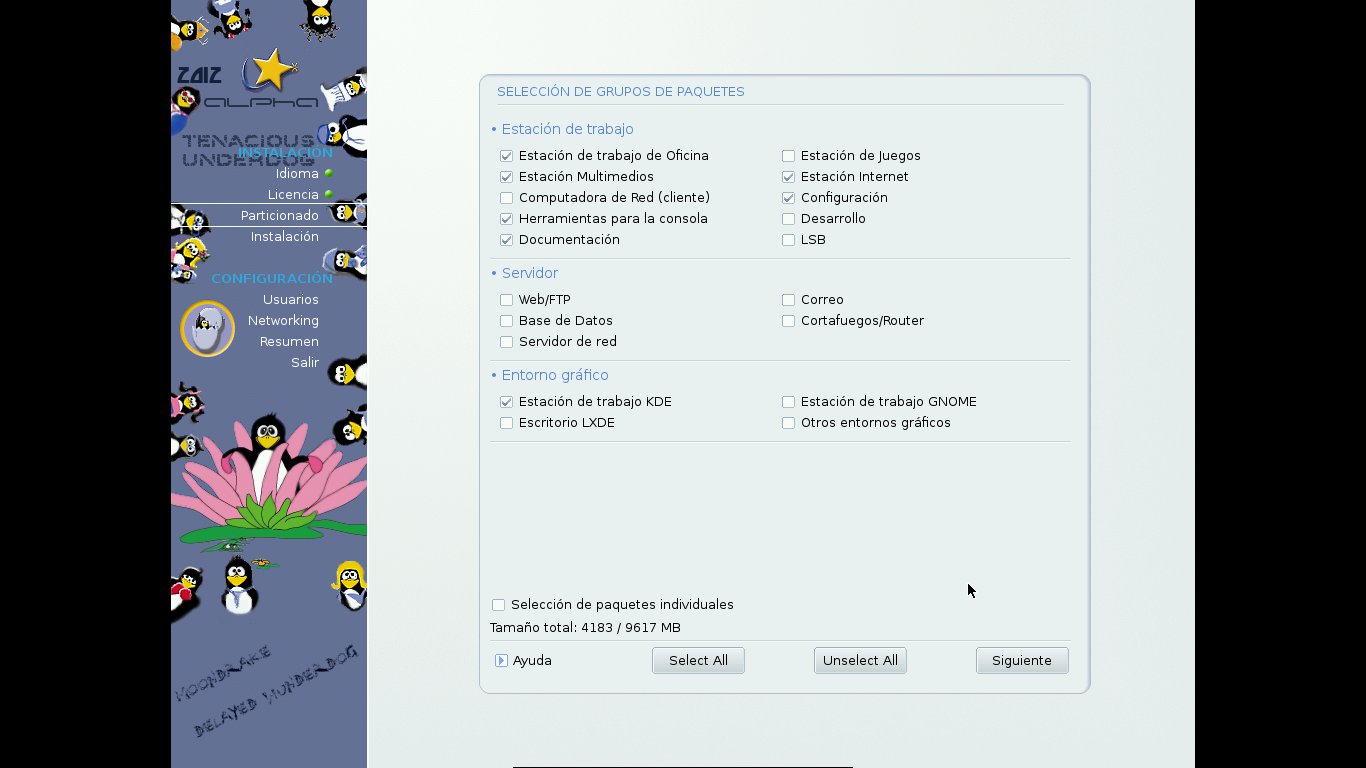
This is a nice feature. Here, it is possible to install many different packages right from the start.  Some might think that this scares newbies away.  Well, this non-technical Linux user simply drools over the options and checks all that seems interesting.


This is familiar territory

After completing some intuitive questions, the distro takes some time to install...


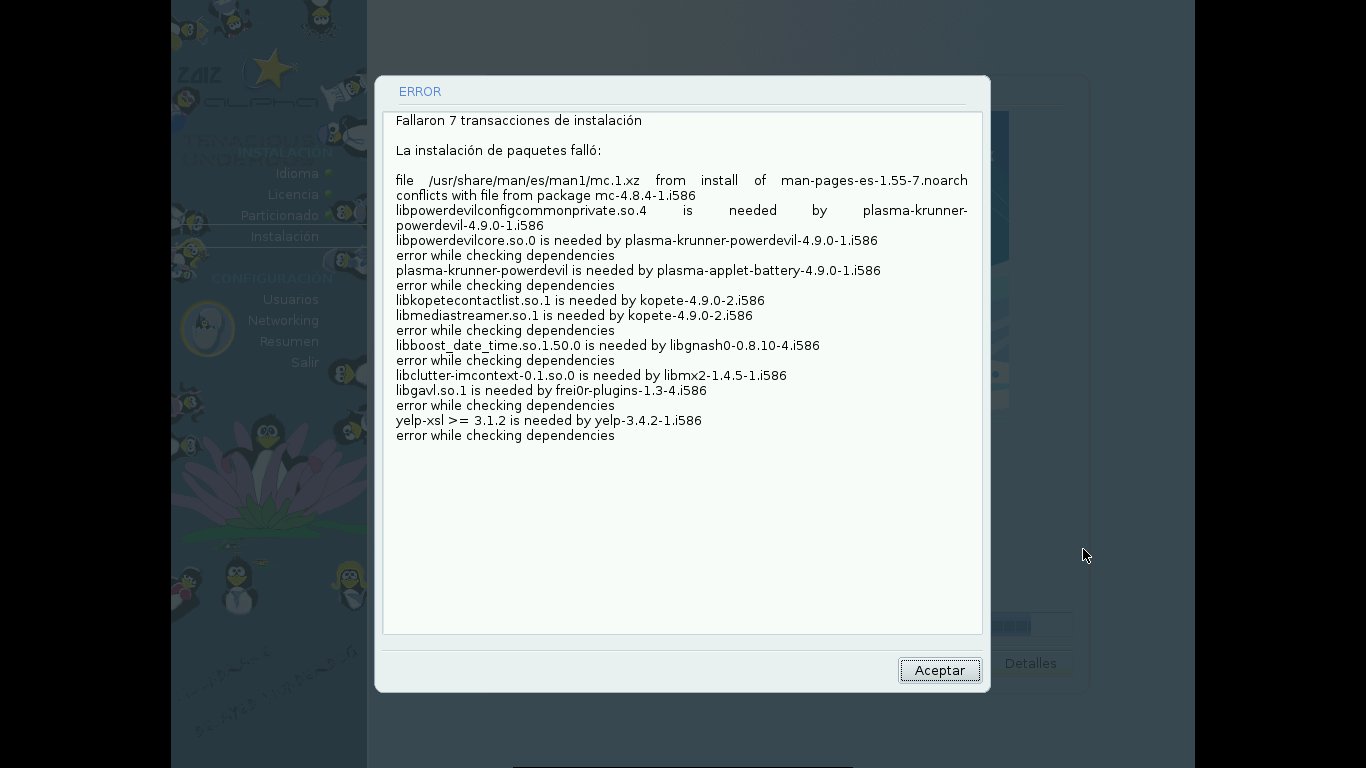
Oops!  The Spanish installation failed...
Now, this was unexpected: the installation did not finish successfully.  Before blaming anyone, I just reminded myself that this is an alpha, so some features might not be included.  I started the installation again, but in English.
*UPDATE: Per Øyvind Karlsen has fixed this issue already! 


The English install worked perfectly
The process completed the GRUB stage and then I could set up the monitor and select an IME.

This time, everything went as expected.


Desktop:

After the install, you see the same elegant log in screen that Mandriva 2011 brought.  Paradoxically, my account avatar is a cat.
You guessed it; I'm not a dog person...
You get the ROSA SimpleWelcome, launcher, stack folders and timeframe.  As I have said, I now like them a lot better than before.
This is the default desktop
I quickly downloaded a Mandriva wallpaper from the KDE pool and modified it with the GIMP.  The dog that is climbing the fence to abandon the land of oblivion seems right for the composition
 The desktop wearing something more appropriate


Final observations:

This release includes KDE 4.9.0.  It's good to see Mandriva sporting new technologies.  Best of all, this desktop environment seems well implemented, which is far more important than just having it.

In the office section, I miss the rest of the LibreOffice suite (only Writer and Calc are present).  Not a big deal; you can download the rest from the repos.

Ah, but my personal test is the factor that determines if I will continue being a Mandriva user or not.  Can it handle Japanese input?
The answer is YES!
iBus + Anthy work flawlessly.
Mandriva, I'm sticking with you.
To Per Øyvind Karlsen and all Mandriva developers, thank you for your hard work.  I'm truly looking forward to seeing the final 2012 release. Judging from the quality of TP and Alpha 1, I'm sure that Mandriva 2012 will conquer my PC, putting an end to the long reign of Mandriva 2010.2.

lunes, 10 de septiembre de 2012

Mageia 3 alpha 1 is now available

Yes, I know this version is for tests and not for reviews.
Well, that's OK because I just want to see if Mageia 3, at this early state, shows some changes and to test how it works.

Very briefly, the installation process is pretty much the same that you get for Mageia install versions (very similar to Mandriva PowerPack).  Therefore, one must install the distro to be able to see it in action because this image is not a live medium.

Once completed, I expected to see GRUB 2, but it seems Mageia 3 still boots with the GRUB I am accustomed to using.

I used the Mageia control center to add new media and retrieve software form the repositories.  Basically, I wanted to download Anthy and Japanese fonts to test if iBus works.  iBus was included during the installation process.

Mageia Control Center adding repos

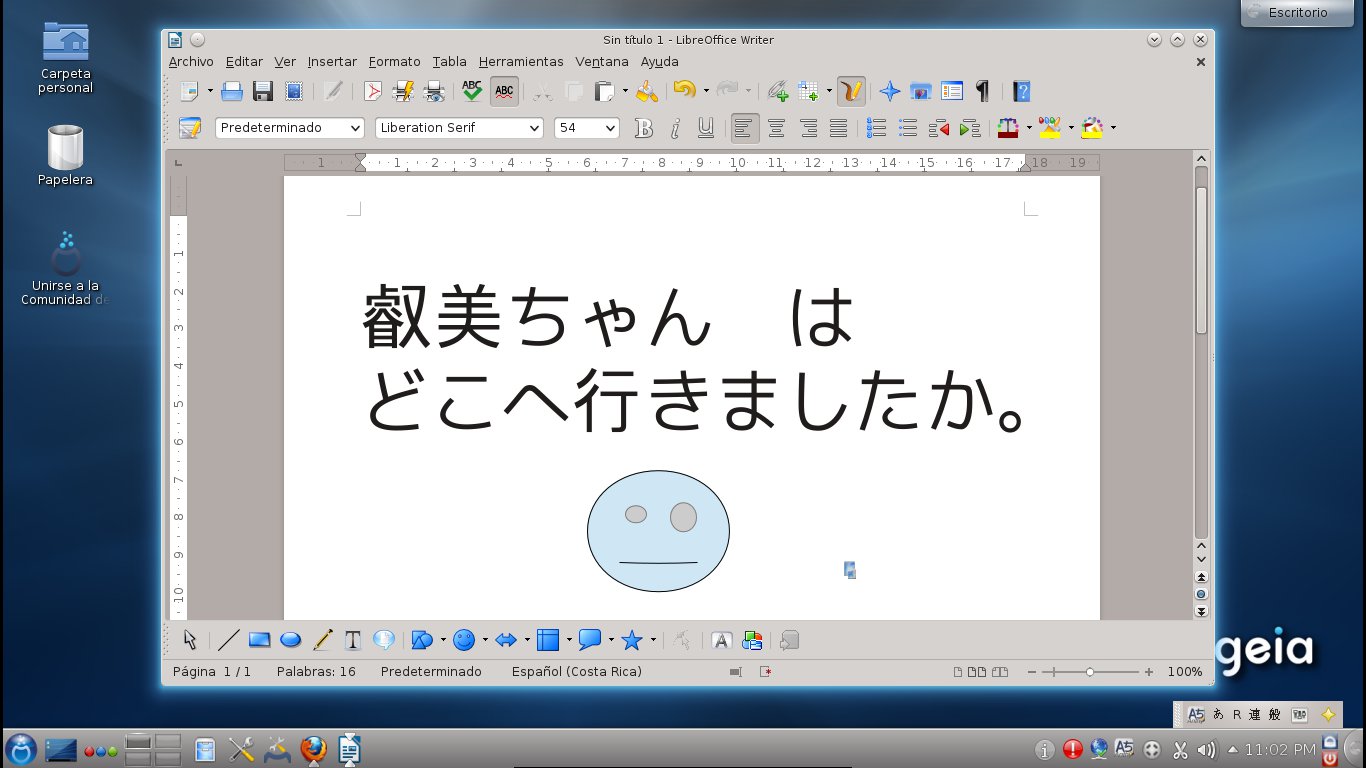
I am very happy to say that iBus works perfectly with LibreOffice and Anthy, so I can type in Japanese without any problems:

Unlike my test of Mageia 2 betas, there were no database errors this time.


Although the desktop effects were not activated (this is not a big surprise because I tested the distro on a virtual machine), I noticed that alerts or error messages are now highlighted and they are displayed on the top side of the window.  The reason: Mageia 3 includes KDE 4.9.0!


I think Mageia 3 looks promising. 

domingo, 9 de septiembre de 2012

Our first UEFI challenge

Yesterday, Megatotoro and I helped a colleague who wanted to dual boot her recently bought desktop PC.  She wanted us to install Mageia 2  and we were confident because it is a process that we have done several times already.

However, when we hit the key to get into the BIOS... Surprise!  We were greeted by UEFI instead.

We thought the dual-boot enterprise was doomed.  We are not computer techies, to begin.  In addition, we had read all the problems that UEFI will give to people who want to try Linux, which was pretty discouraging.  Nevertheless, Megatotoro persisted and found the option to disable the secure boot.  Once this was done, the installation of Mageia 2 was easy.

I hope OEMs keep the option to disable secure boot.  

miércoles, 5 de septiembre de 2012

On the PCLOS 2012.08 KDE release

Katherine Noyes wrote her opinion about the new release of PCLinuxOS here.  When I read it, I did not pay a lot of attention mainly because of one reason: I had installed PCLinuxOS 2011.6 in both my desktop and experimental laptop and I was very satisfied with its performance.  Therefore, I thought, is it really necessary to bother downloading the PCLOS 2012.08 .iso, burning it to a DVD, and installing it if my computers are doing OK? After all, as a PCLOS newbie, I did not want to break a system that was working as expected.

However, I gave in and started the upgrade.

Scary tsunami wallpaper on my PCLOS 2012.08 desktop 
Now, I must say that this is by far the most pleasant upgrade I've ever performed since I migrated to Linux: I simply replaced the root partition and left the home partition intact.  I've done that before with Mandriva and Mageia, but since the results I obtained were not always optimal, I prefer to do a clean install with those systems.

PCLinuxOS was different, though.  The process lasted less than 10 minutes.  The beautified log in avatars greeted me when I rebooted the computers and the new PCLOS did not mess up with my user settings; everything stayed there.  This upgrade included LibreOffice, too, so the OS was ready to go.

The best part was that the new kernel picked up certain functions that were not recognized by the previous release.  Kudos to the PCLOS developers!

lunes, 13 de agosto de 2012

On life, death, and Linux

After a rather long period without visiting the Mandriva community chat (because of an excess of work that is taking a toll on me), I learned that Eugeni Dodonov, a former Mandriva engineer, lost his life in a bike accident a month ago.

Speak about bad news! 

Condolences to his family.

The community felt the loss powerfully and the reaction can be read in many blogs.

One initiative is to name the release of Mandriva 2012 after him as a homage.


------------------------------------------------------------------------
Of course, one never expects to read something like this.

This is one of the reasons why I use Linux, I guess.  The communities certainly make the systems that power my computer more "human", if you understand what I mean... I know because it is amazing when you grieve for a person that you actually never met or barely had contact with.


RIP Eugeni Dodonov.

lunes, 23 de julio de 2012

The Quest of Getting Midi and Karaoke to Work in Mandriva 2010.2 and Mageia 2

There are times in which a seemingly simple task becomes a challenge.  For me, this happened when I was called to substitute a Japanese teacher and wanted to use a .kar file in the class to practice.

To solve this problem, I resorted to several programs: Pykaraoke, Timidity, VLC, Audacious, and Kmid2.  Here is the story.

Chapter 1.  The adventure of enabling midis/.kar files in a Mandriva 2010.2 PowerPack Desktop PC and a Mandriva ONE 2010.2 netbook


When I realized that I was not ready to play .kar files (nor any midi), I checked Megatotoro's entry here on how he had done it in Mepis.  The process seemed pretty straighforward, so I started by downloading Pykaraoke.  However, it would not run.  Pykaraoke was not my winning card. 

Then I remembered that Timidity was not installed, so I grabbed it from the Mandriva repos.  To my despair, although the installation was successful, Timidity simply refused to launch.

In my search for answers, I saw several plugins for midi in VLC and Audacious.  I gave those programs a try, too.  Concerning the latter, I installed first:
fluidsynth, fluid-soundfont-gm, audacious-fluidsynth, and whatever dependency that the system required.

Audacious playing a midi
With everything in place, I  ran Audacious and hit CTRL+P for the preferences dialog.  I navigated to "PLUGINS" and selected the tab "input".   There, I selected AMIDI-PLUG and clicked on the "preferences" button at the bottom.  Then I selected "Fluidsynth backend" for the AMIDI plugin and clicked on the Fluidsynth button next.  there, I used the add button to go to /usr/share/soundfonts and select the 2FluidR3_GM.sf2 file.  With that, Audacious started to play the midi sound, but no lyrics could be displayed yet.


The next candidate was VLC, which stubbornly gave me a warning that MIDI playback was not supported and that "there was no way to fix the problem", a pretty discouraging message that I chose to ignore because I had seen a plugin to that purpose in the PLF repositories (vlc-plugin-fluidsynth). So, I installed it, ran VLC and clicked on the Tools menu and went to "Preferences".  That gave me a window.  To the left, I saw the "INPUT AND CODECS" button.  However, before I clicked on it, I went down and selected "ALL" for the adjustments.   That converted the panel to the left in a tree-like structure with more options.  I selected "INPUT/CODECS", audio codecs, Fluidsynth and wrote the following path in the panel:   /usr/share/soundfonts/FluidR3_GM.sf2.  That enabled midi playback with VLS alright, but still no lyrcs were displayed.

Then I installed Kmid2 and all its dependencies.  When I ran it, I went to the Preferences menu and then "Configure Kmid".  When I clicked the button "synthetizers" and then went to the Timidity tab, I finally discovered what the problem with Timidity was: Kmid2 reported a missing timidity.cfg file in /etc/timidity/

My Mandriva PowerPack 2012.2 PC running Kmid
The reason why the file was not there eluded me, but I installed Timidity on the netbook from the repos and the program launched perfectly: the .kar file started to play and displayed the lyrics.  That took care of my work situation, but I wanted the Desktop PC to do the same.  So, in the netbook, I went to /etc/timidity/, snatched the timidity.cfg file, and dropped it to the same directory in the desktop PC.  That got Timidity running at last and Kmid2 could also play and display the lyrics in the desktop PC. 
 
Chapter 2.  Getting the Elusive Kmid to Cooperate in a Mageia 2 laptop

With all this learning, I turned on my Mageia 2 laptop and tried to install Kmid2.  At first, I did not find it in the repositories, so I enabled all the repositories I could and tried again.  The Mageia control center displayed it, so I selected it with all the dependencies (fluidsynth and its own).  After the installation, I started Kmid2 but it failed to lauch, reporting that the machine could not play midis or that snd_seq was missing in the modules (something about permission denied).  As the latter problem sounded unsurmountable to a non-technical user like me, I decided to rule out the former first.  Thus, I repeated the steps to enable midi playback in VLC and Audacious and, to my relief, both programs played the sound of the.kar file.

Without a lot of confidence in my ability to fix the missing module problem, I searched the Web and found that this had been reported as bug 5892 in Mageia.  According to the report, a user had solved the problem by going to /etc/module and simply adding the line
snd_seq

Although I followed the path, I saw no file called module, so I got the most similar one (/etc/modules.load.d) and edited the file modules.conf with Kwrite, adding the line to it.  That got Kmid2 to work in Mageia 2 as well.

I hope this experience helps those with some karaoke woes in Mageia and Mandriva.

jueves, 12 de julio de 2012

Adios, PardusLife!

Hoy encontré esto en mi correo...malas noticias sobre PadusLife.

http://parduslife.com/2012/07/12/me-retiro-es-el-fin-de-pardus-life-no-lo-se-dejo-la-puerta-abierta/

Es muy triste que Pardus, una de las mejores distros basadas en KDE, desaparezca.  Esperemos que Pardus Anka reviva el proyecto...

Happy Belated 15th Anniversary!

Wow!  Another year flew by!  Yes, I have not been very active posting on this blog for some time now. In fact, the last post was precisely o...