A blog to compile what I have learned (and what I am learning) about Mandriva (and GNU/Linux in general) since 2009, when I migrated. Current distros I'm using: OpenMandriva Lx ROME 5.0, Mageia 9, MX 19, Manjaro 23.1, and Elive 3.
martes, 31 de octubre de 2017
Bendy and the Ink Machine Chapter 3: A Roller Coaster on Linux
One day, I stumbled upon a title that happened to be interesting: Bendy and the Ink Machine. It is a horror game that relies more on the ambience than it does on jumpscares to create its effect.
The first chapter is free, so I installed it and played it. I liked the experience, so I bought the second chapter. It was good.
I joined the crowd that was waiting for the third chapter and, when it came available on September, I bought it.
The problem was they released an update that broke the game on some Windows machines and, for what I could see, prevented Linux users from running the game.
After a while, somebody came up with a solution and posted it on a forum. One had to add this line to the properties of the game: -screen-fullscreen 0
With that, I could play the game again on Linux.
The company wanted to surprise the user base. So, they released an update that combined Bendy and the Ink Machine with another game, Hello Neighbor. It was a Halloween gift.
However, the new update broke the game on Linux again. This time, not even the magical line helped.
Today they released another update. The game started, but crashed. Understandably, many users are not very happy about it.
HAPPY HALLOWEEN!
**************************************
In a moment of desperation, I discovered that the game runs on Linux via WINE if one uses the Windows Steam client.
But that is not a solution...
lunes, 11 de septiembre de 2017
Those good surprises...
Yesterday I decided to update PCLinuxOS on my ZaReason Strata laptop.
PCLinuxOS has always remained a reliable OS to work and, as the update included Lomanager, the distro's method to update LibreOffice, I couldn't delay.
Although the update was fast, LibreOffice was taking a considerable time to finish. Yes, I must thank my ISP for that: my connection has been unstable for over a week, with a speed sometimes down to a crawl.
Speed was abnormally slow. I became a bit restless.
That was when I saw the Steam icon on my desktop...the round icon that had not been clicked on since October 2015.
Back in 2014 or so, PCLinuxOS was, among my OSs, the one that best worked with Steam; all of my games ran like a charm. However, due to a mysterious problem that I could never solve, the Steam client refused to work after an update. I read the forums and tried suggestions to no avail. My Steam on PCLinuxOS was broken.
By then, Steam in Mageia and Openmandriva was going good, so I didn't worry much. Later, I also started playing on Fedora. It was not a real loss.
Yesterday, I don't know why, seeing that the LibreOffice install was slow, I clicked on the Steam icon without actually expecting anything to happen. A window displayed the hopeful message, "connecting to your account."
And, before my eyes, Steam came back from the dead!
I don't know for how long the issue has been fixed. That's, in my opinion, unimportant. Shame on me for giving up and not staying on top of the matter. I learned a lesson here.
Thanks, devs and community members!
sábado, 2 de septiembre de 2017
Elive is getting closer to version 3.0!
Elive is a truly beautiful Debian-based distro that uses Enlightenment as the window manager, so its footprint is rather small and relatively old systems can run it.
When I saw Elive Topaz (the last stable release), I knew that this distro really puts attention to details. Never had I seen a desktop more polished and glamorous! I also discovered that Elive was criticized because it was a project that offered free live CDs but, to be able to install the distro, one had to pay. Back then, I believed that free software had to be also cost-free, so I did not pay. However, I kept thinking about the project for a long time and, after understanding more about free software, my vision changed.
I have to say that this took some years. While some distros seem rushed to get releases according to an inflexible calendar, let us just say that Elive prefers to take its time. The last stable release I was referring to dates from 2010... It is so old that the EliveCD page suggests visitors to download the latest beta instead of trying out Elive Topaz!
In October 2014, my need to have Elive running on my laptop was so big that I paid for the module to install beta 2.3.9, the 19th release of a long development stage that started back in 2013. And I could not have been happier than I did: the beta has run like a stable release on my hardware. What's more, I have never had a problem with it since the install!
Yesterday's release (2.9.8) comes after 12 previous releases that followed the beta which I installed. Elive really takes its time, you see?
I wonder what this new beta has to offer. One thing is sure: I am going to give it a try!
domingo, 20 de agosto de 2017
MX Linux saves the day
domingo, 30 de julio de 2017
10 Days with Fedora 26 and Mageia 6
martes, 11 de julio de 2017
Getting Prepared to Upgrade from Fedora Workstation 25 (KDE) to 26
I decided to install Fedora Workstation 25 (KDE) on December 28, 2016 and, despite the learning curve, I found myself happy with it.
Today, DistroWatch announced that Fedora 26 was released, and this announcement threw me at the eternal crossroads of the Linux users: If the system is running fine, why upgrading it?
Taking into account that I am not an expert Fedora user, the operation can become a risky one. In addition, today is one of those days in which my technological biorhythm (if such a thing actually exists) instructs me to keep away from computers as much as I can.
But I have this article that details the upgrade process.
What can go wrong?
Let's live dangerously!
jueves, 8 de junio de 2017
UEFI and Mageia 6 RC Adventure
viernes, 5 de mayo de 2017
The Return of the Asus Eee PC 900 -- with PicarOS!
It was an amazing little machine that helped me get my tenure at the University where I work, but that I gave away later to a person who needed it to keep studying.
Last month, by pure serendipity, I saw another Asus Eee PC 900 sitting on the display window of a computer repair shop.
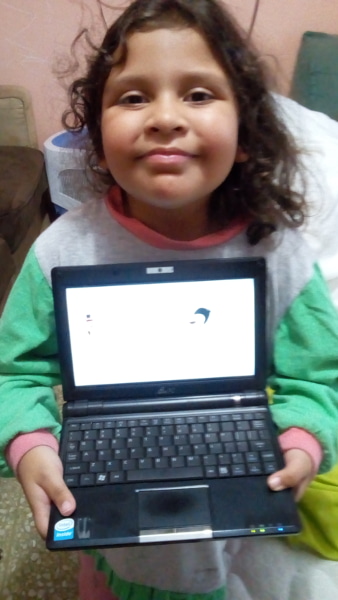
I bought it for my daughter, expecting to change the Windows OS to Sugar since her school decided not to lend the OLPC XO computers for take out.
Even though I had my pendrive ready with Sugar, my plan did not work because I failed to consider that the machine is very old and, hence, its architecture is 32 bit. Most Linux distros abandoned 32 bit to concentrate on 64 bit. Sugar does not support 32 bit.
I put old Mandriva 2010 on the HD and, sure enough, the netbook came to life with Linux. There was another problem, though. When I tried to watch Youtube videos, Google told me that the browser was no longer supported and urged me to upgrade to a more modern browser. I checked Firefox and... it was version 3.5.3!
Of course, getting a more modern Firefox from the repos was impossible as Mandriva repos went to nothingness. It was a dead end.
Then Megatotoro reported that PicarOS was out. PicarOS is a fantastic Linux distro that is designed for children and my daughter loves it. Besides, this beautiful OS has a small system footprint, so it was a good option because it still supports 32 bit architecture.
I downloaded the PicarOS Diego 2017 image and, using ROSA image writer, a great USB live OS creator, stuffed it to a 4GB pendrive.
Although the OS booted perfectly, the installation was problematic. I tried the advance mode and, after completion, the machine simply showed a GRUB error.
I tried the automatic mode. No luck: the netbook did not boot.
I tried the manual mode. Same problem.
I booted it live and, starting to feel defeated, looked for another install method. In the menu, under Minino Tools, there was this suspicious entry that I had not seen in PicarOS before. It was for copying the system to an USB or HD, it said.
I tried it. when prompted, I selected the HD of the netbook and waited.... and waited.
A window with a progress bar was there. The window read "Oh. The /usr folder is so full of things!" After a while, the message changed to "Less work to do now" until it finished copying. I really appreciated the humor.When it was done, I rebooted more confidently (perhaps thanks to the humor?) and... GRUB was there, offering me three options: 64 bit, PAE, and 32 bit.
I selected 32 bit and PicarOS Diego became alive!
The tiny machine has everything one needs to work and play. And it loads YouTube videos, too!
My daughter, Eimi, liked it a lot. She got a bit disappointed when I told her that the little machine does not have enough power to play Among the Sleep, her favorite Steam game.
However, she was very satisfied when she could practice her reading using GCompris and got a perfect score, hehe.
![]() |
| Eimi holding the tiny Asus Eee PC 900 with PicarOS |
lunes, 1 de mayo de 2017
Another Year on the Blogosphere
I had started using Linux a bit earlier (2009), thanks to an Asus Eee PC 900 that came with Xandros Linux pre-installed. I did not like the OS, but decided to give Linux a chance after the complete failure Windows was on that tiny netbook.
I changed the OS to Mandriva 2009 and so I became a full time Linux user. No one asked me to migrate; I came to Linux by myself.
![]() |
| Mandriva 2009: Default wallpaper |
Seven years have already elapsed! Seven years in which I have used my computers without worrying about viruses, of seeing computer myths exposed, of watching the world spin from a different standpoint.
Seven years of learning...
domingo, 30 de abril de 2017
KDE Connect from the eyes of a newbie... What sorcery is this?
Of course, I inferred it was something to connect a phone and a PC in some way and enabling the swapping of files in between the two devices, but I really did not care much about it. After all, that is what bluetooth is for, right?
Today, I decided to give it a try on PCLOS.
The first thing I got was a message saying that "No paired device was found" and that I had to install the android KDE Connect app on my phone first. So, I got the mobile app and ran it on the phone. It picked my PCLOS laptop and asked me if I wanted to pair the devices.
I accepted, expecting the app to crash. However, my PC showed me a notification asking me to pair it with the phone. Apparently, the app had worked!
The first option on the phone was to send files, so I selected a picture of Buachompoo Ford, a Thai singer/actress, and sent it to the PC, but I saw nothing happen. "A-ha!", I grinned, thinking that the app had failed on PCLinuxOS. So, I closed it on the phone.
I was getting ready to reboot in OpenMandriva to perform a second attempt when, inside of a folder, I saw Buachompoo smiling..."What??!!"
There was no doubt; that was the file I had sent from the phone with KDE Connect.
I turned off the phone's bluetooth and rebooted the laptop in OpenMandriva.
After pairing, I saw something that read "Remote input".
I tapped it and got a screen with a message giving me instructions on how to control my laptop from the phone.
Again, without expecting it to work, I moved my finger on the phone screen and the computer pointer mimicked my movement. It was nice, but I was not very impressed because I had used a LibreOffice remote app before. This remote, however, let me operate all of my computer: I rotated the workspaces, changed the activities, fired up the browser... and the bluetooth on the phone was off!
"Sassy app, hu?", I said to myself. "So you work via Wi-fi. Let's see you crash when I use the Japanese keyboard on the phone in LibreOffice." I need to clarify that I do not have a Japanese IME on PCLinuxOS right now, so there was no chance typing in that language was supported...
I opened Writer and chose the keyboard on KDE connect. As I expected, the Japanese keyboard popped up on my phone and I typed with a smile that became petrified when I saw hiragana characters appear on the blank page of Writer and change to kanji.
This meme describes my reaction perfectly:
I have to admit that I have seen something impressive on Plasma 5 at last!
jueves, 13 de abril de 2017
Time for a change
Three days ago, I decided to abandon my efforts to rescue my PCLOS KDE4 install, which was destroyed by a connection disruption while updating. I lost my connection for over a week and, when my ISP finally solved the problem, my desktop was so messed up that I gave up on it and decided to give PCLOS KDE5 a chance.
I must confess that I am not a real fan of Plasma 5. However, as KDE4 is going the way of the dodo, I thought that it was better to take the leap and see how this beautiful Linux distro works with KDE's new desktop.
The installation was as easy as it gets. Everything was functioning after completing the process.
With PCLOS, this is my third distro with Plasma 5: Openmandriva and Fedora also have it. Mageia 6 will have Plasma 5 as well.
I am going to miss the independent wallpapers on the different workplaces.
My First 12 Days with Mageia 10: How to enable repos with dnf5
Well, 12 days have passed since I migrated all of my desktop, laptop, and portable work system to Mageia 10. I have not used the work system...
-
A few days ago, thanks to one student, I realized that something funny was happening with my Linux netbook. He said that it was weird that I...
-
That's right. My desktop, which runs Windows, is infected and I blame Linux. As it normally happens in these cases, this new infection ...