miércoles, 13 de junio de 2012

Mandriva finally died! Well, sort of...

Many Linux users have already proclaimed Mandriva deceased and buried it. But is this old Linux distro quite dead?  Well, yes.  Sort of.  Mandriva became a zombie!

Bernie, the zombie that moved only to the sound of music

That is, at least, what some developers have implied with the release of the Mandriva 2012 Tech Preview: they code-named it "Bernie Lomax", the famous character of the comedy "Weekend at Bernie's".

I know that Tech Previews are not targeted to end-users but, stung by curiosity, I gave the DVD a test drive.  I must confess that the distro, just like Bernie in the sequel of the movie mentioned above, still moves, dances, and even fights!

Let me share my impressions.

First, the DVD booted flawessly when I installed to a virtual machine.  However, I had to give it more disk space than the average 8GB because the DVD included a lot of packages (it asks you if you want an office workstation, a gaming PC, etc).  I chose a KDE desktop install.


Installation screen: language selection


The installer is the same that was included in the Mandriva Desktop 2011.  The artwork, however, has changed: there was a bunch of friendly-looking penguins that kept me company along the way until the installation process was complete and the machine rebooted.


From that moment, my question was if Mandriva would follow the line established with the 2011 release (ROSA SimpleWelcome, launcher, Time Frame) or if it would go back to the 2010 feel, now donned by Mageia.  The answer came soon enough.  When I say "soon", I mean it: the desktop became operational much faster than with the 2011 and the latest ROSA releases.
The log in screen
The ROSA launcher getting ready to dance


Once the desktop loaded, I opened Mandriva Control Center to give this Linux distro release wannabe my mandatory test: Japanese IME capability.  I had chosen iBus as the IME during the installation, but I had to download Anthy and some other packages from the repositories.  "Bernie Lomax" passed the test; it can handle Japanese input with iBus+LibreOffice perfectly.

A となりのトトロ background image I used in Mandriva 2012 TP
I have to say that although the ROSA stuff is not my cup of tea, when I saw its responsiveness here, I found it more appealing.

So there you have it: Mandriva is still moving after being proclaimed dead.  Now we have to see if the corpse finally rots or if a new, more vigorous distro is reborn from its ashes, like a phoenix.

sábado, 19 de mayo de 2012

How to fix a corrupted RPM database

The first time I had a problem with a corrupted RPM database was when I installed Mandriva 2011 to my daughter's computer.  No matter what I did, the Mandriva Control Center would refuse to fetch packages and would throw an error message to my face.

In desperation, I looked for help and found it in one thread posted in one of Mageia's forum.  The post described how to solve the situation easily with the help of Konsole.  I can't find that original post, but found this one, which gives the same information.

So far, I have used the process to fix that Mandriva 2011 RPM database and one in Mageia's Betas.

I even had to use it three weeks ago in my last Mandriva 2010.2 installation, when the Mandriva repositories went down and I made some stupid mistakes while adding repos.

Since the process is so useful, I'm going to post it here in case someone needs it:

1.  Open Konsole and type su
2.  Type your root password
3.  Write rm -f /var/lib/rpm/__db*
4. Now you need to rebuild the database, so write  rpm --rebuilddb
5. You can now close Konsole and open the control center to add the repositories from the GUI.  Of course, you can do that with the terminal, too.

If you run PCLinuxOS and happen to hit the same problem, Texstar wrote a detailed forum post about what to do.  You can check it here.


You can always find good help if you are willing to read a bit.

jueves, 17 de mayo de 2012

Mandriva goes community-based

After so many months of suspense, the official announcement has been made: Mandriva, as a Linux distribution, will become a community-led project.


This decision has been received with enthusiasm by the community, whose disenchantment with the direction that Mandriva SA had taken kept growing.

The business strategy of the former parent company remains undisclosed, though.

However, one wonders if this move was made too late.  Mageia's popularity has increased.

And there's ROSA, too.

Even though some people assert that Mageia has simply fulfilled a temporary need of Mandriva users who now can go back to using their favorite Linux distro, the argument is not convincing. 

One thing is sure: if there is still a thriving Mandriva community, it will have to work hard to rescue their distro from the pit of irrelevance where it is buried right now.  And, in so doing, they will at last prove that their long-used claim blaming the company for the shortcomings of the distro was legitimate.

domingo, 13 de mayo de 2012

Busy weekend with Mageia, LibreOffice, and Liberté

After an intense week, I decided to forget about work this weekend and have some time for my hobby, software testing.  So, I downloaded Mageia 2 RC, LibreOffice 3.4.5, and a Linux distro that I had never heard of: Liberté 2012.1.

Mageia 2 RC
I upgraded my Mageia 2 Beta 3 VirtualMachine and... absolutely nothing happened.  Before some hasty conclusions, I mean NOTHING BAD happened; all my software works, even the Japanese IME with iBus. I guess I will wait until they release the final version to try it on real hardware and to see if my netbook works better with Mageia 2 or if I should keep the previous release.

LibreOffice
I had a previous version, so I upgraded it to have the cool OpenGL effects.  However, I was impressed the most by the great PDF editing feature: with an office suite that can edit PDFs as easily as any other ODF document, MSOffice looks like a real software dinosaur.

The only drawback is that I have not figured out how to enable SCIM to work with it, so I must keep OpenOffice in my Mandriva 2010.2 box to type in Japanese.

Liberté
I must confess that I felt a little anxious about downloading a distro that is so anonymous that even its origin remains undisclosed in DistroWatch.  However, as it is 210MB, I gave it a try.  It enabled Tor and booted without any problem.  Web browsing is done with Gnome Browser.  Liberté includes Abiword for document production and Pidgin as the IM client.  There was no GIMP for image-editing software, which is logical because the purpose of this distro is private communication.  The best part for me is that this distro boots an IME in live mode that includes Anthy for Japanese writing and it works flawlessly with Abiword.  Vive la Liberté !

In my humble opinion, the three of them are promising.

Now I'm downloading the final release of ROSA Marathon...

sábado, 5 de mayo de 2012

Mandriva: A new appeal to the community

In a corteous and somewhat longer-than-usual post, Jean Manuel Croset has communicated with the Mandriva community again to inform some details of the situation (always mentioning that he is unable to disclose as much information as he would like) and to throw a new date on the table.  This time, it is the third week of May, the moment in which the company will unveil its roadmap.

I don't know if this is soothing or stirring, but I can't help hear the Shakespearean soothsayer warning: "Beware the ides of May, Julius Caesar"

ROSA has already got a lot of attention and many of us also love Mageia, which is about to send into the wild its release candidate of Mageia 2.


Let us see how these two facts affect Mandriva.

domingo, 29 de abril de 2012

A quick look at ROSA Marathon EE RC

It's no secret; Mandriva S.A. faced difficult times and improving the company's poor interaction with the community is the latest goal they have established.  In the meantime, developers, users, and forum admins have gone (Farewell, Germ, and thanks for all of your work!).

As a Mandriva user, I am concerned because I would not like this beautiful distro to disappear.  However, I haven't heard of a new Mandriva release soon.  Mageia and ROSA, the two divergent lines of the continuity of Mandriva Linux, are buzzing with activity.  For the ones who are not informed, while Mageia 1 kept the line of Mandriva 2010.2, ROSA is intending to keep the line of Mandriva Desktop 2011.

When Mageia 2 Beta 3 made its appearance in the Linux landscape, I tested it and was satisfied by its new look and use of KDE.  In addition, the Japanese IME was working flawlessly, so I was very pleased there even if multimedia needed some tweaking to run properly.

ROSA, on the other hand, has unveiled its new release candidate of Marathon EE (EE is the version including non-free stuff, like the extinct Mandriva ONE). I downloaded, gave it a run in Live mode, and this is what I found:

ROSA presents some animated bars as the Live environment is becoming ready to launch.  After a while of waiting (the wait was shorter than with Mandriva Desktop 2011, I must say), you are greeted by this desktop:


It is very responsive for a Live CD and the Spanish localization is very good.  The most obvious change is the indicator of the KDE desktop.  When you clic on the ROSA button, you see the well-too familiar ROSA launcher and SIMPLE WELCOME found also in Mandriva 2011:


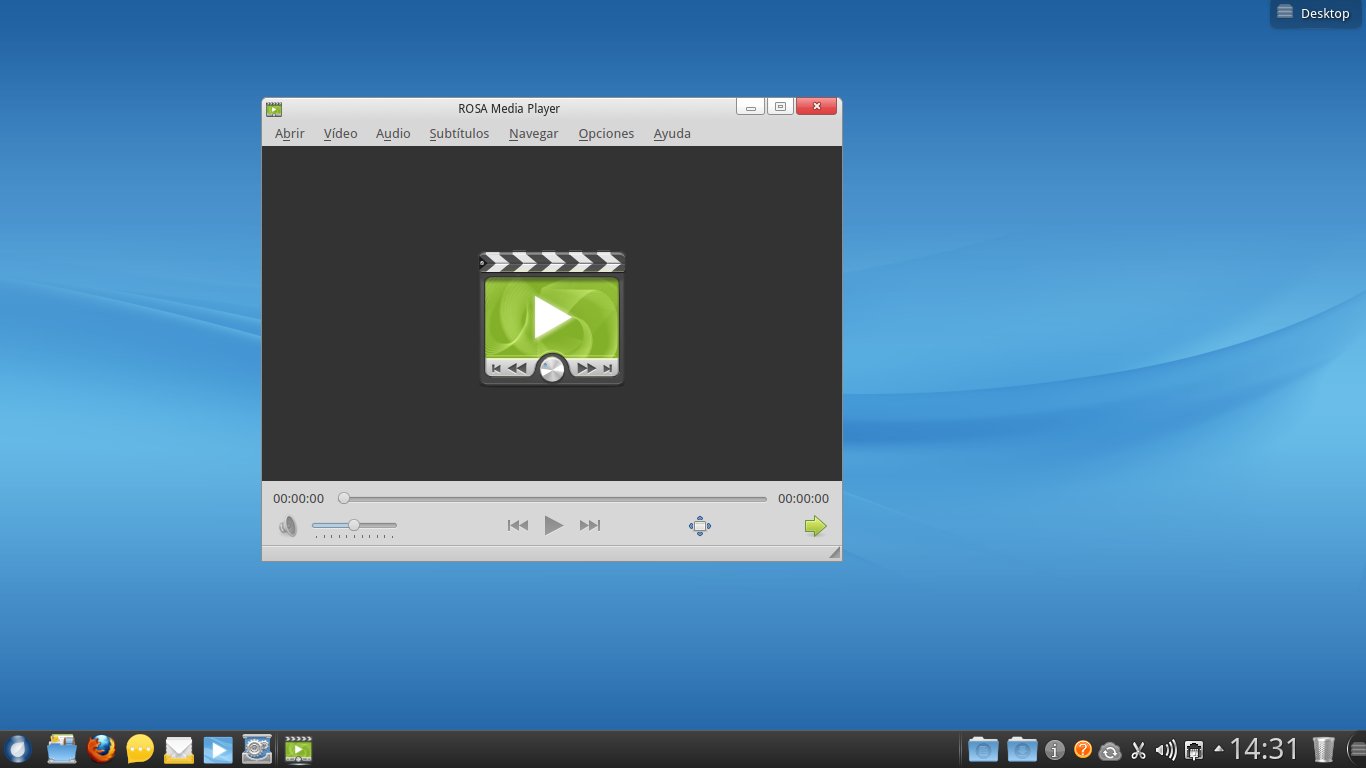
You have a ROSA sync icon, but I noticed the lack of software for a distro this size.  I mean, you get a full LibreOffice suite, but in graphics or multimedia, the options are scarce.  However, the ROSA player is promising:


The ROSA player works well with mpg and avi video but, when playing mp4's or flv's, there was no sound although it displayed the video.  This was curious because YouTube worked fine out of the box.

ROSA Marathon EE also recognizes and mounts all the partitions on the hard drive in Live mode.

On a different note, the Mandriva influence is visible.  For example, to configure the system, you type MCC (Mandriva Control Center), not RCC, and the ROSA control center opens:


You can also see the "M" in the icon ;-)

Overall, I think that this is a heavy system, but it is beautiful and usable for newbies.  ROSa is beggining to capture some attention in the world of Linux, too, as seen by its quick moving up in the DistroWatch chart.  I wonder if there is a ROSA community, though.

Now I will wait for the Mageia 2 RC to run a comparison.

domingo, 8 de abril de 2012

Ready to run? ROSA Marathon is here!

Yesterday, DistroWatch.com made it public that the beta 1 of ROSA Marathon is available for testing. This distro is a new fork of Mandriva.

Interestingly, after one day of being released, ROSA is now in the 11th position, trailing Mageia (#8 in DistroWatch).

In the Mandriva forums users speculated that ROSA is the future of Mandriva. Since the company has not provided any fresh information (except for the "interesting news" without details in a forum post last March 8th), one cannot help but wonder.

Anyway, I downloaded the .iso and, sure enough, ROSA Marathon beta1 is like the twin sister of Mandriva Desktop 2011. Of course, this is no coincidence because the developers at ROSA Labs worked with the Mandriva devs to launch the last Mandriva product there is today. However, the resemblance is absolute: this distro's booting sequence shows no difference at all (well, the logo is different), ROSA has a ROSA Control Center that is identical to Mandriva's (the icon is even the same!) and, to be honest, the only different features I saw were:
1. More polished icons (ROSA logo as a launcher)
2. The ROSA player

I admit that I did not use it much because the interface is not my cup of tea, so I'll give it another run later.

viernes, 6 de abril de 2012

Ubuntu used in a video about viruses?


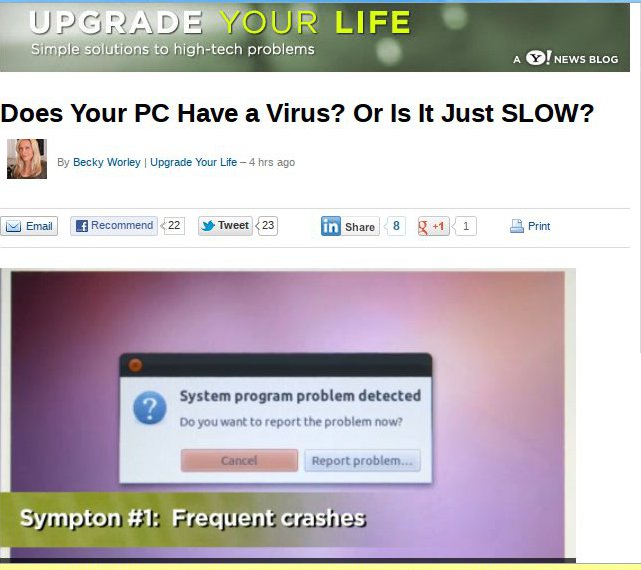
I was bored yesterday and this Yahoo! feature got my attention. It is about how tell if your "PC has a virus".

I might be mistaken, but the image they used to illustrate the first symptom of those annoying virus infections that plague Windows users seems to have come from... a computer running Ubuntu!

If that's the case and the illustration was used unknowingly, the reporter really needs to evaluate her sources.

However, if it was used intentionally, then "frequent crashes" in Ubuntu are being used as a misrepresentation of virus infections... For what purpose, I ask?

Judge it yourselves...

lunes, 2 de abril de 2012

Shibboleet syndrome

A very short time after both my brother and I migrated to Linux, we began experiencing the frustration of seeing the reality of the computer world: lazy technicians that charge to destroy your data, incompetent tech support staff who think that Linux is an anti-virus, unscrupulous companies that avoid their responsibilities and blame their helpless users by chanting their eternal mantra: "Your computer must be infected"...

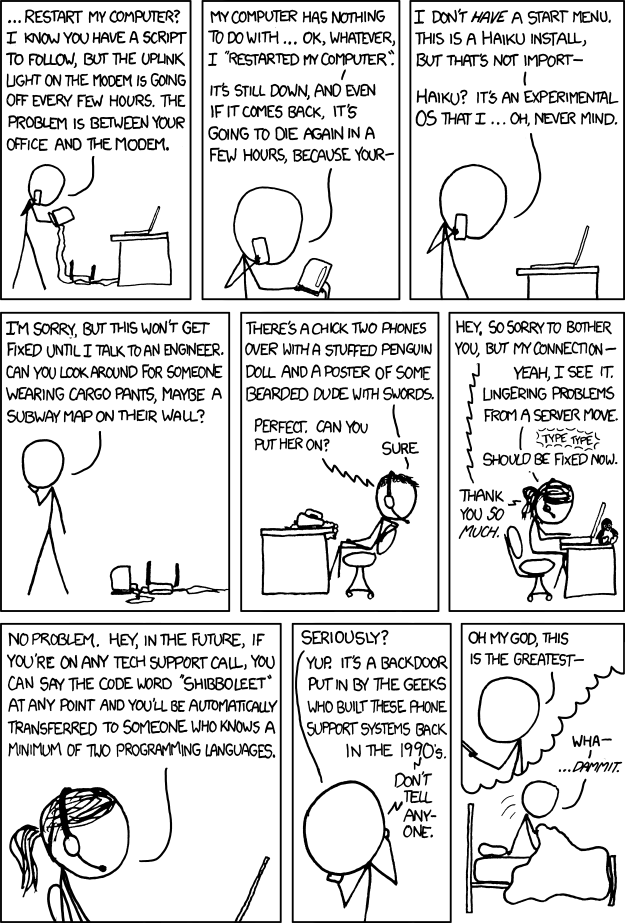
Particularly, dealing with tech support became so unproductive that, once you abandon the rosy all-computers-have-the-same-applications mirage, it is a lot more effective to learn to solve problems yourself unless, of course, you luckily find an individual who really knows about computers. I guess this comic strip summarizes it all.

It's xkcd #806, "Tech Support":


When I read it back then, I found it amusing because I could identify with the character having the problem with the modem. However, it was until yesterday that I could grasp the full impact of the comic strip; I had a dream that made me experience the level of frustration of the character.

In my dream, after running some updates for my Linux box, I was greeted by the most advanced desktop concept ever designed. Lean and mean, its jaw-dropping effects and futuristic features made me rub my eyes in disbelief: multiple workspaces with activities combined into "pages" of something called "Book", natural voice text synthesis, voice command input in multiple languages, an ultra-cute Foxkeh agent plasmoid retrieving Web pages....and the computer had bullet speed! As I was witnessing the system's amazing responsiveness, all that crossed my mind was "KDE really did it this time. I gotta show this to my brother!"

And there was this swirling, flashy 3D button in the middle of the desktop. When I clicked it, an alarm went off and a song started to play. Impressed, I thought, "Whoa! Cool! It's the same song I selected for the alarm I configured to wake u..."

No!!!!! I woke up. My palm went to my forehead: I was frustrated beyond words...

Shibboleet syndrome.

sábado, 24 de marzo de 2012

Observations on the growth of Linux use

Ah, statistics! How we love to deceive ourselves with them! Sometimes we tend to forget they are numbers applied to measure a reality, but they are affected by many variables. Therefore, statistics become a useful prediction, but a prediction is, ultimately, a guess nonetheless.

I am saying this because, since I migrated to Linux in 2009, I have been listening to Windows fanboys chanting that "according to Netmarketshare and StatCounter, Linux accounts for a skimpy 1% of the total market". And the funny thing is that they believe it!

My eyes, however, show me a different picture. When I migrated, the only Linux computer I ever saw was mine; I never spotted another computer running the Penguin OS in public. During the last two years, however, I've run into students who have Linux computers... but Netmarketshare has kept saying that Linux usage is 1% in 2009, 2010, 2011 and, yes, you guessed it, the first two months of 2012, too!

W3counter.com is another source that is frequently quoted to say that Linux represents a 1% marketshare. Notoriously, in 2009 it said Linux was 2% and then declined. Right now, W3counter is showing a gradual increase (1,67%).

It seems that Steve Ballmer, CEO of Microsoft, did not believe those numbers. Back in 2009, as he was giving a presentation to investors, he showed a slide that tells a different story. Wisely, he did not include any numbers (not to disclose critical information and scare investors away, I presume), but the pie chart indicates that Microsoft either:

  1. Tried to minimize Apple (the shares of "Apple" and Linux are virtually identical)
  2. Believed Linux accounts for more than the never-changing 1% that Netmarketshare and StatCounter keep measuring since 2009.

Who would you believe, then? I would go for Ballmer in this case: one would expect him to have more reliable data as he was addressing investors, don't you think?

If we take Ballmer's pie chart as reference, then Microsoft believed Linux had a marketshare of around 5% in 2009, judging from the graph proportion.

W3schools.com throws numbers onto the table that match Ballmer's pie chart (and his statements that Linux was worrisome): When Windows 7 retail was released (October 2009), W3schools' Linux count showed 4.2% marketshare and that number has kept going up to 5% in February 2012.

Another interesting observation is the behavior of Distrowatch. Yes, yes, I know that you are going to say that those numbers cannot be taken as an accurate measuring. Point well taken. However, Distrowatch count shows that either:

  1. The same group of Linux users is keeping track of distros more closely (visiting distro pages crazily and bumping up the count), or
  2. More people are actually clicking on distro pages.

The latter scenario shows more interest in Linux which, in turn, suggests an increase in Linux use, especially when one pays attention to the last distro reported (#100). Let us see: in 2009 it was MOPSLinux (73 clicks). CD Linux took the spot in 2010 (86 clicks). For 2011, DreamStudio got the #100th position with 90 clicks. During the last three months of 2012, that same position belongs to LFS, with 131 visits.

That means that the last position in Distrowatch jumped from a two-digit number to a three-digit one. If we take that merely as an indication of interest in Linux, then it has increased in a 55.6%.

This matches the reality I see more accurately, the same one that Ballmer inadvertently described in 2009. One wonders what his numbers will show today.

sábado, 17 de marzo de 2012

Some reflections on Mageia 2 Beta 2

As a non-technical user of Linux, and after reading several posts about the battle between developers and users who feel neglected by them, I could not prevent myself from worrying a bit about the soon-to-come release of Mageia 2. You know, maybe Mageia also jumped on board that train that takes you to DumbOSland, where you "use-your-computer-as-if-it-were-a-cellphone".

So, I downloaded the beta2 to have a preview of what Mageia offers to users of Linux who are not computer gurus by any standard, but who like computers to behave as what they are.

DISCLAIMER: This is not a technical review, so I'm not getting into codecs, Flash, boot-time, and the like. As a simple computer user, I wanted to check on the progress made by Mageia and I saw both positive points and negative ones. This is what I found on the negative side:

1. The artwork needs some, er, work!

I am inclined into thinking that OSs must keep a balance between efficiency and beauty. While I do not find myself necessarily annoyed by the color scheme or login screens of Mageia, I do believe that lack of consistency might make potential users to refrain from using a system because simple users, when seeing an inconsistency in the booting process, tend to think of it as "a problem". The graphical screen of Mageia 2 Beta 2 overlaps the text screen and it looks strange. Of course, that is not going to make a computer blow up, but still...

2. A hideous bug crawls through Mageia Control Center/ RPMDrake

Although the installation was smooth, when I opened Mageia Control Center to start adding programs, it told me that RPMdrake had to be updated. That is normal, so I marked some packages for install and waited.

The installation was successful and so was the updating of RPMdrake. The latter was the problem: after the updating, RPMdrake became unusable, which prevents you from performing any further software install operations.

Now, this is what I really call a problem. I presently ignore if it is a localized issue or many users experienced it, but this is not good. I tried three different combinations and all of them led me to the same dead end:

a. Install Mageia, select no upgrades, refresh repos (leaving DVD), install software from MCC=locked RPM db

b. Install Mageia, select upgrades, refresh and select some additional repos, install software from MCC=locked RPM db

c. Install Mageia, select no upgrades, refresh repos (unselecting DVD and selecting some additional repos), install software from MCC=locked RPM db

However, this worked:
Install Mageia, select no upgrades, refresh repos (unselecting DVD and keeping the default active), install software from MCC. I suppose this problem is going to be taken care of with the RC.

3. Japanese IME with iBus: Dekiruka, dekinaika?

This is perhaps the most technical requirement I have for selecting an OS: I need a free and efficient way to write in Japanese. There are many functionalities I can live without (games included), but my computer has to accept Japanese character input.

Mageia 1 Beta2 astonished me when I saw that iBus worked flawlessly out of the box, something I could never achieve in Mandriva 2010 regardless of all my efforts (iBus works perfectly in Mandriva 2011, though).

Since Mageia 1 Live CD removed this functionality (I must use SCIM for Japanese IME with that version of Mageia), I was a bit concerned of whether or not iBus will work in Mageia 2. I tried the beta 1 and, to my disappointment, although iBus seemed to be activated, all the languages were shown in light gray, the "conventional" color for unavailable features in a menu.

iBus in Mageia 2 Beta 2 showed the same. However, I discovered that, although they were displayed in a lighter color, if you click on the arrow preceding each language, a tree opens and you see the possibilities... Wheeee! My bad, really. After my battle with MCC, I downloaded all the packages to get Japanese working (Anthy, ibus-anthy, Japanese font) and tried iBus. It works... sort of. Now, although you see the ibus keyboar in the taskbar, you must restart it to get Anthy running. And you must install the java packages for LibreOffice, too. Interestingly, iBus works in LibreOffice even if you do not uninstall the Libreoffice-kde package. Another issue: it does not seem to work with Firefox.

Mageia 2 beta 2 で、日本語のIME、できるか、できないか?できそう。

----------------------------------------------------------------------------------------------------------

On the other hand, Mageia 2 Beta 2 brings onto the table some tempting features for simple computer users like me:

1. New KDE
I really like the way in which Mageia 2 is working with KDE 4.8.1. Let me say this and, please, computer experts, do not feel offended. I simply do not care if KDE is a resource hog or not. I mean, KDE runs perfectly on my 2GB RAM, 500GB HD, even if I have several programs open (including Firefox with 6 tabs). It also looks beautiful with all the eye candy and plasma widgets. People can get systems with twice the horsepower of mine to run another OS that requires a ridiculous amount of resources and they are happy that way. So, to be honest, I find KDE's demands reasonable (again, I am a simple computer user, not a technical expert). Stability? Well, I haven't experienced a single KDE crash in a very long, long time. Yes, maybe it's because I do not use each and every KDE application, but I use the ones I find indispensable. That being said, I think that the prize KDE obtained was well deserved and using it is fun.

By the way, now the bottom panel marks with indicators the programs that are active and it also offers you an instant full-screen preview of the applications that are running. Some people I know are going to be crazy about these new features...

2. A satisfactory assortment of programs

Mageia 2 Beta2 packs LibreOffice 3.5.1.2, KOrganizer (I cannot live without it!) Okular (another gem), Scribus, Amarok 2.5.0, which nows incorporates the Amazon Store... I don't care because it works in some countries and mine is not included), Kdenlive, the players Dragon and Totem, and Gimp 2.7.4 with its new "export as" instead of "save as" dialog and image transformation tools.

3. Solid translations

As a Linux user, I cannot emphasize this point enough. Linux distros that provide only a couple of languages or inconsistent translations might not realize it, but they are reducing their possibility of adoption. Not all computer users speak English.


I believe that Mageia wants to offer a nice usability/freedom blend. Yes, I know that many Linux distros use the same motto, but they do not deliver; some say "We are the easiest computer experience", but then they switch your desktop for something you had never seen before and you are stuck with a desktop that that you simply don't understand. Mageia developers seem to understand that non-technical computer users need an OS that works with them, not against them. Thus, instead of "dumbifying" the user interface to the maximum, which is rather popular lately, they are following KDE's progress while keeping the same installation process. For computer users who lack technical training, that is certainly the right approach: I can follow the same steps and obtain a familiar, more polished desktop in the end. I can use it in my own language; it has the appropriate tools, and it requires little effort to use as I am not expected to relearn everything.
...A desktop that tells me I'm using a computer, not a gigantic cellphone. Thank you, Mageia!

My First 12 Days with Mageia 10: How to enable repos with dnf5

Well, 12 days have passed since I migrated all of my desktop, laptop, and portable work system to Mageia 10. I have not used the work system...